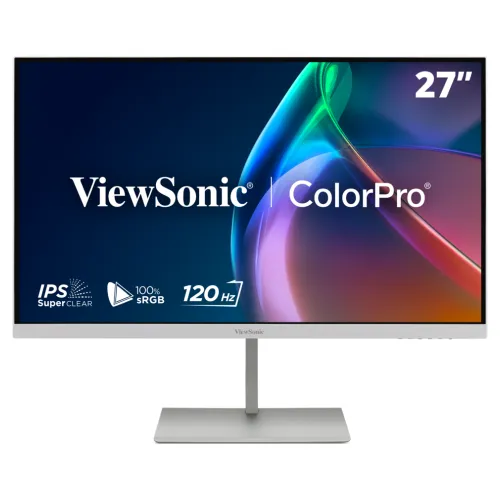
A ColorPro display for creative work
ViewSonic ColorPro VP2766-2K-W is a 27-inch white IPS monitor intended for design, editing and everyday desktop use. It combines QHD 2560 × 1440 resolution, a 120Hz refresh rate and the ColorPro line’s factory-calibrated features. The model suffix matters: VP2766-2K-W identifies the white version, which matches the official product page and catalog photography. Its 16:9 screen provides a familiar layout for creative software, documents, browser windows and video timelines.
The monitor is positioned around colour-conscious productivity rather than gaming specifications alone. ViewSonic highlights Pantone validation, 100% sRGB coverage and factory calibration to Delta E below 2. These features provide a useful starting point for image work, but any display’s output is affected by the colour mode, operating-system profile, surrounding light, application and display age. Use the supplied factory calibration report to understand the individual unit’s measured starting state.
QHD resolution on a 27-inch panel
The native resolution is 2560 × 1440, commonly called QHD or Quad HD. With a 27-inch diagonal and a listed 0.233mm pixel pitch, the screen offers more desktop room than Full HD at the same physical size. Multiple application panels can fit beside a canvas or timeline, and fine interface details remain readable at a comfortable viewing distance. Users can adjust system scaling and application zoom to match their eyesight and desk distance.
QHD is not 4K UHD. Buyers who require a 3840 × 2160 workspace, native 4K video editing or unusually high pixel density should compare a 4K display. For many design, office and web tasks, QHD balances workspace area and graphics demand. The flat 16:9 IPS panel has official 178-degree horizontal and vertical viewing-angle specifications. It uses an anti-glare surface and 3H hard coating.
Pantone validation and calibration
ViewSonic identifies the VP2766-2K-W as Pantone Validated and says it covers 100% of the sRGB colour space. It also describes factory calibration to Delta E below 2 and an individual colour calibration report for each unit. Delta E measures colour difference under a stated test method; a low result is meant to show that measured colours are close to the target. Keep the report with the monitor documentation and use it to check the shipped unit rather than assuming that every later setting preserves the factory result.
A hardware calibration workflow can be used with ViewSonic Colorbration+ and compatible instruments. Supported calibrators listed by ViewSonic include certain X-Rite and Datacolor devices. The monitor package does not list a separate colorimeter. Recalibration may be useful when a workflow has a defined brightness or white-point target, after a long period of use, or when a colour-managed application no longer matches a reference. Calibration is one part of colour management; ambient lighting, profiles and software settings also matter.
Reading the colour-gamut measurements
The official table lists sRGB at 121% size and 100% coverage, DCI-P3 at 89% size and 87% coverage, Adobe RGB at 89% size and 81% coverage, EBU at 119% size and 100% coverage, Rec.709 at 121% size and 100% coverage, SMPTE-C at 130% size and 100% coverage, and NTSC at 85% size. Gamut size and coverage are different measurements. A panel can have a larger area than a reference space but still miss some colours within that space, so compare coverage figures where available.
The stated 100% sRGB coverage is relevant for web imagery and typical sRGB publishing. DCI-P3 coverage of 87% and Adobe RGB coverage of 81% are below full coverage, so people preparing cinema or print work should check whether those ranges fit the project. Pantone validation and Delta E below 2 do not replace checking the exact deliverable colour space. ViewSonic’s ColorPro utilities can help manage colour modes and supported calibration routines.
120Hz refresh and variable refresh rate
The manufacturer lists a maximum 120Hz refresh rate and variable refresh-rate technology. A 120Hz panel can update more often than a standard 60Hz monitor, which may make scrolling, cursor movement and supported motion feel smoother. The computer must provide a supported timing over the chosen connection. The active resolution and refresh rate also depend on source-device capability, driver, cable, operating-system settings and input mode. ViewSonic lists a maximum vertical signal frequency of 120Hz.
Variable refresh rate can align screen updates with frame delivery from compatible hardware within its supported operating range. It does not increase the number of frames the computer can render, and not every program will use it. Enable compatible display and graphics settings where available, then confirm the actual refresh rate in the operating-system display panel. This is a creative and productivity display with 120Hz capability, not a 240Hz or 360Hz esports panel.
Brightness, contrast and HDR10
ViewSonic specifies 350 cd/m² typical brightness, 1,500:1 typical static contrast and a 20-million-to-one dynamic contrast figure. Dynamic contrast is a separate figure and should not be compared directly with static contrast. A 350-nit typical rating can suit many indoor workspaces, though perceived brightness changes with the room, chosen mode and content. Adjust brightness to reduce glare and eye fatigue rather than assuming the highest setting is always best.
HDR10 support means the monitor can accept HDR10 signal content. It does not establish high peak brightness or a local-dimming backlight. The official specification describes an LED IPS display and does not list local dimming or a high-brightness HDR certification. For HDR grading, mastering or highlight-sensitive work, compare measured peak brightness, local dimming, tone mapping and certification for the display being considered.
Response time and motion behaviour
The official specification lists 5ms typical grey-to-grey response and 4.75ms GTG with overdrive. These are separate conditions, not a promise that every pixel transition always completes in the same period. Overdrive changes pixel voltage to accelerate transitions; an aggressive setting can produce overshoot or inverse trails. Choose the response setting based on how motion looks in your applications rather than choosing a mode by its smallest number.
Motion clarity also depends on source frame rate, refresh timing and the pixel transition being measured. The 120Hz refresh can make pointer movement and supported media feel smoother. In games, the monitor can show up to 120 updates each second when the source delivers them. ViewSonic does not market this model as a 1ms gaming screen, and its official response figures should not be relabelled as MPRT.
Eye ProTech+ and comfortable viewing
ViewSonic describes Eye ProTech+ as flicker-free operation combined with a hardware low-blue-light solution. The panel also has an anti-glare surface and a 3H hard coating. These features can support comfortable desk use, but individual comfort depends on viewing distance, brightness, room light and session duration. Place the display so that bright windows do not reflect in the screen and adjust brightness to the surrounding room.
The 27-inch panel and adjustable stand make it possible to set a comfortable viewing angle for a range of desk layouts. Raise or lower it by up to 130mm, tilt it from −5 to +20 degrees, swivel up to 45 degrees each way, or rotate it through a 90-degree pivot range. Use these adjustments to reduce reflections and maintain a neutral posture during long editing or study sessions.
USB-C one-cable workflow
The USB-C upstream port supports DisplayPort Alt Mode, data transfer and up to 90W USB Power Delivery. With a compatible laptop, one cable can carry the picture, connect downstream USB devices and provide charging. The host computer must support both DisplayPort Alt Mode and USB Power Delivery. A USB-C receptacle by itself does not guarantee video or high-power charging. Actual delivered power depends on the source and cable. ViewSonic advises against using USB-C charging and the laptop’s own DC power input simultaneously.
Three downstream USB-C ports and one USB-A 3.2 downstream port act as a small monitor hub. ViewSonic lists a 15W charging function on a downstream USB-C port and data transfer for the downstream group. The upstream connection must reach the computer for hub data to pass through. Check the laptop’s specifications for Alt Mode support before expecting video over USB-C, and check its charging requirement before relying on the monitor for a full-power laptop setup.
HDMI, audio and built-in speakers
The exact-model manufacturer specification lists one HDMI 2.1 input and one USB-C input that can carry DisplayPort Alt Mode. It also lists one USB-A 3.2 downstream port, four USB-C ports, a 3.5mm audio output and DC power input. There is no separate DisplayPort socket listed. The included box contents list an HDMI 1.4 cable, but the display input itself is HDMI 2.1. Select a suitable source and cable for the resolution and refresh timing required.
The monitor has two built-in speakers rated at 3W each according to ViewSonic. They provide convenient sound for meetings, video and basic desktop use. Headphones or external speakers can use the 3.5mm output. Star Tech’s product page includes a support answer that says 2W per speaker; this conflicts with the manufacturer’s official exact-model specification, so this content uses 3W × 2.
Stand, VESA and physical dimensions
The stand provides 130mm height adjustment, swivel from −45 to +45 degrees, tilt from −5 to +20 degrees and pivot from −90 to +90 degrees. Pivot can help with portrait-oriented documents, code or a tall timeline. A 100 × 100mm VESA mounting pattern is available if a display arm is preferred. Check the arm’s load rating, screw type and assembly instructions before mounting.
The monitor weighs 5.5kg with its stand and 3.7kg without it; the packaged gross weight is 9.3kg. Its dimensions with the stand are 613.34 × 408.8–538.8 × 207mm, and without the stand they are 613.34 × 364.46 × 36.71mm. Leave space for the stand base, cable bends and ventilation. Cable organization and a Kensington lock slot are listed among the hardware features.
Power, package and care
The external adapter accepts AC 100–240V. The official power figures are 18W typical, 22W maximum and 0.5W standby; Eco mode values are 14W and 16W. The backlight is specified for a minimum 30,000-hour life. Actual power use changes with brightness, attached devices and operating conditions. Keep ventilation clear and use the specified adapter and cables.
The listed package contains the VP2766-2K-W monitor, a three-pin plug, an HDMI 1.4 cable, USB-C cable, USB-C to USB-A 3.2 Gen1 cable, AC/DC adapter and quick start guide. Local packaging may differ by batch. Keep the carton, foam, invoice, serial information and factory calibration report until the return period has ended and the monitor has been inspected.
Bangladesh price and warranty
Three Bangladesh retailer pages checked on 6 November 2026 showed reference prices between ৳56,430 and ৳57,000. Star Tech displayed ৳57,000, Skyland ৳56,799 and Brotherhood IT ৳56,430. These are third-party seller prices observed for comparison and may change; they are not BiponiBD store offers. A Global Brand listing was present but showed no settled price, so it is excluded from the range.
The catalog MSRP of ৳57,000 and its three-year warranty value remain unchanged. ViewSonic states that the warranty offered may vary by market. Retailer information also shows a three-year term, but confirm which service centre handles the specific Bangladesh unit, what dead-pixel policy applies and what invoice or serial details are required. Keep the seller’s written warranty terms with the factory calibration report.
Best fit and trade-offs
The VP2766-2K-W can suit web designers, sRGB-focused content creators, hybrid workers and users who want a white display in a tidy workstation. QHD provides more desktop space than Full HD; Pantone validation and factory calibration support colour-conscious work; USB-C can simplify a compatible laptop setup; and the stand offers a wide range of adjustments. The built-in speakers and downstream USB ports can reduce desk clutter.
It may not fit workflows that need 4K, full Adobe RGB or DCI-P3 coverage, high-brightness HDR or a very fast esports response specification. Official coverage figures list Adobe RGB at 81% and DCI-P3 at 87%, while HDR10 support is paired with 350-nit typical brightness and no listed local dimming. Compare those values against the job, target devices, print profile and room before choosing.
Setup checklist
Before connecting by USB-C, confirm the laptop supports DisplayPort Alt Mode and USB Power Delivery. Attach the upstream port for video and USB hub functions, then select QHD 2560 × 1440 and a supported refresh rate up to 120Hz. If using HDMI, select the correct input and check the graphics control panel for the desired timing. Use certified cables and avoid bending them sharply where they enter the stand.
For colour work, retain the individual factory report and select an appropriate colour mode. Set brightness for the room, enable application colour management and confirm the operating-system profile. Adjust height and tilt to reduce glare. Test the USB-A and USB-C downstream ports, speaker output and 3.5mm jack. If a 90W charge does not appear, verify the laptop’s USB PD capability and cable rather than assuming that every USB-C host supports the same power level.
Summary
ViewSonic ColorPro VP2766-2K-W is a white 27-inch QHD 120Hz IPS monitor with Pantone validation, 100% sRGB coverage, factory Delta E < 2 calibration and a 90W USB-C upstream connection. It also includes USB-C downstream ports, USB-A, HDMI 2.1, 3W × 2 speakers and an ergonomic stand. The official exact-model specification corrects the catalog’s unrelated generic port text, response measurement label and black colour value.
The existing slug, SKU, ৳57,000 MSRP, three-year warranty value, active status, Monitors category and media identities remain intact. The Bangladesh price estimate is marked as informational and separate from BiponiBD store offers. Check regional warranty terms and laptop USB-C compatibility before ordering.