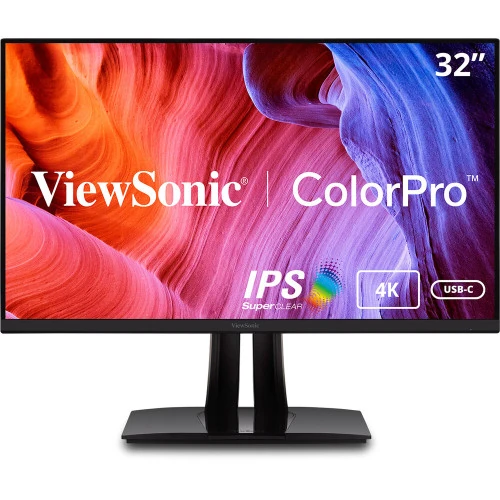
4K workspace and exact model identity
The ViewSonic VP3256-4K is a ColorPro professional monitor with a 32-inch class screen and 31.5-inch viewable area. Its IPS technology panel displays 3840 × 2160 pixels in a 16:9 layout, giving editors, designers and office users room for detailed timelines, large canvases, spreadsheets and side-by-side windows. ViewSonic specifies a 60Hz refresh rate, 5ms typical gray-to-gray response, 350 cd/m² typical brightness and 178-degree horizontal and vertical viewing angles. The screen is flat and uses an anti-glare surface with a 3H hard coating. The manufacturer lists a 0.182mm pixel pitch. Store the product’s clean model as VP3256-4K and identify ViewSonic as the brand; “32-inch 4K” describes its screen and resolution, not part of the model number. The manufacturer documentation associates this exact model with part number VS18845. Be careful to distinguish VP3256-4K from similarly named VP3256A-4K and other ColorPro models because specifications and connectors can differ between revisions. The 60Hz panel is intended for design, photo/video work and general productivity rather than high-refresh competitive gaming.
Color accuracy, Pantone validation and calibration
ViewSonic positions the VP3256-4K for creators who need a consistent sRGB display. The official product page states 100% sRGB coverage, Pantone Validation, factory pre-calibration and an individual color calibration report in the box. It also advertises Delta E below 2. Those are manufacturer claims for the ColorPro model; keep the supplied report with the unit and select an appropriate color mode in the operating system and applications. The specification table gives typical coverage figures of 82% Adobe RGB and 90% DCI-P3, alongside 100% sRGB coverage. These figures describe color-space coverage, not gamut volume, and do not mean every output device or print will match without color management. The display supports 10-bit color input through 8-bit plus A-FRC and can show 1.07 billion colors. For web design, sRGB mode is a practical starting point; photographers and video editors should choose the target color space used by their project and review their particular unit’s calibration report. A Pantone validation mark is useful context for color reproduction, but it does not replace a workflow that accounts for brightness, ambient light, application profiles and the final output device.
HDR10, brightness and refresh behavior
The panel is rated at 350 cd/m² typical brightness, a 1,000:1 typical static contrast ratio and HDR10 support. HDR10 compatibility lets the display receive HDR content, but ViewSonic does not list a VESA DisplayHDR certification for this model. Treat those statements separately when comparing displays: HDR format support alone does not indicate a particular certification tier or guarantee a specific HDR viewing result. The VP3256-4K is a 60Hz monitor with a typical 5ms GtG response time. It also supports Adaptive-Sync or variable refresh rate, which may reduce tearing when used with a compatible graphics card and supported output mode. This is different from a high native refresh rate; it does not turn the screen into a 120Hz or 144Hz gaming monitor. Flicker-Free operation and a software Low Blue Light filter are included in ViewSonic’s specification. The screen’s matte anti-glare treatment can help reduce reflections from ambient light, although desk placement and room lighting still affect comfort. For color-critical work, use consistent brightness and a controlled viewing environment rather than relying on HDR or a preset mode alone.
USB-C charging and the USB hub
The VP3256-4K has a USB-C upstream connection with DisplayPort Alt Mode, data and up to 65W Power Delivery. ViewSonic notes that the connected computer must support USB-C video over DisplayPort Alt Mode and USB Power Delivery for these functions to work. The 65W figure is the maximum supported power, not a guarantee that every laptop will charge at that rate; charging depends on the laptop’s requirements, cable and workload. The monitor also provides a USB-B upstream port and two USB 3.2 Gen 1 Type-A downstream ports. Connect USB-B from the monitor to the computer when you want to use the attached keyboard, mouse or storage through the built-in hub. The USB-C upstream path can carry video and data in one cable and power a compatible laptop, while USB-B is the separate hub path when using another video input. The published specification lists two HDMI inputs and one DisplayPort input as well. Because port-version listings differ among current manufacturer pages and older regional specifications, this description records the input count and advises checking the exact delivered unit for HDMI revision. This avoids promising a port standard that may not match the Bangladesh stock revision.
Video inputs, audio and day-to-day setup
ViewSonic’s VP3256-4K offers two HDMI inputs, one DisplayPort input and one USB-C upstream port with DisplayPort Alt Mode. ViewSonic’s current global datasheet identifies HDMI 2.1, while its VP3256-4K user guide says the monitor has two HDMI 2.0 ports and the package includes an HDMI 2.0 cable. Confirm the delivered unit if port version matters. The datasheet lists DisplayPort 1.4. Current ViewSonic material specifies dual 3W speakers; local listings may say 2W each, so confirm the revision. No built-in microphone or webcam appears in the manufacturer’s specification. Plan for an external microphone and camera if video meetings are part of the setup. HDR10, multiple color modes and display presets let a user adjust the monitor for different work, while vDisplay Manager can provide desktop window organization and OSD control. The monitor has no RJ45 Ethernet port. Its three-sided frameless design can make a multi-screen desk feel more continuous. Operating-system scaling may be useful at this screen size depending on viewing distance and preference.
Ergonomic stand and VESA mounting
The included stand supports height adjustment up to 130mm, tilt from approximately −5° to +21°, swivel through 120° total and pivot to portrait orientation in either direction. ViewSonic’s product page also describes Auto Pivot support for adapting orientation when the monitor is rotated. This range makes it possible to position the screen for seated desk work, portrait documents or a collaborative viewing angle. A 100 × 100mm VESA mount is available for a compatible monitor arm or wall mount. The manufacturer lists physical dimensions of about 715mm wide, 513.8–643.8mm high and 265mm deep with the stand; the panel without stand measures about 715 × 423 × 66mm. Net weight is listed at 10.9kg with stand and 7.2kg without stand. Packaging is listed as 840 × 520 × 326mm and gross weight as 15.3kg, but shipping labels and warehouse packaging may differ. These are manufacturer packaging dimensions, not necessarily the parcel dimensions used by a local courier. The stand and screen together require a substantial desk footprint, so measure the workspace and allow room for cables and the rear adjustment mechanism before installation.
Power, accessories and compatibility
The display uses an internal power supply and accepts 100–240V AC at 50/60Hz. ViewSonic lists typical power consumption of 46W, maximum consumption of 50W, eco modes and 0.5W standby. Its official package list includes the monitor, a three-pin power plug, HDMI 2.0 cable, USB-C cable and Quick Start Guide. Regional bundles can vary; check the package that ships with the Bangladesh unit. The USB-C connection requires a compatible computer for video and Power Delivery. ViewSonic lists Windows 11 certification and macOS testing and specifies 3840 × 2160 compatibility for PC and Mac. USB-C charging is separate from the monitor’s own AC power connection: the monitor remains connected to mains power while supplying up to 65W to a supported laptop. The manufacturer’s guide covers HDR10, Adaptive-Sync and response-time controls. Brightness and power use vary with selected picture mode, connected devices and USB charging. The listed warranty is market-dependent; ViewSonic explicitly says warranty offerings may differ by market, so a Bangladesh retailer’s three-year claim should be confirmed against the exact unit’s warranty card and service provider.
Bangladesh price, stock and warranty checks
Local Bangladesh seller pages place the VP3256-4K in the upper professional-monitor price range, with reviewed prices around ৳93,000 to ৳100,499 depending on retailer, promotion and snapshot date. The existing BiponiBD variant is currently listed at ৳99,500. Keep that catalog price until the merchant confirms an authorized price update; search snapshots and third-party seller prices are not a substitute for the merchant’s own live offer. Some local pages state three years of warranty, but the exact warranty provider and service coverage should be confirmed in writing for the delivered model. Retail listings also differ in port-version details, color-gamut descriptions and some power values. The ViewSonic product specification and manual are the primary references for technical claims, while local pages are useful for a market price range and warranty context. Ask the seller to confirm current stock, model code VP3256-4K, the packaging and included cables, HDMI revision, warranty card and invoice before purchase. The product page should not promise an exact stock status, discount or seller warranty beyond what the merchant has verified. This keeps search copy useful and truthful even when local promotions change.
Model comparison and buyer fit
Choose the VP3256-4K when a 31.5-inch 4K IPS workspace, full sRGB coverage and creator-focused factory calibration are priorities. It is a 60Hz model with Adaptive-Sync, HDR10, a USB-C connection rated up to 65W and a flexible stand. Those features suit design, photo editing, productivity and mixed work where a single-cable laptop connection is convenient. It is not a replacement for a high-refresh gaming display, and its 350 cd/m² typical brightness and HDR10 support should not be confused with a VESA DisplayHDR tier. Verify the model code carefully because VP3256A-4K is a separate related model and may have differing physical or technical details. Likewise, the 65W USB-C output may not satisfy laptops designed for a higher-wattage charger. Check the HDMI revision for the precise regional revision because old and current source material is inconsistent. The adjustable stand and VESA option allow more placement choices, while two integrated 3W speakers handle basic audio. For critical color work, inspect the supplied calibration report and use color-managed software; product claims describe intended factory performance but do not prove the condition of an individual used or transported unit.