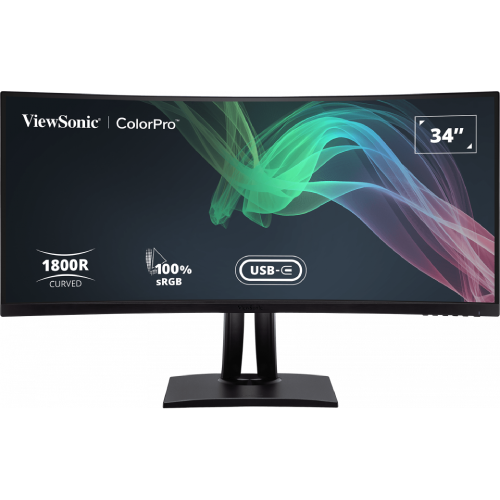
ViewSonic ColorPro VP3481a at a glance
The ViewSonic ColorPro VP3481a is a 34-inch curved ultrawide monitor designed around a 21:9 UWQHD workspace. Its native 3440 × 1440 resolution spreads editing timelines, reference material, spreadsheets and multiple application windows across a single panel. The screen uses VA technology, an 1800R curve and an anti-glare surface with a 3H hard coating. ViewSonic identifies the product as model VP3481a and the manual lists VS17736; those identifiers help distinguish this display from similarly named VP3481 products. The monitor is not a 4K panel: its pixel count is 3440 × 1440. The wide format can be useful when a task benefits from horizontal space, though the benefit depends on software layout and viewing distance. Before purchase, compare the model label on the carton and rear unit with the listing, then confirm the local service terms and included accessories.
Panel, resolution and curved viewing area
The panel’s 3440 × 1440 pixel grid uses a 21:9 aspect ratio and a listed pixel pitch of 0.232mm. The manufacturer gives a 178-degree horizontal and vertical viewing angle and an 1800R curve. The anti-glare display surface is listed with a 3H hard coating. The panel is specified for 16.7 million colors with 8-bit true color. A typical brightness figure of 400 cd/m² is provided. These are manufacturer specifications; perceived brightness, reflections and color depend on room lighting, display settings and the viewer’s position. The screen’s curvature may make the far left and right edges feel closer during centered viewing, but it does not change the image geometry sent by the computer. Use the native resolution when possible for the sharpest text and interface rendering. If an application uses scaling, choose a comfortable operating-system scale rather than changing the monitor’s native pixel mode without a specific reason.
Color coverage, factory calibration and HDR
ViewSonic identifies the VP3481a as Pantone Validated and lists factory color calibration with a Delta E value below 2, alongside 100% sRGB coverage. The official product sheet also lists gamut figures for Adobe RGB, DCI-P3, EBU, Rec.709, SMPTE-C and NTSC, and describes a 14-bit 3D Look-Up Table and Colorbration+ hardware calibration support with a separately purchased compatible colorimeter. Gamut coverage and Pantone validation do not guarantee that every individual unit remains identically calibrated after shipping or settings changes; retain the supplied calibration report and recalibrate when needed. The official product page lists wider gamut coverage while some concise regional summaries emphasize 100% sRGB, so buyers comparing extended-gamut workflows should check the datasheet for their market. HDR10 signal support is listed alongside typical 400 cd/m² brightness. HDR10 compatibility does not establish a VESA DisplayHDR certification tier or local-dimming hardware. Content mastering, source output, operating-system HDR configuration and monitor settings affect the result.
Refresh, motion and compatible sources
The VP3481a is specified for a 100Hz refresh rate and AMD FreeSync support. A higher refresh can make pointer movement and supported content appear smoother than a 60Hz mode, but the computer must generate a compatible signal and the selected cable/input combination must carry it at 3440 × 1440. FreeSync operation similarly requires compatible graphics hardware, drivers and settings. The monitor’s 5ms response-time figure should be treated as the manufacturer’s stated measurement rather than a guarantee that every pixel transition will appear identical under all conditions. Use the monitor menu and source display settings to select a supported timing. When troubleshooting a missing 100Hz option, check the graphics adapter, cable specification, operating-system display panel, selected input and firmware before assuming the monitor is defective. HDR and variable-refresh behavior can also depend on the source and chosen mode. Gaming performance will ultimately be limited by the computer’s ability to render the game at the ultrawide native resolution.
USB-C docking, KVM and desk connectivity
A key feature is the USB-C upstream connection, which supports DisplayPort Alt Mode, data and up to 90W Power Delivery for a compatible host. A single USB-C cable can carry video and data while supplying power, subject to the laptop’s requirements and the cable’s rating. ViewSonic also lists an integrated KVM function, an RJ45 Ethernet connection and a USB hub. The official specifications identify two USB 3.2 Type-A downstream ports and a separate USB 3.2 Type-B upstream connection. Do not confuse that Type-B hub upstream port with USB-C: the old catalog attribute incorrectly described the USB-C port as USB-B and has been corrected. The KVM and downstream peripheral behavior depends on connecting the computers and upstream links as described in the user guide, then selecting the proper host. Ethernet pass-through and USB peripheral availability similarly rely on the monitor’s data connection to the active host. Confirm the notebook supports USB-C DisplayPort Alt Mode if you plan to use video over USB-C.
Video inputs, audio and speakers
ViewSonic lists two HDMI 2.0 inputs and a DisplayPort input, with HDCP 2.2 support. The DisplayPort revision is not consistent across official product materials: regional connector tables and the included DisplayPort 1.2 cable point to an earlier revision, while some retailer and marketing text cite 1.4. The catalog therefore states the confirmed DisplayPort connection without promising an unverified revision; check the exact regional manual and unit label for bandwidth details. The monitor also has audio connectivity and two built-in speakers rated at 5W each. PIP and PBP modes with a Dual Color Engine are listed for displaying two sources together. Available audio behavior depends on the source sending audio through the selected video input, the operating system’s output selection and the monitor’s volume settings. The included package is reported to contain a DisplayPort 1.2 cable, HDMI 2.0 cable, USB-C cable and USB A/B 3.2 cable, in addition to power lead and documentation; regional bundles can differ, so check the seller’s exact box contents before purchase.
Ergonomics, mounting and physical planning
The included stand is specified with up to 130mm of height travel, 120 degrees of swivel and a tilt range from −6 to +21 degrees. A 100 × 100mm VESA mounting pattern is listed for compatible arms or wall mounts. The monitor measures approximately 809mm wide; with the stand, height varies from about 480.46 to 539.23mm and depth is about 243mm. ViewSonic lists net weight of about 11.2kg with the stand and 7.3kg without it. Check the desk footprint, arm load rating, VESA hardware and cable clearance before installing the display. The panel is wide, so allow room for a centered position and enough viewing distance to see the full screen without frequent head movement. If the stand is not centered or the arm is undersized, the display can feel unstable. Follow the manual’s lifting and mounting instructions, support the panel at its edges and avoid pressing on the screen surface while positioning it.
Power, environmental limits and package details
The specification lists an internal power supply accepting AC 100–240V. Typical power consumption is stated at approximately 33.6W, with a maximum around 38.6W and lower eco-mode figures depending on the selected profile; standby is listed at approximately 0.5W. Actual draw changes with brightness, refresh mode, connected USB devices and laptop charging load. The operating-temperature range is 0–40°C, while the relative humidity range is 20–90% non-condensing. These environmental limits were previously placed in the catalog’s color-temperature field and are now represented correctly as operating conditions; color temperature refers instead to the display’s selectable image presets. The listed box contents include a monitor, power cable, DisplayPort cable, HDMI cable, USB-C cable, USB A/B cable and Quick Start Guide, with local packaging subject to variation. Keep the ventilation openings unobstructed and avoid condensation when moving the monitor between environments. For service, retain the carton and paperwork until the seller’s inspection or return period has passed.
Bangladesh price, stock and warranty context
At the time of this review, Bangladesh retailer pages checked for the exact VP3481a model showed cash or listed prices around ৳106,500 to ৳110,000. Star Tech and TechLand displayed the lower ৳106,500 level; ZettaByte displayed ৳110,000. A Ryans page was checked but showed the product out of stock, so it is not evidence of a currently purchasable offer. These are market references, not a live BiponiBD offer or a promise that a seller has stock today. The catalog’s variant price remains ৳106,500 and is preserved as configured. Reviewed sellers state three-year warranty terms, but coverage provider, service location, exclusions and eligibility can vary by region and invoice. Ask the seller to confirm current stock, final payable price, sealed/new condition, serial number, exact HDMI revision, included cables and written warranty coverage before placing an order. The market range has a review date so readers can distinguish it from a permanently fixed price.
Who may find this monitor useful
The VP3481a can suit a desk where a single wide display is preferred for arranging several windows, editing a broad timeline or switching a shared USB setup between computers. Its 100Hz refresh and FreeSync support also accommodate compatible entertainment and gaming sources, while the 1800R curve is intended to support viewing across the wide panel. USB-C charging, Ethernet, KVM and integrated speakers can reduce separate desk devices for some laptop workflows. Those conveniences depend on compatible source hardware and correct connections, and the monitor does not replace a dedicated dock in every setup. Color-gamut coverage may be useful for managed sRGB or Rec.709 tasks, but buyers needing documented factory accuracy should request a calibration report for the exact unit. The large panel needs suitable desk space and a computer able to drive 3440 × 1440 at the desired refresh rate. Compare the connection list and warranty terms with your actual setup before choosing; the model name and connector specifications should be verified on the unit and packaging.
Frequently asked buying and setup questions
The VP3481a is the model documented in ViewSonic’s current product pages; the earlier VP3481 is a distinct older revision, while “VP3481a-2” appears in some feeds as a suffix but is not established as a separate Bangladesh retail model with different hardware. Confirm the carton and regulatory code VS17736 for the audited model. The global ViewSonic datasheet and local listing identify HDMI 2.0 with HDCP 2.2. Official material varies on the DisplayPort revision, so check the regional manual and unit label if bandwidth matters. Ask whether the three-year warranty is manufacturer-backed or seller-provided, where service is handled and what proof is required. Verify that your laptop’s USB-C port supports DisplayPort Alt Mode and that the cable supports the required video and charging functions. Up to 90W is the monitor’s stated USB-C power ceiling, not a promise to meet every notebook’s full-power demand. Check whether the included cables match your intended computer and whether your PC can output 3440 × 1440 at 100Hz over your chosen input. A 100 × 100mm VESA arm should be rated for the monitor’s weight.