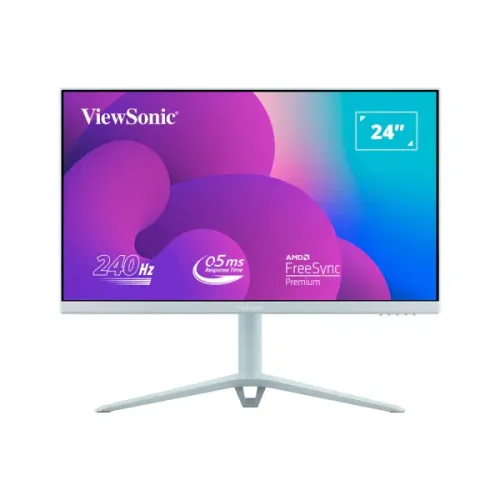
ViewSonic VX2428AJ-BL 24-inch 240Hz Fast IPS monitor
The ViewSonic VX2428AJ-BL is a 24-inch-class Full HD gaming monitor with a 23.8-inch viewable area, Fast IPS technology and a maximum 240Hz refresh rate. The exact “-BL” variant has a pastel blue chassis and stand. ViewSonic specifies a 0.5ms MPRT response time, 250 cd/m² typical brightness, 1,000:1 typical static contrast, HDR10 input, AMD FreeSync Premium and NVIDIA G-SYNC Compatible support. The listed sRGB color size is 102% and the NTSC color size is 72%; color depth is 8-bit (6-bit + FRC). These are manufacturer specifications rather than a calibration report. The existing catalog variant price of ৳23,700 is preserved. Local seller prices, stock and warranty terms are snapshots and should be confirmed before ordering.
Full HD resolution and panel details
The monitor displays 1920 × 1080 pixels in a 16:9 format. The pixel pitch is 0.275mm horizontally and vertically, or about 92.6 pixels per inch on the 23.8-inch viewable panel. Full HD is a common fit for competitive games and everyday desktop use, and it can be easier to drive at very high frame rates than a higher-resolution screen. The panel is Fast IPS with a flat, anti-glare surface and 3H hard coating. ViewSonic rates viewing angles at 178 degrees horizontally and vertically. IPS viewing angles and the fast panel design support a consistent image across normal seating positions, though color, uniformity and motion response vary by panel and settings. The 250 cd/m² brightness and anti-glare surface suit many indoor rooms, but bright ambient light can still affect visibility.
240Hz refresh and 0.5ms MPRT
ViewSonic lists a maximum refresh rate of 240Hz, and the exact-model datasheet confirms that figure. A 240Hz panel can refresh up to four times as often as a 60Hz panel when the source supplies frames and the selected mode is active. Your graphics card, game, connection and settings determine the actual frame rate. ViewSonic specifies 0.5ms MPRT, which is a motion-picture response-time rating; it is not a 0.5ms gray-to-gray rating. MPRT and GTG describe different measurement methods and should not be interchanged. Use the graphics settings to select 1920 × 1080 at up to 240Hz after connecting. If 240Hz is unavailable, check the cable, GPU output, driver, monitor input and operating-system advanced display settings.
Adaptive sync, HDR10 and color
The manufacturer lists AMD FreeSync Premium and NVIDIA G-SYNC Compatible variable-refresh support. Adaptive synchronization can coordinate display refresh with changing frame output on compatible hardware, but a suitable graphics card, cable, driver and settings are still required. ViewSonic lists HDR10 input support; that does not by itself mean the panel is certified to a separate VESA DisplayHDR brightness tier. Typical brightness is 250 cd/m² and static contrast is 1,000:1, with an 80M:1 dynamic contrast figure also listed. Color is rated at 16.7 million values using 8-bit (6-bit + FRC) processing, with sRGB 102% size and NTSC 72% size. “Color size” is ViewSonic’s stated gamut metric; it is not a guarantee of measured color accuracy or factory calibration. For color-critical work, use a calibrated workflow and verify the individual unit.
Ports, audio and connection choices
The official connector list contains two HDMI 1.4 ports, one DisplayPort 1.4 input, a 3.5mm audio output and a DC power socket with center-positive polarity. ViewSonic does not list USB ports for this exact model, despite a conflicting seller specification row that incorrectly mentions three USB-A ports. The monitor has two built-in 2W speakers and can also send audio to headphones or external speakers through the 3.5mm output. No USB hub or USB-C input is specified. Connect a PC through DisplayPort or HDMI, select the matching input and choose the supported Full HD refresh mode. Check the source device and cable if the display initially runs at a lower frequency. The included package lists an HDMI 2.0 cable and a DisplayPort 1.2 cable; regional bundle contents can vary, so verify the actual package with the seller.
Pastel Blue chassis and adjustable stand
The “-BL” suffix identifies the pastel blue variant. ViewSonic lists an ergonomic stand with 130mm height adjustment, 30-degree swivel, tilt from -5 to +20 degrees, and pivot from 90 to 0 degrees. The stand column includes a cable-management clip visible in the supplied images. The monitor also supports a 100 × 100mm VESA mount and has a Kensington lock slot. With the stand, the monitor measures 541.86 × 417–547 × 207mm (W × H × D); the height range reflects stand adjustment. Without the stand, it measures 541.86 × 323 × 43.5mm. Net weight is 3.8kg with the stand and 2.8kg without it. The retail carton measures 610 × 402 × 180mm and gross packaged weight is 5.5kg. These details can help plan desk and arm fit; check the mount’s load capacity and available clearance before installation.
Eye-care features, controls and power
ViewSonic lists Flicker-Free technology and a software-based Low Blue Light solution. The on-screen display includes input selection, audio adjustment, ViewMode, color adjustment, manual image adjustment and setup options. Five physical controls are listed: favorite, three additional control keys and power. The datasheet also lists a Kensington lock slot and cable organization. Power comes from an external adapter and the monitor uses an AC input range of 100–240V. Power consumption is listed as 25W typical, 26W maximum, 19W in optimized Eco mode, 16W in conserve Eco mode and 0.3W in standby. Eye-care functions are adjustable viewing features, not medical treatment or a guarantee against eye strain. Set brightness for the room and take breaks that suit your work.
Bangladesh price, seller warranty and package
The checked Bangladesh seller listings showed offers around ৳23,000–৳26,200: Star Tech displayed ৳23,700 cash price (with a regular-price figure of ৳26,040 and another listed reference price of ৳26,200), TechLand ৳23,700, Ultra Technology about ৳23,500, and Computer Village about ৳23,050. Ryans and Skyland were listed in an approximate ৳23,000–৳24,500 range in the reviewed comparison. Prices, stock, EMI and discounts can change. The sellers reviewed advertised three-year warranty coverage; confirm the issuer, service terms and invoice conditions. The catalog’s ৳23,700 price remains unchanged. The manufacturer package list includes the monitor, a three-pin power lead, HDMI cable, DisplayPort cable, AC/DC adapter and quick-start guide, but import bundles can differ. Ask the seller to confirm the pastel blue color, exact VX2428AJ-BL model, local warranty provider, in-box cable versions, dead-pixel policy and return terms. Exact regional barcode/GTIN and country of origin remain unverified for this catalog unit.
Buyer fit and setup checklist
The VX2428AJ-BL suits buyers who want a Full HD screen with very high refresh, IPS viewing angles, variable refresh, built-in speakers and a height-adjustable stand. Its 23.8-inch viewable area is smaller than 27-inch gaming screens, and the 1920 × 1080 resolution offers less workspace than QHD; those may matter for large desktop layouts or fine text. Its pastel blue finish is a visible styling choice, not the white chassis listed by some retailers for other color variants. For setup, connect the computer using a suitable DisplayPort 1.4 or HDMI cable, set 1920 × 1080 and select up to 240Hz in the operating system or graphics control panel. Enable FreeSync Premium or G-SYNC Compatible variable refresh through supported graphics settings if desired. Adjust height, tilt, swivel and pivot to your seating position, then tune brightness and picture mode. If the available refresh rate is low, verify the selected input, cable, GPU output, driver and display mode before troubleshooting the monitor.