ViewSonic VX2537 24.5-inch 420Hz Full HD Gaming Monitor: Complete Buying Guide
Model identity and intended use
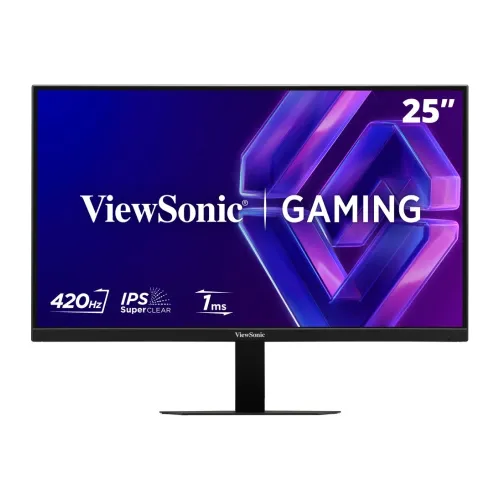
The ViewSonic VX2537 is a 25-inch-class gaming monitor with a 24.5-inch viewable area, Full HD resolution and a very high 420Hz maximum refresh rate. Its model identifier is VX2537; the model is not the similarly named VX2532 or XG2536. The VX2537 is designed primarily for competitive PC gaming where high frame rates and a responsive display matter. It can also serve as a general desktop monitor for browsing, office tasks and video, although Full HD gives less workspace and fine detail than a QHD panel. The catalog title, URL slug, active status and price identify this exact product and are retained. The product brand and model fields have been corrected to ViewSonic and VX2537.
24.5-inch Full HD IPS picture
The monitor uses ViewSonic SuperClear IPS technology with a 24.5-inch viewable area, 1920 × 1080 pixels and a 16:9 aspect ratio. Its 0.283mm horizontal by 0.28mm vertical pixel size yields a clear, familiar Full HD desktop at typical gaming distances. IPS technology supports 178-degree horizontal and vertical viewing angles, helping maintain a consistent image when viewed from the side. The typical static contrast ratio is 1000:1, and brightness is specified at 400 cd/m². The anti-glare surface has a 3H hard coating. These details describe the screen and its surface; they do not promise immunity from scratches or replace careful cleaning with a soft cloth.
420Hz refresh: understand the connection
The VX2537 is specified for up to 420Hz through DisplayPort 1.4, while its HDMI 2.1 inputs support a vertical frequency range up to 240Hz. This port distinction is important: the product headline “420Hz” does not mean every input or every connected device will produce that rate. To reach 420Hz, use DisplayPort from a PC and graphics card that can output 1920 × 1080 at the required rate, with a suitable cable and supported driver settings. Then select the maximum available refresh rate in the operating system. Consoles and HDMI sources generally use their own supported modes; check the console’s output mode and the manufacturer compatibility list before purchase.
Motion response and variable refresh
ViewSonic lists 1ms MPRT response time, AMD FreeSync Premium and NVIDIA G-SYNC Compatible. MPRT measures perceived motion persistence and is not the same as a grey-to-grey pixel transition figure. The fast refresh and motion setting are most useful when the PC can render high frame rates; a monitor cannot create frames that the system does not render. Variable refresh synchronizes the panel with a compatible source to reduce tearing and stutter within supported ranges. GPU, driver, port selection, cable, game settings and frame-rate limits all affect results. For a balanced setup, tune image quality and frame rate together instead of assuming maximum refresh is always the best setting.
HDR10 and colour support
The VX2537 accepts HDR10 content and lists 16.7 million colours using 8-bit (6-bit + FRC) colour support. The typical colour coverage is 104% sRGB size and 72% NTSC. These are useful specifications for games and everyday media, but they should not be confused with 10-bit input depth, a DCI-P3 coverage rating or factory calibration certification. Brightness is 400 cd/m² typical and no local dimming is listed, so HDR10 compatibility does not make this a high-end HDR display. If your priority is HDR movie mastering, high-contrast grading or professional colour work, compare measured gamut, calibration reports, contrast technology and peak-brightness requirements before buying.
Four digital video inputs and audio out
The rear I/O provides two HDMI 2.1 inputs and two DisplayPort 1.4 inputs, plus one 3.5mm audio output. The four video connectors allow multiple devices, such as two PCs and two consoles, to remain connected while the user selects the active source in the on-screen menu. The maximum signal depends on which input is used: the official vertical-frequency specification reaches 240Hz over HDMI and 420Hz over DisplayPort. The 3.5mm jack can feed headphones or external speakers from connected-source audio. The VX2537 does not include internal speakers or a downstream USB hub. The product image shows labels for HDMI 1, HDMI 2, DP 1 and DP 2, resolving an incorrect catalog port count.
Eye comfort and daily use
ViewSonic lists Flicker-Free and Low Blue Light technologies under its Eye ProTech approach. Low-blue-light modes can adjust the image colour, while flicker-free operation is intended to reduce backlight flicker. Users should still set brightness for the room, avoid reflections, choose comfortable viewing distance and take breaks during long sessions. The monitor’s 400 cd/m² typical brightness is suited to ordinary indoor spaces, but maximum brightness is not necessarily comfortable for every desk. ViewMode and image controls are available from the on-screen display. They can be used to tune colour and image appearance for games or other content; the exact menu behavior depends on selected input and current picture mode.
Stand, VESA and dimensions
The included stand supports forward/back tilt from -5° to +20° but does not provide height, swivel or pivot adjustment. The monitor supports a 100 × 100mm VESA mount for a compatible arm or bracket. ViewSonic lists dimensions of 559.32 × 422.24 × 189.03mm with the stand and 559.32 × 329.26 × 47.22mm without it. Weight is 3.8kg with stand and 3.0kg without stand. Check desk depth, clamp access, arm load rating and clearance for the power and video plugs before installation. The back includes a Kensington lock slot. A properly supported VESA arm can improve ergonomic positioning where the compact tilt stand is insufficient.
Power and package logistics
The monitor has an internal power supply with an AC 100–240V input and a 3-pin IEC C14 inlet. ViewSonic lists typical consumption at 39W, maximum at 48W, Eco modes at 29W and 33W, and standby at 0.3W. Use the supplied power cable and a properly grounded outlet. Official package dimensions are 620 × 420 × 117mm, gross weight 5.1kg. The stated package contents include the VX2537, a 3-pin plug, a DisplayPort 1.4 male-to-male cable and a quick-start guide; regional box contents can vary. Shipping weight and carton dimensions have been recorded in the variant for delivery planning, while barcode, GTIN and origin remain unknown because the retail carton label is unavailable.
Price, warranty and buying checklist in Bangladesh
The catalog variant remains priced at ৳32,800. Current Bangladesh listings reviewed were approximately ৳31,500 at Ultra Technology, ৳32,500 at Star Tech and ৳32,800 at UCC; price depends on offer and payment method. UCC and retailer information state a three-year warranty, but the product datasheet itself says warranty can vary by market. Before checkout, confirm the exact VX2537 model code, sealed-box condition, included DisplayPort cable, current refresh-rate support for your PC, stock, final price, warranty provider and claim process. Keep the invoice and warranty card. Do not rely on listing titles alone for the input refresh limit: HDMI and DisplayPort have different maximum frequencies.
Who should choose this display
Choose the VX2537 when a competitive PC gaming setup can use a very high frame rate over DisplayPort and you value a 420Hz maximum, IPS viewing angles and FreeSync Premium/G-SYNC Compatible support. Its four video inputs are convenient for a multi-device desk, while 400-nit typical brightness, anti-glare surface and Full HD resolution also suit general daily use. It is less suitable for buyers who want high pixel density, built-in sound, a height-adjustable stand, USB-C docking or premium HDR. Match the monitor to the GPU, game frame rates and preferred resolution. Confirm the current local warranty and package before purchase; exact regional identifiers such as barcode and country of manufacture are not inferred.