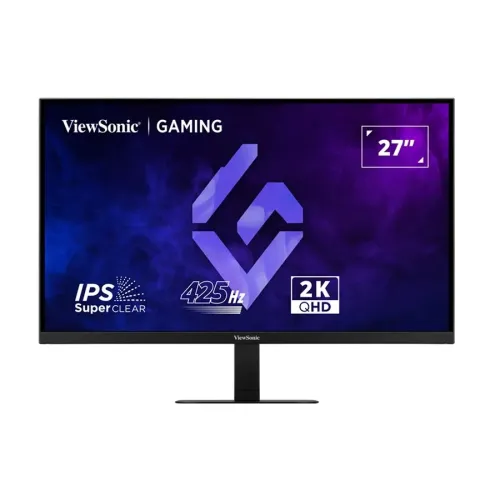
ViewSonic VX2757-2K-PRO-4 overview
The ViewSonic VX2757-2K-PRO-4 is a 27-inch QHD gaming monitor built around a SuperClear IPS panel. ViewSonic lists a native resolution of 2560 × 1440 and a maximum refresh rate of 425Hz. Its product page also identifies Variable Refresh Rate, G-Sync Compatible operation, HDR10 input, Flicker-Free and Low Blue Light features. Those specifications make it a high-refresh option for compatible PC setups, while the QHD panel keeps the resolution at 1440p rather than 4K.
The exact model has been matched to ViewSonic’s Bangladesh product page and its technical specification. The catalog previously assigned the generic Others brand, used an overlong model value containing screen size and refresh rate, and described HDMI as version 2.0. The product and variant MPN are normalized to VX2757-2K-PRO-4 and the two video inputs are corrected to HDMI 2.1, following the manufacturer. The current slug, active status, Monitors category, SKU, ৳59,500 catalog MSRP, warranty, logistics and five existing images remain intact.
QHD resolution and 27-inch panel
The display measures 27 inches diagonally and presents 2560 × 1440 pixels in a 16:9 format. QHD is often called 1440p and provides more desktop pixels than Full HD at the same size. It can show fine details in games, maps, application interfaces and videos while requiring the graphics system to render fewer pixels than 4K at the same frame rate. The monitor is flat and uses a SuperClear IPS panel.
ViewSonic lists 0.233mm horizontal and vertical pixel pitch, 178-degree horizontal and vertical viewing angles, and an anti-glare surface with 3H hard coating. These figures describe the display and its surface; viewing-angle measurements do not mean that brightness and colour remain perfectly identical at every position. Choose scaling and viewing distance to make small interface text comfortable, and angle the panel to reduce reflections in the room.
425Hz refresh rate and system requirements
The official Bangladesh product page and technical table list 425Hz as the maximum refresh rate. ViewSonic’s signal frequency data gives vertical ranges up to 425Hz for HDMI 2.1 and DisplayPort 1.4. To use the top mode, the graphics card or console, output port, cable, resolution, driver and operating-system settings must all support the selected timing. After setup, check the active refresh value in the operating system or graphics control panel.
A high refresh rate can make motion look smoother when the system generates enough frames. The display itself does not raise game frame rates. Fast competitive titles may reach high frame rates on suitable hardware, while demanding scenes and graphics settings may fall below 425 frames per second. If your system cannot drive that mode, the monitor can still display lower supported refresh rates; select the highest stable mode that fits your computer and game.
Response time, GTG and MPRT wording
ViewSonic’s technical specification table lists a typical response time of 1ms GTG. Its feature copy and Bangladesh retailer pages also use 1ms MPRT. Grey-to-grey and moving-picture-response-time values are different measurement methods and should not be treated as a single identical guarantee. Response-time behaviour can vary by transition, overdrive mode and refresh setting, so a rating does not ensure that every moving scene has no blur, overshoot or ghosting.
For the content fields, both claims are preserved with their labels: the technical table says 1ms typical GTG, while marketing also describes 1ms MPRT. When comparing displays, check which test method is being used and whether the selected overdrive setting creates artifacts. This keeps the response-time statement useful without claiming that a single specification eliminates all motion effects under every game and configuration.
Variable Refresh Rate and G-Sync compatibility
ViewSonic lists Variable Refresh Rate technology and identifies the display as G-Sync Compatible. VRR coordinates the monitor’s refresh timing with frame output from a compatible graphics system, which can reduce tearing and uneven motion within the supported operating range. Enable the feature in the monitor and graphics settings where needed, and confirm that the chosen connection and driver expose the variable-refresh option.
The manufacturer’s page does not identify an AMD FreeSync certification for this model, so no such claim is added. The monitor supports multiple inputs, but compatibility and usable VRR range can depend on the device, graphics card, driver, cable and selected settings. A G-Sync Compatible label should not be confused with a claim that every GPU, console and game will use every mode automatically.
HDR10, brightness and contrast
The product page lists HDR10 input support and typical brightness of 400 cd/m². ViewSonic specifies a 1,000:1 typical static contrast ratio and separately lists a much larger dynamic contrast value. Static and dynamic contrast describe different behaviours, so the dynamic ratio should not be compared directly to the native static figure. The manufacturer’s specification page does not list VESA DisplayHDR certification or a local-dimming system for this model.
HDR performance depends on the game or video, system HDR configuration, tone mapping, room lighting and display contrast. HDR10 support means the monitor accepts compatible HDR content; it does not imply OLED-like black levels or a premium DisplayHDR tier. Buyers who need a formally certified HDR level or advanced dimming zones should compare those specific features before purchasing rather than infer them from the HDR10 label alone.
Colour depth and gamut figures
ViewSonic lists 1.07 billion colours and 10-bit colour using an 8-bit panel with frame-rate control. The same technical section gives typical sRGB coverage of 100%, sRGB gamut size of 131%, DCI-P3 coverage of 90% and NTSC gamut size of 93%. Gamut size and coverage use different comparisons: a size value can exceed 100% without meaning that more than all colours in a colour space are accurately covered.
The monitor can be used for gaming, media and general creative work, but the listing does not claim Pantone validation or factory Delta E calibration. For colour-critical production, confirm the required colour space, profile, brightness and calibration workflow. If a project is prepared for standard sRGB web delivery, the manufacturer’s coverage figure is relevant; print, cinema and wide-gamut workflows may require additional calibration and proofing.
Video connections and console setup
The exact-model ViewSonic specification lists two HDMI 2.1 inputs, two DisplayPort 1.4 inputs and one 3.5mm audio output. This allows several compatible video devices to remain connected at once. The manufacturer overview calls out flexible dual HDMI and DisplayPort inputs. The HDMI version matters when comparing the high refresh capability: the official product page identifies the ports as HDMI 2.1, while some local reseller tables incorrectly label them HDMI 2.0.
Use a quality cable rated for the selected resolution and refresh rate, then confirm that the source device exposes the expected mode. The monitor’s 425Hz maximum is intended for a compatible PC signal; consoles generally use lower output refresh rates. The 3.5mm jack is an audio output for compatible headphones or external audio equipment. No USB-C video, docking hub or USB data port is listed for this model.
Stand adjustment, VESA and desk fit
The included stand supports tilt from −5 degrees forward to +20 degrees backward. ViewSonic’s specification does not list height adjustment, swivel or pivot for this stand. A 100 × 100mm VESA mounting pattern is provided for compatible arms or wall mounts. This model’s catalogue value previously said height adjustment N/A; the corrected text explains what is available and leaves the unsupported stand movement unclaimed.
Official physical dimensions are 615.07 × 454.06 × 190mm with the stand and 615.07 × 364.1 × 47.23mm without it. The package measures 678 × 450 × 118mm. The manufacturer lists a net weight of 4.4kg, 3.6kg without the stand and 6kg gross. Check the depth of your desk, monitor-arm load rating and cable route before mounting or repositioning the screen.
Eye care, audio and physical controls
ViewSonic lists Flicker-Free and hardware/software Low Blue Light features, grouped under its EyeProTech wording. These are display options that can be configured for a particular room and user; they do not guarantee comfort for everyone. The monitor’s on-screen display provides input selection, audio adjustment, ViewMode, colour adjustment, manual image adjustment and setup controls. Physical navigation controls are listed as up, right, down, left and power.
The manufacturer lists a 3.5mm audio output but does not list integrated speakers or a webcam. Connect external speakers or headphones through the audio path supported by your source and monitor, and use a separate camera if calls require one. A Kensington lock slot is included for compatible cable locks. The rear product images show the VESA area, chassis and lower port panel, but image views should not be taken as evidence of unlisted features.
Power draw, operating conditions and box contents
The specification page lists an internal power supply and AC input from 100–240V. It states 39W typical consumption, 46W maximum, 29W in Eco conserve mode, 33W in Eco optimized mode and 0.5W standby. Actual power use depends on brightness, selected refresh and image settings, attached equipment and usage. Keep the ventilation path clear and use the supplied power lead with a suitable outlet.
The manufacturer lists a three-pin power plug, DisplayPort 1.4 male-to-male cable and quick-start guide with the monitor. Package contents may vary by market, so confirm the actual box contents with the Bangladesh seller. ViewSonic also lists operating conditions of 0–40°C and 20–90% non-condensing humidity. Those values describe the environment for use and are not a recommendation to expose the monitor to moisture or temperatures outside the operating range.
Bangladesh price and warranty context
On 6 November 2026, Ultra Technology’s exact-model page showed ৳58,500, marked in stock, and Star Tech showed ৳59,500 with its cash-discount option and stock status. The observed range of ৳58,500–৳59,500 is a dated snapshot and can change with seller inventory, offers and payment method. It is not a current BiponiBD store offer. The existing catalog MSRP of ৳59,500 remains unchanged.
The catalog already recorded a three-year warranty, and both local seller pages list three years. The warranty field is preserved as 3 Years, but the specific seller, importer, service location, dead-pixel policy, claim documentation and original-box requirement should be confirmed before purchase. Product price and warranty are separate from an actual store offer on BiponiBD; the page currently has no live store offers for the variant.
Who may choose this monitor?
This model can suit competitive PC players who want to try a very high refresh rate at QHD, and users who need multiple HDMI and DisplayPort devices connected. The IPS panel, wide viewing angles, HDR10 input, 10-bit 8-bit-plus-FRC colour and G-Sync Compatible VRR cover a range of display modes. It can also serve ordinary desktop use at lower refresh settings when the computer is not pushing 425Hz.
It may be a weaker fit for buyers who need 4K resolution, a height-adjustable stand, integrated speakers, USB-C docking, certified high-tier HDR or built-in USB hub features. Before choosing it for esports, confirm the PC can sustain the game frame rate and that its cable/output supports the target mode. Before choosing it for colour-critical work, confirm whether its listed sRGB, DCI-P3 and calibration characteristics meet the workflow requirements.
Listing identity and summary
ViewSonic VX2757-2K-PRO-4 is a black, flat 27-inch SuperClear IPS gaming display with QHD 2560 × 1440 resolution, a maximum 425Hz refresh rate, 1ms typical GTG, HDR10 input, G-Sync Compatible VRR, 400 cd/m² typical brightness and 10-bit colour using 8-bit plus FRC. Its inputs are two HDMI 2.1 and two DisplayPort 1.4 ports, plus 3.5mm audio out. The stand tilts and the monitor supports 100 × 100mm VESA mounting.
The exact model appears consistently in the product title, brand, model and MPN, long copy, SEO metadata, specifications, feature list, FAQs, tags and image alt text. Existing slug, Active status, Monitors category, variant SKU, ৳59,500 MSRP, three-year warranty, variant logistics and media identity are preserved. The market snapshot is source-linked and clearly described as seller context, separate from confirmed BiponiBD store prices.