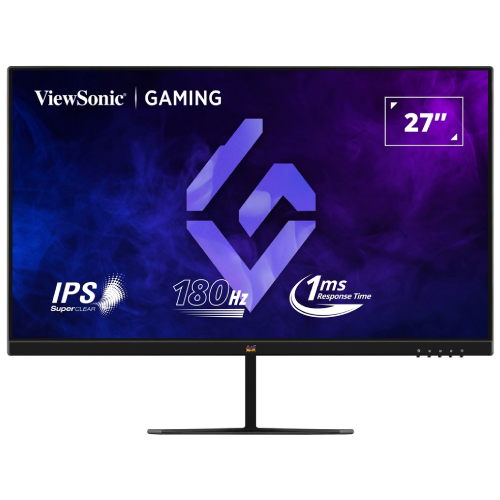
ViewSonic VX2779-HD-PRO 27" 180Hz IPS Gaming Monitor. Read this model-specific guide to resolution, maximum refresh modes, connectivity, setup, warranty and buying checks.
ViewSonic VX2779-HD-PRO overview
The ViewSonic VX2779-HD-PRO is a 27-inch flat gaming monitor built around a Full HD IPS panel. Its main appeal is a high refresh ceiling at a relatively accessible Bangladesh-market price: the manufacturer advertises up to 180Hz with a 1ms MPRT mode, adaptive sync, and a set of common digital connections. The distinction between the advertised maximum and the monitor timing table matters. ViewSonic documentation and the service manual identify a 165Hz recommended timing, while 180Hz is described as an manufacturer-rated maximum. This guide keeps both statements visible so shoppers do not mistake the optional 180Hz maximum mode for a guaranteed native timing on every connection and computer. The product is suitable for people who value smoother motion and straightforward PC or console connectivity, and it is less suited to users who prioritize very sharp text, USB-C docking, height-adjustable ergonomics or high-end HDR.
Screen size, resolution and sharpness
The 27-inch diagonal screen uses 1920 × 1080 pixels in a 16:9 layout. That resolution is widely supported and makes it easier for many graphics cards to reach high frame rates than QHD or 4K. It also keeps games and applications compatible with a broad range of computers. The trade-off is pixel density: 27-inch Full HD works out to roughly 82 pixels per inch, with a pixel pitch around 0.311mm. Text and fine interface elements look larger and less crisp than on a 27-inch 2560 × 1440 display. Sitting a little farther back or increasing operating-system scaling can make general desktop use comfortable, but buyers who inspect detailed images, spreadsheets or small text at close range may prefer QHD. IPS viewing angles are specified at 178 degrees horizontally and vertically, which helps the picture remain usable when viewed off-centre. The panel is flat and uses an anti-glare treatment for typical indoor lighting.
Refresh rate, refresh-rate setup and response
ViewSonic promotes up to 180Hz, which can make cursor movement, camera pans and supported games appear smoother than a conventional 60Hz screen. Official documentation also lists a recommended 1920 × 1080 at 165Hz timing. The product should therefore be understood as a 165Hz recommended mode with an optional 180Hz maximum mode, rather than assuming every HDMI or DisplayPort source will automatically show 180Hz. The refresh setting is enabled through the monitor’s on-screen display; choose a supported input and cable, update graphics drivers, and then select the desired refresh rate in the computer’s display settings. If a mode is missing or unstable, return to the recommended timing. The 1ms MPRT number refers to a motion-picture response mode, which uses a different measurement and may change brightness or sync behavior. It is not interchangeable with a normal grey-to-grey pixel transition specification. Use the response setting that gives a clean image without distracting inverse ghosting; the fastest menu setting is not always the best-looking one.
Colour, brightness and HDR10
The specification lists 250 cd/m² typical brightness and 1,000:1 native contrast. Those figures suit an ordinary desk in a room with controlled lighting, though strong direct sunlight can make the screen hard to see. Colour is listed as 8-bit output using a 6-bit panel with frame-rate control, with typical coverage of 72% NTSC and 104% sRGB. This is a useful broad-gamut description for everyday media and casual creative tasks, but a gamut percentage alone does not certify colour accuracy. Photographers and designers should calibrate the display and use a monitor with verified factory accuracy if print matching or precise brand colours are important. HDR10 support means that the display can receive an HDR10 signal. It does not by itself guarantee vivid HDR. At 250 nits and without a listed local-dimming system, highlight brightness and dark-scene contrast remain limited compared with monitors designed for premium HDR playback. HDR can still be useful for compatibility, but shoppers should judge this model primarily as an SDR Full HD gaming monitor.
Adaptive sync, eye comfort and connections
AMD FreeSync is listed, and ViewSonic markets G-Sync compatibility for supported systems. Adaptive sync can reduce tearing when the game frame rate changes, provided the graphics card, driver, input and display mode work together. The exact variable refresh range should be checked for the chosen configuration rather than assumed from the headline maximum. Flicker-Free operation and software Low Blue Light settings offer options for extended reading or late-night use; they do not replace sensible breaks, comfortable room lighting and a suitable viewing distance. The inputs include two HDMI 1.4 ports and one DisplayPort 1.4 port, alongside a 3.5mm audio output. Multiple inputs help connect a computer and another video source without swapping the cable each time. There is no USB-C display input, USB hub or built-in speaker system listed. For sound, connect headphones or powered speakers to the audio jack, or route audio through the computer. Check which input carries the refresh mode you intend to use, especially when connecting a console, laptop adapter or older graphics card.
Stand, mounting and desk setup
The supplied stand supports tilt, approximately -5 degrees forward to +20 degrees backward. It does not include height adjustment, swivel or pivot rotation, so users may need a riser or monitor arm to align the screen with eye level. ViewSonic lists a 100 × 100mm VESA mounting pattern. Before installing an arm, compare its load rating with the monitor’s actual weight, verify the mounting screws and use the manufacturer’s instructions to avoid damaging the case. Leave room behind the display for the stand and cables, and make sure the arm can safely support the screen throughout its range. The monitor operates from AC 100–240V according to the catalog specification; use the supplied power accessories and do not force a connector that does not fit. After setup, set the operating system to 1920 × 1080 and select the highest stable refresh mode supported by the connection. Confirm that the monitor OSD and computer settings agree.
Gaming and everyday work
The high refresh ceiling is the feature most likely to distinguish this model from standard office monitors. Fast-paced games can feel more responsive when a computer produces enough frames, and adaptive sync can help when performance varies. Full HD is easier to drive at high frame rates than QHD, making the monitor practical with modest gaming hardware. For story games, video and general work, IPS viewing angles and the wide sRGB-class gamut provide a flexible picture. For productivity, 27 inches creates room for multiple windows, but fine text is not as crisp as on a higher-resolution display. The stand’s tilt-only design may also make a separate arm attractive for long work sessions. Buyers should consider their typical viewing distance, desk depth, graphics performance and the software they use rather than choosing solely by the 180Hz label. A competitive player may appreciate the motion smoothness; a design professional or spreadsheet-heavy user may place more value on pixel density and ergonomic adjustment.
Bangladesh price, warranty and buying checklist
The Bangladesh retailer pages reviewed for this audit showed listed prices in the approximate ৳28,500–৳29,900 range and advertised three-year warranty coverage. The catalog variant’s existing ৳28,500 price remains the product’s recorded offer; the separate market range is only a snapshot of public listings at review time. Sellers may change price, availability, delivery conditions and the party responsible for warranty service. Ask the retailer to identify the exact VX2779-HD-PRO model on the carton, confirm whether the 180Hz maximum mode is covered by the advertised specification, and state who handles warranty claims and what documents are needed. Check that the screen has no shipping damage before installation, retain the invoice and serial details, and confirm the accessories included in the sealed package. For a laptop, verify its output port and adapter can carry the desired Full HD refresh rate. For a desktop, check the graphics card output, cable and driver. For a console, verify the console’s supported resolution and refresh mode. These quick checks reduce the chance of purchasing a suitable monitor but connecting it in a mode the source cannot deliver.
Who should choose this display
Consider the VX2779-HD-PRO if your priorities are smooth Full HD gaming, IPS viewing, a choice of two HDMI inputs plus DisplayPort, adaptive sync and VESA mounting at a value-conscious price. It is also reasonable for general browsing, study and video in a moderate-light room. Consider a 27-inch QHD monitor if crisp small text and workspace detail matter more than achieving very high frame rates. Look for a brighter display with local dimming if HDR movie performance is a priority, and choose a USB-C model if one-cable laptop docking is important. A height-adjustable stand may be preferable when you do not want to buy a separate arm. Whichever model you compare, distinguish MPRT from GtG response, native timing from maximum refresh, HDR10 signal acceptance from high HDR luminance, and retailer warranty language from confirmed service terms.
Final setup notes
Use the monitor’s OSD to confirm the intended input, refresh and refresh state. Select the desired refresh rate in the operating system, then verify it while a game or motion test is running. If the image flickers, blanks or shows artifacts at 180Hz, revert to the recommended 165Hz timing and check the cable and driver. Test adaptive sync with a compatible source, and choose a response setting that avoids visible overshoot. Adjust tilt for a comfortable eye line, reduce glare from nearby windows and keep the screen at a reasonable distance. This balanced setup allows shoppers to benefit from the VX2779-HD-PRO’s high refresh capability while understanding its FHD sharpness, brightness and stand limitations.