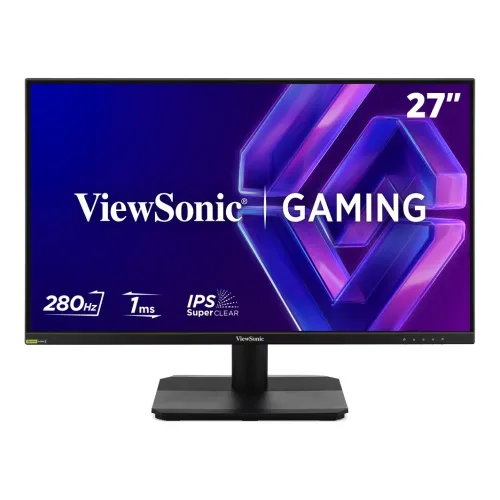
ViewSonic VX27G31A 27-inch FHD 280Hz IPS Gaming Monitor
27-inch FHD IPS panel
The ViewSonic VX27G31A is a flat 27-inch Full HD gaming monitor using an IPS panel and LED backlight. ViewSonic specifies 1920 × 1080 resolution, a 16:9 aspect ratio, 178-degree horizontal and vertical viewing angles, a typical brightness of 300 cd/m², 1,000:1 typical static contrast and 16.7 million colors with 8-bit true color. The matte anti-glare screen has a 3H hard coating. At this size, Full HD provides a large image and high frame-rate target; it is less pixel-dense than QHD on the same 27-inch diagonal, which can be noticeable with small text and detailed desktop work. The complete model is VX27G31A. Do not confuse it with VX27G31-2K or other similar ViewSonic model codes, which can have different resolutions, refresh limits and features.
280Hz maximum and per-input limits
The headline maximum refresh rate is 280Hz. The detailed ViewSonic signal table distinguishes the inputs: HDMI 2.1 lists a 48–260Hz vertical range, while DisplayPort 1.4 lists 48–280Hz. To use the full 280Hz, connect a compatible graphics source through DisplayPort 1.4, use a cable and GPU output that support the required mode, set 1920 × 1080 and select 280Hz in the operating system. HDMI is specified up to 260Hz, not 280Hz, despite the general headline. The monitor's refresh limit does not mean a game will render 280 frames each second; performance also depends on the GPU, game, settings and source. ViewSonic lists FreeSync Premium for HDMI and FreeSync Premium plus G-SYNC Compatible for DisplayPort. These variable-refresh features require compatible hardware, drivers and a supported mode.
1ms MPRT and adaptive refresh
ViewSonic rates response at 1ms MPRT. MPRT is a motion-picture response measure, not gray-to-gray response time; it should not be rewritten as 1ms GtG. MPRT modes can operate with a strobing/backlight behavior and trade-offs may vary with refresh and settings, so read the user guide and compare the on-screen options for your use. The high refresh and adaptive sync can improve motion smoothness and reduce tearing when the computer can deliver compatible frame timing. They cannot remove all latency, make every transition identical or guarantee a competitive result. Five physical control keys and on-screen input, audio, ViewMode, color and image controls are listed for configuration.
HDR10, contrast and color gamut
The display supports HDR10 signal input according to ViewSonic, but the specification does not list a VESA DisplayHDR certification tier. Treat HDR10 as format support rather than proof of a particular peak-brightness or local-dimming performance. The manufacturer gives 129% sRGB color-space size and 92% NTSC size, both typical. These figures are labeled “size,” not calibrated coverage percentages; broad color volume can look more saturated, and it does not establish color accuracy of an individual unit. The monitor lists 8-bit true color, 300 cd/m² typical brightness, a 1,000:1 typical static contrast ratio and an 80M:1 dynamic contrast ratio. Static and dynamic contrast are different measures, so the dynamic figure should not be compared with a normal native contrast measurement.
Eye ProTech and image modes
ViewSonic's Eye ProTech includes flicker-free operation and hardware and software low-blue-light options. These settings can alter screen color and appearance. The anti-glare finish helps limit reflections but does not eliminate glare in direct sunlight. Eye-care features may be useful when adjusting a desk display for comfort, but they are not medical treatment or a promise that long sessions cannot cause fatigue. The monitor can also display different ViewMode and color settings through the on-screen menu. Users doing color-critical work should use an appropriate calibration process and verify the profile and workflow rather than relying on gamut size alone.
Ports, headphones and audio
The rear panel has two HDMI 2.1 inputs, one DisplayPort 1.4 input, a 3.5mm audio output and a DC power socket. There are no built-in speakers listed in the manufacturer's specification; connect headphones or external speakers to the audio output or route sound through the computer. The HDMI 2.1 and DP inputs allow multiple PCs or consoles to stay connected. ViewSonic's official specification lists the 280Hz maximum over DP and up to 260Hz over HDMI; this is the key distinction when choosing a cable or source. Regional retailers sometimes shorten the connector descriptions to HDMI and DP, so use the exact model specification for port versions and signal frequencies.
Stand adjustment and VESA source conflict
The included stand is tilt-only: ViewSonic lists a 0-degree forward and 20-degree backward range. It does not list height, swivel or pivot adjustment for this stand. A monitor arm may provide more movement, but the correct VESA pattern needs confirmation. ViewSonic's detailed specification table states 100 × 100mm mounting, while the dimension/I/O graphic on that same product page and its datasheet labels the mount 75 × 75mm. Because the official material conflicts, this listing identifies both source values and asks the buyer to verify the physical mount and local manual before purchasing an arm or bracket. The official physical dimensions and weight do not resolve the pattern discrepancy.
Dimensions, weight and desk fit
The ViewSonic global specification estimates dimensions with stand at 613.8 × 452.08 × 198.97 mm (width × height × depth), and without stand at 613.8 × 361.9 × 44.5 mm. Listed net weight is 3.9 kg with the stand, 3.5 kg without, and gross shipping weight is 5.3 kg. Packaging is estimated at 698 × 463 × 143 mm. These values are manufacturer estimates; check available clearance, desk depth and shipping needs. The rear also includes a Kensington lock slot. Catalog images show a black display with a simple tilt stand and the product's 27-inch, Full HD, IPS and 280Hz marketing graphics.
Power, package and warranty
Power uses an external AC/DC adapter. ViewSonic lists a universal 100–240V AC input, typical consumption of 27W, maximum 36W, optimized Eco mode of 21W, conserve Eco mode of 18W and 0.5W standby. The global package list includes the monitor, a male-to-male DisplayPort 1.4 cable, AC/DC adapter, quick-start guide and one or two power plugs depending on country. The Bangladesh package contents and warranty can vary by market. ViewSonic explicitly states that warranty offered may differ by market; current local sellers advertise three years, so confirm the provider, service route, claim requirements and warranty terms on the invoice.
Bangladesh price and exact-model checks
Current Bangladesh exact-model listings observed during this review showed approximately ৳22,500 at Ryans and ৳23,000 at Star Tech. These online offers and stock can change. The existing BiponiBD variant price is ৳23,000 and is preserved. One seller page contains conflicting secondary copy on brightness, contrast, color depth, VESA and connector version; ViewSonic's exact-model global specifications are used for supported facts and the VESA discrepancy is left visible. Before buying, check the VX27G31A label, current price, stock, local warranty, mount pattern, desired connection and cable. For 280Hz, use DisplayPort 1.4 with a source that supports 1920 × 1080 at that rate; HDMI is specified up to 260Hz.
Who should choose this display?
This model is aimed at gamers who want very high refresh at Full HD on a large 27-inch display. It also supports FreeSync Premium and DisplayPort G-SYNC Compatible, HDR10 input, a headphone output and multiple connected sources. Practical trade-offs include the lower text density of 1080p at 27 inches, a tilt-only included stand, no listed internal speakers and the need for a capable graphics card to make use of 280Hz. The manufacturer-source discrepancy about VESA mount size should be resolved against the exact local unit before mounting. The product name and URL are preserved as requested; model identity, attributes and the buyer guide use the exact VX27G31A specification.