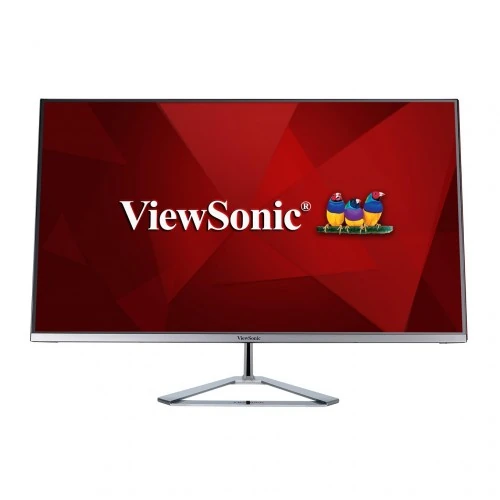
ViewSonic VX3276-2K-MHD-2: 32-inch QHD IPS monitor
A large QHD screen for everyday desks
The ViewSonic VX3276-2K-MHD-2 is a 32-inch class desktop monitor built around a 2560 × 1440 QHD panel. ViewSonic specifies a 31.5-inch viewable diagonal, a 16:9 aspect ratio and an IPS display. That combination is suited to people who want a broad screen for office applications, study, browsing, video and everyday home computing. The monitor is sold as an entertainment display; its 75Hz ceiling and 4ms typical GTG response should be understood before comparing it with gaming-focused high-refresh products. Identify the complete “-MHD-2” suffix when checking listings because nearby VX3276 models can have a different resolution or port layout.
What QHD means at 32 inches
The native 2560 × 1440 resolution contains about 3.7 million pixels. It provides more working area than Full HD at the same 16:9 shape, which can help keep a document beside a browser or spreadsheet without constantly switching windows. At a 32-inch class size, QHD also uses larger pixels than a 27-inch QHD screen or a 32-inch 4K panel. That can make interface elements easier to see at a normal desk distance, while users who sit very close or do fine-detail image work may prefer higher pixel density. For crisp output, set the connected computer to the panel’s native resolution.
IPS viewing and image characteristics
ViewSonic identifies the panel as SuperClear IPS and lists 178-degree horizontal and vertical viewing angles. IPS technology is useful when more than one person views the display or when the viewer is not seated directly in front of it. The manufacturer specifies 250 cd/m² typical brightness and 1,200:1 typical static contrast. These are practical everyday monitor figures, rather than a promise of exceptionally bright sunlight performance or deep OLED-like blacks. Room lighting, selected picture preset and the content itself affect perceived contrast. The listed gamut is a size ratio, not a factory calibration or colour-accuracy measurement.
Colour depth and gamut, explained carefully
ViewSonic lists support for 1.07 billion colours using a 10-bit signal path described as 8-bit plus FRC. Frame-rate control alternates nearby colour values over time to represent additional shades; this is not the same description as a native 10-bit panel. The exact-model regional specification gives 72% NTSC size and 103% sRGB size. Gamut size indicates the range of colours a display can represent relative to a reference space. It does not say how accurately each colour is reproduced. For design, photo or video work where exact colour matching matters, use calibration and a workflow suited to the delivery colour space.
Refresh rate and motion expectations
The maximum listed refresh rate is 75Hz, with the manufacturer’s technical record showing 2560 × 1440 at 60Hz and 75Hz as supported modes. Moving the desktop at 75Hz can look somewhat smoother than a conventional 60Hz setting when the computer and connection expose that mode. The monitor also lists a 4ms typical grey-to-grey response time. GTG is a different measurement from MPRT, and the published figure should not be read as a guarantee of zero blur or identical response in every transition. This is a general-use and entertainment monitor, not a 144Hz or 240Hz competitive gaming model.
Adaptive Sync and HDR10 compatibility
ViewSonic lists variable refresh technology and describes Adaptive Sync as a way to reduce tearing and choppy frame pacing with compatible sources. Actual operation depends on the graphics device, driver, cable, selected input and supported frame-rate range. The product is also listed as HDR10 compatible. HDR10 input support means the display can accept that signal format; it does not establish a VESA DisplayHDR certification, a peak-brightness figure or local dimming. View HDR-capable content with realistic expectations for a 250 cd/m² typical panel, and confirm the source device’s output settings if an HDR mode does not appear.
Inputs for computers and media devices
The exact-model specification lists two HDMI 1.4 inputs, one full-size DisplayPort 1.4 and one Mini DisplayPort 1.4. A separate 3.5mm audio output is also listed. This selection can be useful when a desktop computer, laptop dock, console or media device uses different connector types, although only one source is displayed at a time. The available resolution and refresh mode depend on the source and its output, the cable or adapter and the monitor input. The official timing table lists HDMI vertical frequency from 24 to 75Hz and DisplayPort/Mini DisplayPort from 48 to 75Hz. Check the computer’s display settings after connecting.
Built-in sound and headphone output
Two integrated 2W speakers provide convenient basic sound for calls, system alerts, online lessons and casual video. Their presence can reduce desktop cable clutter when high-volume or bass-heavy audio is not required. A 3.5mm audio-out jack is listed for headphones or external speakers. Audio routing can depend on the computer’s selected playback device and whether sound is sent over HDMI or DisplayPort. If a meeting application remains silent after connection, check its output device, the operating-system volume and the monitor’s own audio level. For music or a larger room, a separate speaker system is more appropriate.
Desk design and stand movement
The manufacturer describes a slim profile, frameless-style bezel and a metallic or chrome-like triangular stand. The product photographs in this listing show the thin front appearance and the silver-tone stand from multiple angles. The supplied support is for tilt positioning; retailer specifications list a limited forward/back angle. The stand is not described as a height-adjustable or portrait-pivot design. Measure the desk depth and screen footprint before purchase, especially because a 32-inch display occupies substantial horizontal space. If height, swivel or portrait rotation is important, consider a separate arm that supports the stated 100 × 100 mm VESA pattern and the monitor’s weight.
Mounting, dimensions and power
ViewSonic lists a 100 × 100 mm VESA mounting pattern. The technical record gives approximate physical dimensions of 713 × 504 × 230 mm and a weight around 6.2 kg; retailer pages provide similar values and distinguish measurements with and without the stand. Check the final installed depth, cable bend space and arm capacity before mounting. The monitor uses an internal power supply and accepts AC 100–240V, 50/60Hz according to the specification record. Use the supplied or an authorized power lead and follow the installation guide. The specific items included in a regional box can vary, so confirm the seller’s package list.
Eye-comfort features and presets
The model lists Flicker-Free operation and a software Low Blue Light filter. ViewSonic’s ViewMode menu includes Game, Movie, Web, Text, Mono and Mac presets; each changes picture parameters such as gamma, colour temperature, contrast or brightness. These options can make it quicker to choose a starting point for different activities, but they are not substitutes for ergonomic breaks, suitable room lighting or a calibrated colour workflow. A lower brightness setting may be more comfortable in a dim room, while a brighter environment may require a different setting. Adjust the OSD gradually and keep text readable at the chosen viewing distance.
Power-conscious desktop use
The manufacturer describes an Eco Mode intended to reduce energy use. ViewSonic documentation lists typical power around 43W for the base model’s technical record, while regional product pages show mode-specific numbers that should be treated as dependent on settings and measurement conditions. The actual draw varies with brightness, audio level, active signal and selected ECO mode. For a multi-monitor workstation or a display used for long office days, users can reduce brightness and enable a suitable energy-saving preset. Power figures from different pages should not be compared without considering their test conditions, so this listing avoids promising a specific monthly electricity cost.
Which tasks fit this monitor?
The broad QHD workspace can suit spreadsheets, dashboards, coding, documents, web research and video playback. A 32-inch image offers room for side-by-side windows, while IPS viewing angles help when showing content to a colleague. Casual games can benefit from Adaptive Sync and a refresh rate above 60Hz, but players seeking high frame rates should compare models with a higher maximum refresh. For photo or design work, confirm the application’s colour-management settings and consider calibration; the gamut percentage is not a colour-accuracy certificate. For HDR movies, remember that HDR10 signal compatibility is not the same as a certified high-luminance HDR display.
Compatibility checks before ordering
Before purchase, compare the full model code on the listing, quotation and product label: VX3276-2K-MHD-2. Check that the computer can output 2560 × 1440 and that the chosen port and cable support the intended refresh mode. HDMI, DisplayPort and Mini DisplayPort are not interchangeable without the correct cable or adapter. If using a laptop, verify the port’s video-output capability rather than relying only on its physical connector shape. Confirm the stand, power lead and any bundled signal cable with the seller, then inspect the panel for damage and test native resolution, audio and the available refresh options during the return window.
Warranty and Bangladesh seller details
The current catalog record states a three-year warranty. Bangladesh retailers publish their own terms, conditions and availability notices, and some require the box or original purchase documents for service. Because those are seller-specific and can change, confirm the written warranty provider, coverage, claim process and stock with the chosen shop before ordering. Seller prices in Bangladesh also change over time; the dated source snapshot is retained in research evidence rather than treated as a permanent recommended price. This product page focuses on the model’s specifications and usage so buyers can compare it without mistaking a temporary offer or one retailer’s terms for a universal guarantee.
A practical setup checklist
Place the monitor on a stable desk or a compatible VESA arm, connect a quality cable to the selected input, and choose 2560 × 1440 in the operating system. Then select an available 75Hz mode if the source and connection provide it. Adjust brightness to the room, choose an appropriate ViewMode preset and set the audio output device if you plan to use the integrated speakers. For Adaptive Sync, enable compatible settings in both the monitor menu and graphics software. Test HDMI, DisplayPort or Mini DisplayPort connections individually if a multi-device setup behaves differently. Keep ventilation openings clear and follow ViewSonic’s installation and safety instructions.
Technical summary
- 32-inch class 16:9 SuperClear IPS panel with QHD 2560 × 1440 resolution
- 75Hz maximum refresh at native QHD; confirm the source device and selected input mode
- 4ms typical GTG response time and Adaptive Sync support
- 250 cd/m² typical brightness and 1,200:1 typical static contrast
- HDR10 signal compatibility; no VESA DisplayHDR certification claim is made
- 10-bit colour output through 8-bit plus FRC, with 1.07 billion colours specified
- Typical 72% NTSC and 103% sRGB gamut size according to the exact-model regional specification
- Anti-glare surface with 3H hard coating
- Two integrated 2W stereo speakers and a 3.5mm audio output
- Two HDMI 1.4, one DisplayPort 1.4 and one Mini DisplayPort 1.4 input
- Flicker-Free, software Low Blue Light filter and six ViewMode presets
- 100 × 100 mm VESA mounting; included stand supports tilt adjustment only