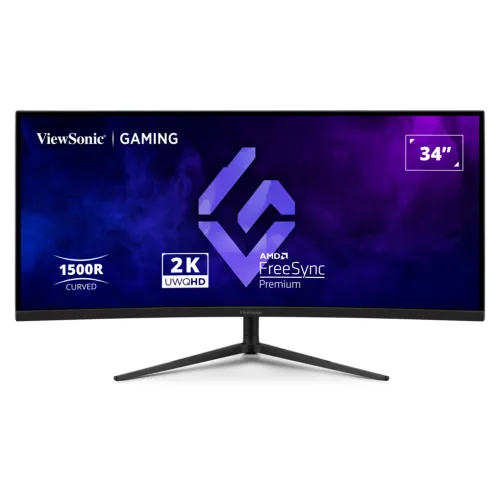
ViewSonic VX3418C-2K overview
The ViewSonic VX3418C-2K in this listing is a 34-inch curved gaming monitor with a 3440 × 1440 UWQHD resolution, a 21:9 aspect ratio and 1500R curvature. ViewSonic’s US exact-model specification identifies a 180Hz refresh rate over DisplayPort, AMD FreeSync Premium, 1ms MPRT and 2ms typical grey-to-grey response. It also lists two HDMI 2.0 inputs, two DisplayPort 1.4 inputs, internal 5W × 2 speakers, a 3.5mm audio output and an adjustable stand. The product has 250 cd/m² typical brightness and 4,000:1 typical static contrast. A current ViewSonic Global page lists a 200Hz revision under the same VX3418C-2K name, while the US and Bangladesh pages reviewed for this catalog item list 180Hz. Check the regional model specification and product label when ordering, especially if 200Hz is important.
34-inch UWQHD and 21:9 workspace
The monitor’s native 3440 × 1440 resolution provides a wide desktop with a 21:9 shape. This can place a game scene, editing timeline, spreadsheet or several application windows across a broad horizontal area. It has more horizontal pixels than a standard 2560 × 1440 QHD monitor, but it also requires more graphics processing to run demanding games at high settings and refresh rates. The 34-inch diagonal, 1500R curve and VA technology are intended to create a panoramic viewing position. The curve may feel immersive in landscape gaming and video, while not every game, console or streaming service supports ultrawide output. Some content may show side bars or use a cropped image, depending on the player and source.
180Hz DisplayPort refresh mode
The ViewSonic US specification says the reviewed VX3418C-2K version reaches 180Hz through DisplayPort only. The page lists the vertical frequency range as 48–180Hz over DisplayPort and 48–100Hz over HDMI. A suitable DisplayPort 1.4 cable, compatible graphics output and a supported display mode are needed for the full refresh rate. Select 3440 × 1440 at 180Hz in the computer’s operating-system settings after connecting the PC to DisplayPort. If the option is missing, check that the cable is connected to the graphics card rather than a lower-capability adapter, verify the driver and input, and confirm the display mode. ViewSonic’s Global page now lists a 200Hz revision under the same base model label, so confirm the local model/version with the seller rather than assuming every unit has identical timing limits.
Response time, FreeSync and gaming
ViewSonic specifies 1ms MPRT and 2ms typical GTG for the US 180Hz version. These are separate response measurements and do not mean every pixel transition occurs in exactly one millisecond. Motion appearance depends on the chosen overdrive setting, game frame rate, refresh mode and scene. AMD FreeSync Premium uses VESA Adaptive-Sync to coordinate a compatible graphics card and monitor, helping reduce tearing and stutter when the frame rate varies within supported limits. The monitor also provides ViewMode presets for activities such as gaming, movies and editing. A high refresh mode can make compatible motion appear smoother when a PC can deliver enough frames, but demanding UWQHD games may need reduced quality settings to maintain high frame rates.
Curved VA panel, contrast and HDR
The panel uses MVA/VA technology with a 1500R curve, 178-degree horizontal and vertical viewing angles, 250 cd/m² typical brightness and 4,000:1 typical static contrast. ViewSonic lists 80-million-to-one dynamic contrast as a separate figure; this dynamic rating is not equivalent to the static contrast ratio or a local-dimming backlight. HDR10 compatibility is included, but the brightness rating is modest compared with high-brightness HDR monitors. HDR appearance varies with the content, operating system, game settings and display mode. This model may suit users who want the wide curved workspace and VA contrast for mixed gaming and media, while a buyer seeking bright HDR highlights or deep reference HDR should compare a display with those specific capabilities.
Color, image surface and viewing comfort
ViewSonic lists 16.7 million colors with 6-bit plus FRC, a 0.232mm pixel pitch, anti-glare treatment, 3H hard coating and 25% haze. The manufacturer page lists NTSC 72% size and sRGB 104% size for this version. These figures use color-space size conventions and should not be read as coverage percentages without matching measurement definitions. Flicker-free technology and a software blue-light filter are included. Set the brightness and color mode to suit the room and task, use a comfortable viewing distance and take breaks during long sessions. The display’s curve can alter the perceived geometry for some layout or image work, so users doing precise flat artwork or technical drawing may want to compare a flat panel before choosing.
Connections, audio and multiple sources
The official US specification lists two HDMI 2.0 inputs, two DisplayPort 1.4 inputs, a 3.5mm audio output and an AC power input. Four video inputs can keep a desktop, laptop and console connected for switching between sources. The maximum refresh rate depends on the source: the manufacturer page identifies 180Hz through DisplayPort and a lower HDMI frequency range for the 180Hz product version. Two built-in 5W speakers can provide convenient desktop audio, while the 3.5mm output supports headphones or external audio equipment. ViewSonic does not list a USB hub on the reviewed US page. A Bangladesh seller’s older table lists HDMI 1.4, but the ViewSonic exact-model US specification says HDMI 2.0; this product content follows the manufacturer specification.
Stand adjustment, VESA and security
The supplied stand offers 120mm of height adjustment, 60 degrees of swivel and tilt from −5° to +25°. The display supports a 100 × 100mm VESA mount and includes a Kensington lock slot. The listed US physical dimensions with the stand are 808mm wide, 411.41–531.41mm high and 289.42mm deep; without the stand, they are 808 × 363.92 × 116.93mm. Listed net weight is 12.1kg with stand and 5.6kg without it. Check that the desk, arm and mounting hardware can carry the weight and width, and leave room for the stand base and cables. Height, swivel and tilt can help align the center of the wide panel with the user’s seating position.
Power and included accessories
The US exact-model specification lists an internal power supply, 100–240V at 50–60Hz, 51W typical consumption, 65W maximum and 0.5W standby. It also lists Eco Mode values of 37W and 44W. Actual power use changes with picture settings, audio and operating state. The package contents on the US page include the VX3418C-2K display, power cable, DisplayPort cable and quick start guide; local box contents may vary by region. The display can be powered from a compatible local supply within its rated voltage range. Keep ventilation clear and use the supplied cable and grounded outlet where required. Since ViewSonic notes that warranty can differ by market, verify local package and service terms with the Bangladesh seller.
Bangladesh price and warranty
Four Bangladesh retailer pages checked on 6 November 2026 showed reference prices between ৳55,799 and ৳56,000 for the ViewSonic VX3418C-2K. These seller pages can change price and stock, and they are not BiponiBD offers. This product’s catalog MSRP of ৳56,000 and existing three-year warranty statement remain unchanged. Before ordering, confirm the exact regional product version, 180Hz or 200Hz specification, current stock, included DisplayPort cable, invoice and written warranty coverage. ViewSonic’s warranty information says coverage may differ from market to market; ask which local service center handles a Bangladesh purchase and what the dead-pixel, return and repair terms are. Keep the serial number and purchase invoice for any claim.
Strengths and limitations
The wide 3440 × 1440 workspace, 1500R curvature, VA static contrast, FreeSync Premium, 180Hz DisplayPort mode, built-in speakers and adjustable stand are the central strengths of this 180Hz product listing. The primary trade-offs are its 250 cd/m² typical brightness, HDR10 without a high-brightness claim, large footprint and the need for a powerful PC to target 180 frames per second at UWQHD. HDMI does not provide the 180Hz mode according to the US product specification. ViewSonic Global now lists 200Hz for a revision with the same base model name; HDMI and power data also differ between pages. Buyers should use the exact version’s label and region-specific documentation to decide which performance details apply to their unit.
Setup checklist
Before purchasing, confirm that the box identifies VX3418C-2K and ask whether the specific unit is the 180Hz or newer 200Hz regional version. For the 180Hz version reviewed here, connect a compatible PC directly to DisplayPort 1.4 with a suitable cable, select 3440 × 1440 at 180Hz, then enable FreeSync in the monitor and graphics settings if supported. HDMI is suitable for compatible computers and consoles but does not provide the 180Hz path on the US specification. Set the ViewMode preset and brightness to the room, then adjust height, tilt and swivel. Connect headphones or external speakers through the 3.5mm audio output if needed. Confirm current price, included cables, local warranty and return policy with the seller before payment.