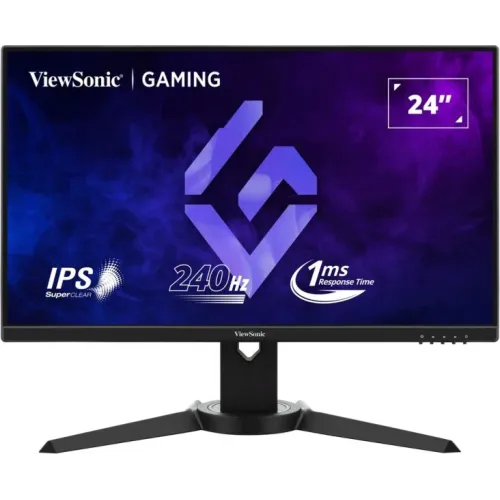
ViewSonic XG2409A: model ও display overview
ViewSonic XG2409A হলো 23.8-inch viewable Full HD Fast IPS gaming monitor, native resolution 1920 × 1080 এবং সর্বোচ্চ 240Hz refresh rate-সহ। Manufacturer manual-এর P/N XG2409A, product/model ID VS19535। এটি desktop gaming, competitive FPS, streaming এবং day-to-day office use-এ ব্যবহার করা যায়। Product record-এ brand আগে “Others” ছিল; এখন ViewSonic-এ ঠিক করে modelName/MPN exact XG2409A করেছি। XG2409A-কে 27-inch XG2709A বা XG2431-এর আলাদা features-এর সঙ্গে মেশানো উচিত নয়।
Fast IPS panel 178° horizontal/vertical viewing angle ও 16:9 aspect ratio দেয়। 240Hz-এ প্রতিটি second-এ অনেক বেশি refresh দেখা যায়, তবে 240Hz output পেতে PC graphics card, cable, input, game engine এবং OSD overclock setting-ও ঠিক থাকতে হবে। Manufacturer manual-এ 1920 × 1080 at 200Hz recommended timing; 220Hz/240Hz modes OSD overclocking চালু করলে available। তাই product copy-তে “up to 240Hz; OC required at 220/240Hz” পরিষ্কার রাখা দরকার।
Manual supported timings-এ HDMI vertical frequency 48–180Hz এবং DisplayPort 48–180Hz দেখায়, অথচ 220Hz/240Hz timing footnote বলছে overclocking enable করলে পাওয়া যায়। Port hardware ও firmware mode-এ এই অমিল তাই feature copy-তে overclock caveat হিসেবে স্পষ্ট রাখা হয়েছে। 240Hz না এলে OSD-তে Overclocking চালু করুন, compatible DP/HDMI cable-এ 1920 × 1080 নির্বাচন করুন এবং driver panel-এ mode verify করুন; signal error হলে 200Hz recommended mode-এ ফিরে যান।
Resolution, color, HDR ও viewing
23.8-inch active diagonal এবং 1920 × 1080 resolution প্রায় 93 PPI দেয়; pixel pitch 0.2745 × 0.2745mm। এই size/resolution pair text ও game UI-তে 27-inch Full HD-এর তুলনায় বেশি pixel density দেয়। Anti-glare treatment ও 3H hard coating glare কমাতে এবং surface durability-তে সহায়তা করে, তবে scratch-proof নয়। Brightness 250 cd/m² typical—bright window-facing desk-এ বেশি brightness-এর display তুলনা করুন।
ViewSonic product page static contrast 1000:1 typical, dynamic contrast 80M:1 এবং 16.7M colors উল্লেখ করে। 8-bit input 6-bit + FRC implementation; color gamut NTSC 72% area, sRGB 102% area। “Area” ratio sRGB target-space coverage বা calibration accuracy নয়; manufacturer exact color coverage/Delta-E assurance দেয়নি। Professional print/video grading-এ monitor colorimeter দিয়ে calibrate ও gamut requirement যাচাই করুন। Brightness, white point ও panel uniformity unit-ভেদে বদলাতে পারে।
HDR10 signal support আছে, কিন্তু এটি VESA DisplayHDR certification নয়। HDR game/content দেখার জন্য compatible source, cable ও OS/game setting প্রয়োজন। SDR desktop-এ HDR mode image tone বদলাতে পারে; প্রয়োজন না হলে OSD HDR off রাখুন। Adaptive Sync, Flicker-Free এবং Blue Light Filter আছে; Blue Light Filter software-based এবং enabled করলে color temperature উষ্ণ হয়। Long session-এ এটি comfort preference, medical protection guarantee নয়—break, ambient light ও viewing distance বজায় রাখুন।
240Hz, overclock ও response metrics
XG2409A-এর refresh capability 240Hz পর্যন্ত, কিন্তু manufacturer recommended mode 1920 × 1080 at 200Hz; manual footnote বলে 220Hz ও 240Hz modes-এর জন্য OSD Overclocking চালু করতে হবে। প্রথম setup-এ 200Hz-এ signal stability নিশ্চিত করে তারপর OSD menu-তে Overclocking On করে GPU settings-এ 220/240Hz নির্বাচন করুন। Unsupported timing card-এর ক্ষতি করতে পারে বলে manual সতর্ক করে; graphics driver/OSD-এর প্রস্তাবিত mode অতিক্রম করবেন না।
240Hz monitor-এ GPU-কে game অনুযায়ী উচ্চ FPS render করতে হবে। FPS 240 না হলেও refresh rate interface/low frame latency perception-এ ভূমিকা রাখতে পারে, কিন্তু monitor game FPS বাড়ায় না। FreeSync compatible graphics card-এর frame delivery ও refresh sync করতে সাহায্য করে; official product page AMD FreeSync বলেছে, full specs FreeSync এবং G-Sync compatible তালিকাভুক্ত করে। Driver compatibility, input mode, Adaptive Sync OSD এবং game configuration যাচাই করুন।
Manufacturer 1ms MPRT response time প্রকাশ করেছে। MPRT moving-picture response/persistence metric; এটি grey-to-grey transition বা complete system input lag নয়। OSD-তে response-time presets Standard, Advanced, Ultra Fast আছে; বেশি aggressive preset-এ inverse ghosting/overshoot দেখা গেলে কম level বেছে নিন। 1ms Mode/blur reduction feature চালু করলে brightness, VRR বা refresh-mode behavior বদলাতে পারে। নির্দিষ্ট setup-এ motion test করে setting বেছে নিন।
Ports, stand ও physical dimensions
Connectivity-তে দুইটি HDMI 1.4, একটি DisplayPort 1.4, একটি 3.5mm audio out এবং DC input আছে। দুইটি HDMI port-এ PC ও console সংযুক্ত রেখে OSD input source পাল্টাতে পারেন। Audio out-এ headphone বা powered speakers লাগানো যায়; built-in speaker specification এখানে নেই। Manual package contents-এ adapter, video cable এবং quick guide; included cable country অনুযায়ী আলাদা হতে পারে। 240Hz timing-এর জন্য high-bandwidth cable ও source mode পরীক্ষা করুন।
Stand ergonomic adjustment সমর্থন করে: height 0–130mm, tilt −5° থেকে +22°, swivel ±45° এবং pivot 90° portrait direction-এ। VESA mount 100 × 100mm, manual maximum loading 14kg এবং screw specification M4 × 10mm four screws। With-stand dimensions 541 × 507~377 × 228mm, weight 4.8kg; stand ছাড়া 541 × 323 × 43.5mm, 2.7kg। Arm বা wall bracket-এর load rating, VESA holes ও screw size মিলিয়ে নিন, বেশি লম্বা screw ব্যবহার করবেন না।
Power adapter external; AC input 100–240V, 50/60Hz auto switching। Official page typical power 26W, maximum 28W ও standby <0.5W বলে। Adapter replacement-এ shipped unit-এর DC voltage, polarity ও current rating label অনুসরণ করুন; generic adapter লাগানোর আগে exact electrical match নিশ্চিত করুন। Kensington security slot আছে। Monitor সরানোর আগে cables খুলুন, stable surface-এ screen face down রাখুন এবং panel-এ চাপ না দিয়ে stand dismount করুন।
ভালো দিক, সীমাবদ্ধতা ও স্থানীয় মূল্য
XG2409A-এর প্রধান plus হলো 23.8-inch Fast IPS Full HD panel-এ 240Hz OC, FreeSync, HDR10 signal support এবং ergonomic height/swivel/pivot/tilt stand। DisplayPort ও dual HDMI-তে একাধিক source রাখা যায়। 100 × 100mm VESA standard, 250-nit brightness এবং OSD game presets setup flexibility দেয়। Competitive gaming-এ 240Hz mode smooth motion দিতে পারে, যদি GPU যথেষ্ট frame render করে এবং overclock timing stable থাকে।
সীমাবদ্ধতা: 240Hz overclock mode-এর উপর নির্ভরশীল, manual recommended mode 200Hz। 27-inch QHD screen-এর তুলনায় FHD resolution কম detail workspace দেয়। Typical brightness 250 nits; HDR10 থাকা সত্ত্বেও VESA DisplayHDR certification নেই। Built-in speaker নেই বলে ধরে নিন আলাদা audio লাগবে; 3.5mm out আছে। 1ms number MPRT, GtG নয়। Box cable/adapter regionভেদে পরিবর্তন হতে পারে এবং 240Hz timing ব্যবহার করার আগে manual warning মানা প্রয়োজন।
বাংলাদেশে দেখা offers: Star Tech ৳18,500 cash (regular ৳20,180) এবং in stock; Ryans ৳18,800; Techland listing current product page-এ দাম দেখায়নি। Variant price ৳18,500-এ রাখা হয়েছে lowest exact-model seller offer অনুসারে, এটি BiponiBD offer নয়। Star Tech তিন বছরের warranty দেখায়; local distributor/provider, dead-pixel policy, panel replacement, 240Hz overclock coverage ও invoice warranty term লিখিতভাবে নিশ্চিত করুন। Prices, availability এবং bundled cables পরিবর্তন হতে পারে।
Setup ও maintenance checklist
Monitor assemble করে stand-এর height/angle সেট করুন, power adapter যুক্ত করুন এবং PC-কে HDMI বা DisplayPort-এ সংযুক্ত করুন। OSD Input Select-এ correct source নিন; OS বা GPU control panel-এ 1920 × 1080 নির্বাচন করুন। Recommended 200Hz mode আগে পরীক্ষা করুন। 220/240Hz চাইলে OSD Overclocking On করে refresh selection পরীক্ষা করুন। Black screen, flicker বা sync error হলে Overclocking Off করে 200Hz-এ ফিরে যান, তারপর cable, GPU port ও driver পরীক্ষা করুন।
AMD FreeSync বা compatible VRR চালাতে driver-এ Adaptive Sync option enable করুন এবং OSD menu-তেও Adaptive Sync On রাখুন। Game FPS, V-Sync এবং frame cap একে অপরের সঙ্গে balance করুন। HDR10 content-এ source/display HDR enable করুন, কিন্তু desktop-এর color/brightness পরিবর্তনে অস্বস্তি হলে বন্ধ করুন। Blue Light Filter কাজ/রাতের জন্য adjust করুন; color-critical task-এর আগে native/neutral preset-এ ফিরুন। OSD ViewMode-এ Standard, FPS, RTS, MOBA, Movie, Web, Text, Mac ও Mono profiles আছে।
Panel পরিষ্কারে device off করে নরম microfiber cloth ব্যবহার করুন; liquid সরাসরি screen-এ দেবেন না। Height/pivot adjust করতে display দুই পাশে ধরে stand mechanism ব্যবহার করুন। Arm mount করলে M4 × 10mm screw, VESA 100 × 100mm এবং ≤14kg load limit মানুন। Power adapter ও cable ventilation unobstructed রাখুন। Serial, receipt, carton, warranty card সংরক্ষণ করুন এবং delivery-র পর dead pixel, port, speaker/headphone out, high refresh ও ergonomic movement পরীক্ষা করুন।