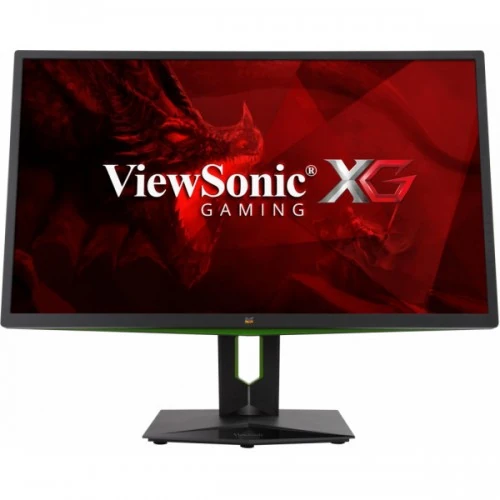
WQHD IPS display and image quality
The ViewSonic XG2703-GS is a flat 27-inch gaming monitor with a 2560 × 1440 WQHD panel and a 16:9 aspect ratio. The SuperClear IPS-type panel, identified in ViewSonic material as AHVA, offers 178-degree horizontal and vertical viewing angles and an anti-glare surface with a 3H hard coating. Its 0.233mm pixel pitch corresponds to about 109 pixels per inch, providing finer text and game detail than a 27-inch Full HD monitor. Typical brightness is 350 cd/m² and typical static contrast is 1,000:1. The listed dynamic contrast ratio is 120,000,000:1, a separate dynamic figure and not a substitute for native contrast. Color is specified as true 8-bit with 100% sRGB coverage and approximately 112% sRGB gamut size. These specifications can suit gaming and general content work, though buyers who need color-critical production should still use calibration and review measured performance rather than relying on coverage claims alone. The screen is flat and does not use a curved panel.
Native 144Hz and DisplayPort overclock to 165Hz
The important refresh distinction is that 144Hz is the native mode and up to 165Hz is an overclocked mode at the native WQHD resolution using DisplayPort 1.2a. This resolves the confusing catalogue mix of a title claiming 165Hz and attributes that say 144Hz: both describe supported rates but refer to different operating modes. The HDMI 1.4 input supports 2560 × 1440 up to 60Hz. For 144Hz or 165Hz gaming, connect a compatible NVIDIA graphics card directly to the DisplayPort input with a suitable cable, then select the desired refresh in the graphics driver and monitor menu. A dock, adapter or older graphics output can limit the available mode. The monitor uses an earlier dedicated G-SYNC hardware module, so its gaming refresh, variable overdrive and ULMB behavior are tied to the supported DisplayPort path. Check current NVIDIA driver and GPU compatibility before purchase, particularly if you intend to use the overclocked mode or motion-blur reduction.
Dedicated G-SYNC and ULMB operation
This model contains a dedicated NVIDIA G-SYNC hardware module rather than relying on generic HDMI Adaptive-Sync. With a compatible NVIDIA GPU over DisplayPort, G-SYNC matches panel refresh to the graphics card’s frame output within the supported range, helping reduce tearing and stutter. ViewSonic also lists NVIDIA ULMB, or Ultra Low Motion Blur, at 85Hz, 100Hz and 120Hz DisplayPort modes. ULMB uses backlight strobing to improve perceived motion clarity and is separate from variable refresh; the supported mode and image brightness can differ from normal operation. The monitor also lists variable overdrive, Dark Boost/black stabilization and gaming picture presets. Configure one feature at a time and compare motion, brightness and flicker. The first-generation G-SYNC module is a legacy design, so it should not be described as FreeSync or as universal Adaptive-Sync support. Laptop owners should verify that the laptop’s DisplayPort path is wired to a compatible NVIDIA GPU and does not pass through a bandwidth-limiting dock.
Response time and motion modes
ViewSonic’s marketing specification gives 4ms gray-to-gray response time with overdrive. The raw panel data also lists 6.6ms typical GTG without overdrive, which explains the approximately 7ms figure that appears in retailer data. Both values can be stated with their conditions: 4ms with overdrive and 6.6ms typical without it. They are not a contradiction when the mode is made clear. Overdrive changes pixel transition behavior and can introduce inverse ghosting at aggressive settings, so users should choose the lowest artifact-free setting for their own frame rate and games. ULMB is a distinct backlight-strobing mode available at specified refresh rates and is intended to make moving objects appear sharper. A strobing mode may alter brightness and is not necessarily used at the same time as G-SYNC variable refresh. The practical motion result depends on game frame rate, graphics response, monitor settings and viewing conditions. The 144Hz native rate is already high for everyday use, while 165Hz is an optional overclock for supported systems.
Video inputs, USB hub and audio
The display has one DisplayPort 1.2a input and one HDMI 1.4 input. DisplayPort is the connection for WQHD G-SYNC and 144Hz/165Hz operation; HDMI is suitable for secondary sources at up to 2560 × 1440 at 60Hz. There is no USB-C video input. A built-in USB hub includes one USB 3.0 Type-B upstream port, two USB 3.0 Type-A downstream ports and two USB 2.0 Type-A downstream ports. The included Type-A-to-Type-B upstream cable connects the monitor hub to the computer; the Type-A ports do not become a second display connection. For USB 3.0 transfer speeds, connect the upstream link to a matching computer port and use compatible devices and cables. Audio includes two 2W stereo speakers and a 3.5mm headphone output. An integrated headphone hook provides a place to hang a headset when it is not in use. These connection details help buyers plan for a single DisplayPort gaming PC plus a second HDMI source and separate USB upstream cable.
Ergonomics, footprint and mounting
The supplied stand provides 100mm of height adjustment, tilt from −5° to +15°, a 350° swivel range (±175°) and a clockwise 90° pivot to portrait orientation. The panel supports a standard 100 × 100mm VESA mount and includes a Kensington lock slot. ViewSonic lists dimensions with the stand at 624.4mm wide, 427.1–532.4mm high and 250.4mm deep. Without the stand it measures 624.4 × 383.6 × 78.6mm. Its net weight is 7.0kg with the stand and 4.0kg without. The wide stand depth is useful to check before placing the monitor near a wall or on a shallow desk. For an arm, verify the load rating and VESA pattern. The rear design uses green accent lighting and a cable-management loop, while the attached stand can be adjusted for seated posture or rotated for vertical document work. The monitor is not a touch display and portrait rotation does not automatically rotate every game or application.
Power adapter, consumption and package
Unlike some newer ViewSonic models, the XG2703-GS uses an external AC/DC power adapter connected through a center-positive DC socket. ViewSonic lists AC 100–240V, 50/60Hz input and power consumption of 48W typical, 71W maximum, 40W in Optimize Eco, 34W in Conserve Eco and below 0.5W in standby. The package list includes the monitor, external adapter, three-pin IEC C5 power cord, DisplayPort 1.2 cable, USB 3.0 Type-A-to-Type-B upstream cable and Quick Start Guide. Cartons can differ by regional batch, so confirm the actual contents before purchase and keep the adapter matched to the monitor. Dimensions of the retail package are 741 × 481 × 306mm and gross shipping weight is 9.5kg. The product variant logistics below uses package dimensions and gross weight for shipping. Keep the invoice, serial and adapter together for service or resale. Country of manufacture is not asserted because the official reference does not establish the origin of a particular local unit.
Bangladesh availability, price and warranty
Star Tech’s historical product listing recorded a discounted cash price around ৳98,000 and regular price around ৳98,500, with a three-year warranty. The XG2703-GS is a legacy monitor and other Bangladesh retailers no longer appear to carry active stock, so this price is a dated market reference rather than confirmation of current availability. The existing variant MSRP of ৳98,000 remains as catalog pricing context. Before ordering, ask the seller to confirm that a unit is physically available, sealed or graded as described, the exact model code, included external adapter and cables, and whether the warranty is official or seller-provided. Get the warranty duration and service provider stated on the invoice. Because this unit uses a dedicated G-SYNC module, confirm that your computer has a compatible NVIDIA GPU and a usable DisplayPort output. Verify that 144Hz native or 165Hz overclocked is exposed by your setup and understand that HDMI is limited to 60Hz at WQHD. The official specs describe the model’s capabilities but do not guarantee local stock or a particular unit’s condition.
Compatibility checks and practical use
This model is best assessed as a period-specific gaming display rather than as a generic modern high-refresh monitor. The dedicated NVIDIA G-SYNC board, 165Hz DisplayPort overclock, ULMB, WQHD IPS panel and broad stand adjustment are key parts of its design. Buyers using AMD graphics, a console, a USB-C-only laptop or a modern variable-refresh HDMI workflow should confirm compatibility carefully before treating the G-SYNC feature as interchangeable with newer Adaptive-Sync monitors. The HDMI input can remain useful for a second source, but at WQHD it is limited to 60Hz. The product has no USB-C input, no integrated USB-C charging and no internal AC power supply; the external adapter is part of the required setup.
For a desk setup, connect the primary gaming computer by DisplayPort 1.2a, connect the USB Type-B upstream cable if you want to use the built-in USB hub, and attach HDMI only for a secondary source that can operate at 60Hz WQHD. Select the native resolution, enable G-SYNC in compatible NVIDIA settings, then try the 165Hz overclock and a conservative overdrive level. Test ULMB separately because its strobing refresh choices are limited and it does not serve the same purpose as variable refresh. The user should check for flicker, overshoot and brightness changes in the actual room and game.
Before buying a legacy unit, verify panel condition, backlight uniformity, dead-pixel policy, stand condition, all included cables, external adapter compatibility and warranty status. Ask whether the listing describes new old stock, refurbished stock or a used display. Check the serial number and service eligibility with the warranty provider. Since current local stock is not confirmed, do not assume the historical Star Tech price represents an available offer. A current seller should confirm price and stock in writing, along with whether the three-year warranty remains valid for the specific unit. Compare the alternatives in the same ViewSonic family by exact model code: newer XG2709A, XG2736-2K and XG2737 have different resolution, refresh, panel, ports or sync implementation and are not substitutes in specification databases.
For everyday work, WQHD supplies useful extra desktop space at 27 inches, the IPS viewing angles suit shared viewing and the adjustable stand supports portrait reading. The 350 cd/m² typical brightness and 100% sRGB coverage are useful reference points, but a decade-old G-SYNC monitor may not have the same firmware, warranty or interface support as a current model. Keep the correct external power adapter, power cord, DisplayPort lead and USB upstream cable with the unit. If anything is missing, confirm exact replacements and safe electrical ratings before use. Country of manufacture should be read from the label on the specific unit rather than inferred from the model or retailer listing.