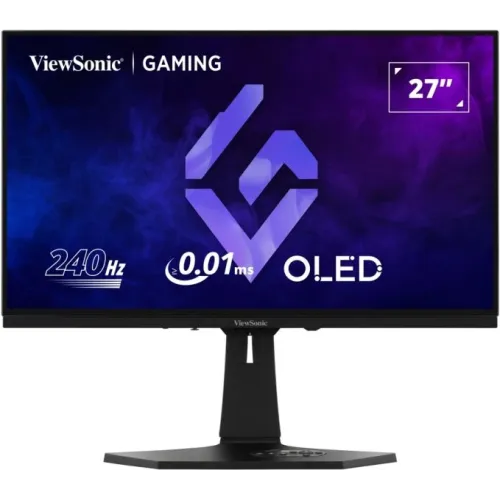
ViewSonic XG272-2K-OLED overview
The ViewSonic XG272-2K-OLED is a 27-inch-class QHD OLED gaming monitor designed around a 240Hz maximum refresh rate. ViewSonic identifies a 26.5-inch viewable area, so the commonly advertised 27-inch size is the screen class rather than the exact active diagonal. Its 2560 × 1440 native resolution balances desktop sharpness with the high frame rates that competitive games can use. The official specification lists OLED technology, a 150,000:1 static contrast ratio, 450 cd/m² brightness, 10-bit color support and 97% DCI-P3 coverage in local specifications. A low response figure is part of the product’s appeal, but ViewSonic’s 0.01ms MPRT headline and 0.02ms typical GTG specification describe different test methods. They should not be read as total system input lag. The monitor also provides two HDMI 2.1 and two DisplayPort inputs, USB-C video, a multiport USB hub, built-in speakers, an ergonomic stand and VESA mounting. Review the complete specification and seller terms for the unit available in Bangladesh before ordering.
OLED image quality, QHD resolution and screen size
OLED pixels produce their own light, allowing the panel to switch individual picture areas on or off instead of relying on a conventional LCD backlight. This supports deep blacks and high contrast in dark games and movies. ViewSonic specifies 150,000:1 static contrast for this model and lists 450 cd/m² brightness. Those are specification values under manufacturer test conditions; they do not guarantee that every image or screen area will sustain the same brightness. The display uses a native 2560 × 1440 grid in a 16:9 format. At the product’s 27-inch class size, QHD provides more desktop and game detail than Full HD while requiring fewer rendered pixels than 4K. The official specification calls the viewable area 26.5 inches, while some Bangladesh titles simply say 27 inches. The panel has an anti-glare surface and a published 178-degree horizontal and vertical viewing angle. Actual reflections, perceived sharpness and viewing comfort still depend on room lighting, screen distance, scaling and the visual content being displayed.
240Hz motion, response figures and BFI
The XG272-2K-OLED supports refresh rates up to 240Hz at its native resolution according to ViewSonic. A display refreshing 240 times per second can show a new frame more frequently than a 60Hz monitor, provided the graphics system actually renders and delivers those frames. ViewSonic’s product headline promotes a 0.01ms pixel response using MPRT language; the detailed specification lists 0.02ms typical gray-to-gray response. MPRT and GTG are distinct measurements and neither should be equated with the total time between a mouse action and a visible game response. The manufacturer also promotes Blur Busters Verified Advanced Black Frame Insertion (BFI), which can improve perceived motion clarity by inserting dark intervals between displayed frames in supported modes. BFI may reduce image brightness and can have mode restrictions; users should consult the manual and verify which refresh rate, variable refresh and BFI combinations are available together. A capable graphics card, correct input, suitable cable, game frame rate and display settings all affect the real result.
Color reproduction and HDR10
ViewSonic specifies 10-bit color support for up to 1.07 billion colors and advertises HDR10 support. Bangladesh seller specifications list 97% DCI-P3 coverage, which is a wide color gamut suited to vivid games and video when the source content uses it. Wide gamut does not automatically mean factory calibration for every creative workflow. Anyone editing print, photography or video for a defined color target should confirm the mode and calibration process required by that workflow, and use appropriate color management. HDR10 is a compatible input format, but the visible result depends on the game or video’s mastering, operating-system output, monitor mode and room lighting. Brightness figures are not interchangeable: ViewSonic lists 450 cd/m², but HDR highlights and full-screen brightness can behave differently. Choose HDR only when the content and operating system are configured for HDR, and compare its appearance with SDR rather than assuming that every HDR signal will look better. No HDR certification tier beyond the listed HDR10 support is asserted here.
Adaptive-Sync, G-SYNC, FreeSync and console use
ViewSonic lists NVIDIA G-SYNC compatibility and AMD FreeSync Premium technology for smoother variable-refresh gaming. Adaptive-Sync lets the screen refresh in coordination with compatible graphics output within the supported operating range, which can reduce tearing when frame delivery changes. Results depend on the GPU, driver, cable, connector, display mode and game. Enable the relevant setting in the monitor menu and graphics software, then verify the active refresh rate. The monitor’s 240Hz ceiling is most useful with a gaming PC able to render high frame rates; consoles and less powerful devices may operate at lower refresh or resolution modes. Two HDMI 2.1 inputs provide current-generation console connectivity, but do not assume that every console supports 240Hz output. The correct supported timing should be checked in ViewSonic’s manual for each connection. Variable refresh and BFI can be mutually exclusive in some modes, so users should choose the motion option that fits their system rather than expecting every feature to run simultaneously.
Connections, USB hub and 15W USB-C
The official connector specification lists two HDMI 2.1 inputs and two DisplayPort inputs, plus a USB-C connection. It also lists a USB-B upstream port and three USB-A downstream ports for a connected computer’s peripherals, along with a 3.5mm audio output. ViewSonic documentation and product reporting describe USB-C as carrying DisplayPort Alt Mode video and up to 15W of power delivery. That amount can power or slowly charge some small devices, but it should not be marketed as a high-power laptop charging dock. A notebook may still require its own charger, particularly under load. The USB hub’s ports require the appropriate upstream data connection to the host. With multiple video sources, select the intended input in the on-screen display and confirm the manual’s instructions for USB routing. Two DisplayPort inputs allow multiple PC sources without swapping cables, while HDMI provides a path for compatible consoles and media devices. Check regional port labeling and the included cable bundle when buying, because listing text does not guarantee that every cable is in the box.
Speakers, remote, RGB lighting and controls
ViewSonic lists two integrated 3W speakers, providing built-in sound for everyday desktop alerts, calls and casual video. Small monitor speakers have limited bass and loudness compared with external speakers or headphones; the 3.5mm audio output is available for compatible audio gear. Official product imagery shows a white rear chassis and stand stem with dark front and base details; a Bangladesh retailer’s color field says black, so confirm the exact shipment color. The product page highlights a bundled remote control and integrated RGB lighting on the monitor’s rear. The remote can make menu and input changes more convenient from a seated position, while the RGB effect is a visual feature rather than a substitute for room lighting. A joystick on the monitor provides access to the on-screen display for picture, input, gaming and setup options. ViewSonic’s manual shows a remote and batteries in its package contents but also says accessories can vary by country. Confirm the Bangladesh box contents with the seller. OLED burn-in prevention features reduce risk but do not eliminate image retention or permanent burn-in. Follow the manual’s panel care, screen timeout and cleaning guidance.
Stand, VESA mounting, dimensions and power
The included stand supports up to 120mm of height travel, −5°/+20° tilt, ±20° swivel and portrait rotation up to ±90°. ViewSonic lists a 100 × 100mm VESA mounting pattern for a compatible arm or wall bracket. The official US product page lists dimensions with the stand of approximately 604.4mm wide, 447.8–566.6mm high and 216.9mm deep. Official ViewSonic specification pages differ on the without-stand dimensions: the US product page lists about 604.4 × 364.5 × 63.5mm, while detailed documentation lists about 604.4 × 374.9 × 62.2mm. Confirm the regional drawing if cabinet clearance matters. Net weight is about 7kg with the stand and 4.8kg without it; packaging weight is 10.4kg. Power figures also vary by test condition: the US product page lists 44W typical with audio, 60W maximum and 0.5W standby; detailed specifications show 42W typical without audio, 30–34W Eco modes and ≤0.3W off. The unit uses an external supply and 100–240VAC input. Check the VESA plate, screws, load rating and desk clearance before installation.
Bangladesh pricing, warranty and OLED buying checklist
The checked Bangladesh retailer pages show that prices can vary. Star Tech lists a cash price of ৳104,500 and a regular price of ৳112,080, while TechLand displays ৳122,699. These are retailer references captured on November 6, 2026, not a guaranteed live offer or BiponiBD checkout price. The existing BiponiBD variant value of ৳104,500 is retained. Stock, cash discounts, EMI pricing, delivery charges and seller warranty can change, so compare the final payable amount on the day of purchase. The official US page states a three-year limited warranty, and Bangladesh sellers also list three years; these statements do not prove that the same service center or exclusions apply locally. Ask the seller who handles warranty claims and whether OLED burn-in, dead pixels and accidental damage are covered. Confirm that the carton and rear label state XG272-2K-OLED, check the unit color, ask which cables and remote are included, and review return conditions before opening the product. For OLED longevity, enable manufacturer care features and avoid leaving fixed bright interface elements displayed for long periods.