Product overview
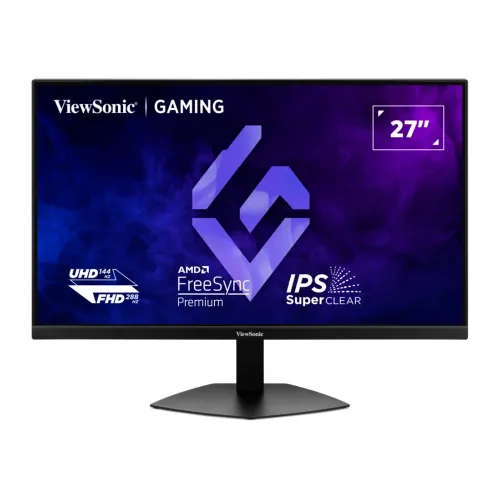
The ViewSonic XG2730D-4K is a 27-inch flat IPS gaming display centered on a dual-mode feature. ViewSonic specifies UHD resolution at up to 144Hz or Full HD at up to 288Hz, allowing the owner to select detail or speed for a particular title. A separate 24.5-inch esports setting reduces the active picture area for players who prefer a compact field of view. Actual signal modes depend on source hardware, the connected port, cable and chosen monitor settings.
Beyond gaming, the screen can handle streaming, web browsing and desktop productivity. UHD provides a dense image area for media and large layouts, while the IPS panel and wide viewing angles can help when the viewer is not directly centered. This listing preserves the existing product URL, category, price, SKU and six image records. Manufacturer data and retailer-only claims are identified separately below.
Dual mode UHD and Full HD
In UHD mode, the monitor accepts a 3840 × 2160 image. That is four times the pixel count of Full HD and can show fine textures, small interface details and high-resolution video with greater pixel density. The 27-inch size gives the resolution a practical desktop footprint, though some users may choose operating-system scaling to keep text and menus comfortable. The panel uses a 16:9 aspect ratio familiar to games and video services.
ViewSonic lists UHD at up to 144Hz. The computer must generate the frames and send a compatible signal for the display to use that refresh rate. Graphics settings, game engine limits, cable bandwidth and output configuration affect performance. A monitor refresh specification describes its supported display mode; it does not guarantee a particular frame rate in every game. Check the graphics card documentation before selecting a target resolution and refresh.
Full HD high-refresh mode
Full HD mode supports up to 288Hz according to ViewSonic. That option can suit competitive games where a supported PC can render many frames and the player prefers smooth motion over the extra pixel detail of UHD. The change in resolution is meaningful: Full HD has fewer pixels than UHD, so image sharpness and desktop space differ. The dual-mode concept lets one monitor serve games with different performance priorities.
The product page notes that the display may optimize itself for a few seconds after switching modes or sources. Wait for the image to settle before changing cables or assuming the input has failed. Recheck the source output settings and the monitor’s on-screen menu when moving between modes. The particular refresh and resolution combinations available may depend on firmware and the source signal, so the user guide remains useful for setup.
24.5-inch esports display setting
ViewSonic describes a 24.5-inch esports setting that scales down the active image area. The display remains a 27-inch physical panel; the mode changes the size of the visible game image. Some competitive players prefer the reduced field because it keeps action closer to the screen center or matches their familiar tournament setup. Other users may prefer to use the full panel for a larger view.
The feature is a preference option rather than a universal advantage. Consider how far you sit from the monitor, how much of the game interface remains visible and whether the title supports the expected resolution. ViewSonic describes multiple size and refresh combinations across its product copy. Consult the supplied manual to confirm which settings the exact regional firmware offers and how to activate them.
IPS panel and UHD detail
ViewSonic lists IPS technology and 178-degree horizontal and vertical viewing angles. IPS displays are often selected for relatively consistent image appearance away from the center, which can be helpful for shared viewing or when the screen is used in different seating positions. This model is flat, not curved, and its 16:9 shape fits standard game and video content without requiring an ultrawide layout.
The technical table gives a typical static contrast ratio of 1,500:1 and typical brightness of 250 cd/m². These are manufacturer figures, not guarantees that every preset or unit will measure identically. Users who work in a bright room should compare brightness with other displays. Room lighting and screen position influence perceived contrast, so a careful desk setup can matter as much as the headline specification.
Color reproduction and HDR10
The manufacturer lists 1.07 billion colors and 10-bit processing through 8-bit plus frame-rate control. It specifies 95% DCI-P3 coverage, 96% NTSC size and 99% sRGB coverage typical. Those figures help compare color gamut, but they do not establish factory calibration accuracy, screen uniformity or professional color-management performance. For editing that depends on precise color, calibration and the full workflow still matter.
HDR10 compatibility allows the display to accept compatible content when the source, application and selected mode also support it. The cited page does not state a peak HDR brightness class or local-dimming system. Therefore HDR10 should be understood as format support, not as a promise of a particular highlight brightness or dark-scene effect. Compare measured reviews if high-impact HDR performance is a deciding factor.
Refresh rate and real-world performance
A 144Hz or 288Hz display can refresh more often than a 60Hz panel when configured for that signal. Smoothness depends on the source producing frames at a comparable rate and the content supporting the selected mode. When a game renders fewer frames, the monitor does not create additional game content. Users can balance visual detail and frame rate through the game’s quality settings and the monitor’s selected display mode.
For the fastest advertised mode, use a source and connection that support it, then select the correct refresh rate in the operating system or graphics control panel. Some applications default to a lower setting even when the monitor accepts more. If the available list does not show the expected mode, inspect the cable, adapter, dock and driver before concluding the monitor lacks support.
MPRT and motion clarity
The detailed ViewSonic table lists 0.5ms MPRT. MPRT is a motion-picture response measure and is not interchangeable with a gray-to-gray pixel transition number. The same manufacturer page has a feature banner that says 1ms MPRT, so the page contains inconsistent response-time copy. This listing uses the detailed specification value and keeps the banner conflict visible rather than presenting both values as if they agreed.
Motion clarity also depends on refresh rate, frame rate, pixel transitions, overdrive and the content being displayed. A response-time headline does not describe every transition or guarantee no blur in every scene. Try the available response settings with the games you play and look for overshoot or trailing. The combination of refresh rate and adaptive sync may be more relevant to a comfortable experience than a single response-time figure.
Adaptive sync
ViewSonic lists AMD FreeSync Premium and NVIDIA G-SYNC Compatible support. When a compatible graphics device, driver and connection are used, variable refresh can coordinate panel timing with rendered frames under supported conditions. This can reduce tearing in relevant scenarios. The feature does not increase the graphics card’s output speed or guarantee that every application will operate within the supported variable-refresh range.
Enable the technology in both the monitor menu and graphics software where required, and check that the selected port and display mode support the intended configuration. Driver versions, frame-rate limits and game settings can affect results. Console and PC support may differ. If an issue appears, test a direct connection and verify that the source device is using the resolution and refresh rate expected.
Inputs and USB-C discrepancy
The manufacturer’s technical connector list shows two HDMI 2.1 inputs, one DisplayPort 1.4 input and one 3.5mm audio output. HDMI inputs can keep multiple sources connected at once, while DisplayPort offers a direct option for a compatible PC. The correct input depends on the output capabilities of the source and the target mode. Check the manual for the exact mode supported on each input.
ViewSonic’s marketing copy mentions USB-C, but USB-C is not present in the detailed connector list visible on the product specification page. This product entry does not claim a USB-C port or laptop charging capability. Anyone planning a one-cable setup should ask the Bangladesh seller to verify the exact port and its supported functions before buying. A USB-C-shaped connector, if present on another product, does not by itself prove video or power delivery support.
Console compatibility
The manufacturer product copy discusses compatibility with PlayStation 5 and Xbox Series X/S and links to guidance for 120Hz output. Consoles have their own output limits and game-specific modes. The monitor’s maximum Full HD 288Hz specification does not mean a console will send 288 frames per second. Confirm the console’s supported output, game mode and cable before expecting a particular experience.
A PC may expose different combinations than a console because its graphics driver can offer custom output settings. Use a direct connection where possible and check the source menu after connecting. HDMI 2.1 inputs provide a current interface for compatible devices, but results still depend on the complete chain, including cable quality, game support and the selected resolution.
Ergonomic stand and VESA
ViewSonic describes an ergonomic design with height adjustment, tilt, swivel and pivot. Tech Land’s exact-model listing gives 120mm of height travel. Height and tilt can help align the screen with the user’s eye level and seat; swivel can point it toward a second position, and pivot can rotate it for portrait content. The useful range depends on desk depth and the space behind the display.
The manufacturer lists 100 × 100mm VESA compatibility for a separately purchased arm or wall mount. Before mounting, check the arm’s weight rating, screw length, desk clamp clearance and cable access. The supplied stand may be easier for a simple desk setup, while a VESA arm can free desk space or provide additional reach. A mount is not included unless the seller specifically confirms it.
Eye-comfort options
ViewSonic lists flicker-free operation and a hardware/software low-blue-light solution. These settings give users options for adjusting the display during long sessions. Their effect varies with brightness, room lighting and personal sensitivity. Position the monitor to avoid direct reflections, set brightness to a comfortable level and take breaks during long work or gaming sessions. A display feature cannot guarantee comfort for every person.
The surface is described as anti-glare with a 3H hard coating. Anti-glare treatment can reduce reflections but does not remove every reflection in all environments. Place lamps and windows outside the most direct reflection angles. If the monitor is used for photo work, evaluate the image in the lighting where the final work will be viewed and use a calibration tool if color consistency is important.
Gaming and everyday workflows
The UHD mode can support sharp game graphics, high-resolution video and large work layouts. Full HD mode may be preferable when a game and PC can use a higher frame rate. For everyday work, the IPS panel, wide viewing angles and adjustable stand support a general desktop setup. Color gamut figures may interest creators, but the product’s published gamut does not substitute for calibration or a color-accurate reference display.
The value of dual mode depends on how often the user switches between those priorities. If the same resolution and refresh are used for every task, a simpler monitor might satisfy the need. Consider the graphics card, games, console use, desk size and preferred image scale. A list of maximum specifications is a starting point for comparison, not a replacement for matching the monitor to the intended workload.
Speaker and audio information
Star Tech and Tech Land list built-in 2W × 2 speakers. The visible manufacturer table does not list speaker output, so this remains retailer-reported rather than confirmed by the cited technical specification. A 3.5mm audio output does appear in ViewSonic’s connector list. If speaker presence or signal routing is important, confirm it with the exact seller and test the delivered unit promptly.
The same source gap applies to USB-C: the feature copy mentions it, but the connector list does not. This listing excludes a confirmed USB-C claim. Ask whether the supplied product has a USB-C input, what video standard it supports and whether it can deliver laptop power. Do not plan on using the display as a dock or charger until the exact specification is confirmed.
Power, dimensions and setup
Local retailer specifications provide some power, weight and physical measurements that are not all visible in the manufacturer table inspected. They are useful as secondary references, but should be verified if the exact value affects a desk mount or power budget. Keep room behind the panel for cables and ventilation. If the monitor is mounted on an arm, include the mount’s own clearance and movement when measuring the workspace.
Retailer tables state a weight near 6.2kg with stand and 4.1kg without stand, along with a package size and power adapter details. Treat these figures as retailer-published until the exact box label or manufacturer documentation is checked. The monitor is listed for 100–240V input on local seller specifications. Verify supplied cable, adapter and plug type for the Bangladesh unit.
Current Bangladesh price snapshot
The exact-model Bangladesh pages checked on 6 November 2026 showed ৳63,000 at PQS and ৳64,000 at Star Tech and Tech Land. Star Tech displayed ৳69,440 as its regular price and Tech Land displayed ৳66,000. The observed comparison band uses the current cash or online amounts, not the higher regular or EMI values. The catalog MSRP remains ৳64,000 and is recorded separately.
Star Tech, Tech Land and PQS each displayed the product as in stock when checked. Stock and payment options can change. These observations are reference data and do not represent an offer made by BiponiBD. Check the seller page for the final checkout price, delivery terms and stock status before ordering, especially if payment method changes the displayed price.
Warranty, service and buyer fit
Star Tech and Tech Land list a three-year warranty. PQS’s visible product details did not show the warranty term during this check. Local service can depend on the importer and seller, so confirm the warranty provider, service location, coverage exclusions and proof-of-purchase requirements in writing. Do not assume that a three-year statement from one seller automatically applies to every imported unit.
The display may suit someone who wants a single monitor for both UHD detail and high-refresh Full HD play, with an adjustable stand and current HDMI inputs. It may be less suitable for a buyer who requires a verified USB-C dock, unusually bright HDR performance or manufacturer-confirmed speaker specifications. Compare the local warranty and price against other dual-mode monitors before choosing.
Before you place an order
Before ordering, confirm the exact model number XG2730D-4K on the invoice and ask the seller which port and cable are needed for the preferred refresh mode. Confirm the 24.5-inch esports option, the speaker configuration, USB-C presence or absence, included adapter and warranty provider. These checks resolve the known differences between the manufacturer feature copy, detailed technical list and local seller fields.
Record cash, regular and EMI prices separately, verify stock on the order date and retain the written warranty. After setup, select the desired output resolution and refresh in the source device, enable supported adaptive sync, and test the input, sound and stand adjustments. This makes it easier to confirm that the actual delivered configuration matches the intended use.