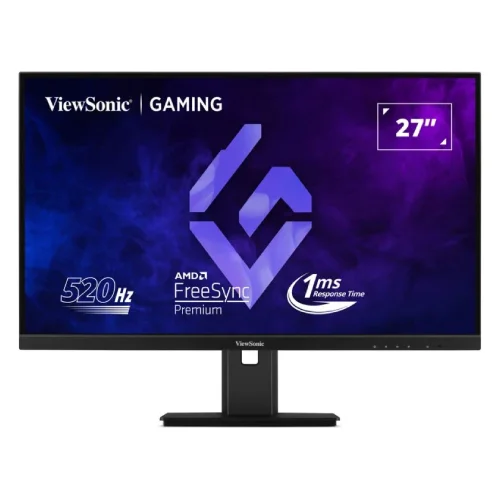
High refresh Full HD Fast IPS display
The ViewSonic XG2737 is a flat 27-inch gaming monitor with a native 1920 × 1080 resolution, 16:9 aspect ratio and Fast IPS panel. Its defining feature is a maximum refresh rate of 520Hz, placing it in the high-refresh esports category. The high refresh capability can make motion updates more frequent when the game, graphics card, connection and selected display mode all support the required timing. It does not mean every title will render at 520 frames per second: game-engine limits, graphics settings, CPU/GPU performance and system load all affect real frame rate. The Full HD resolution uses a 0.311mm pixel pitch. This prioritizes speed and may make small text or fine desktop details appear less sharp than on a higher-resolution 27-inch display. Buyers should choose it for the refresh use case and compare the resolution trade-off against their normal games and desktop work.
520Hz mode and input requirements
ViewSonic lists up to 520Hz at 1920 × 1080. The manufacturer’s documentation ties that top mode to a compatible graphics card, Windows 11 and a supported HDMI 2.1 FRL or DisplayPort 1.4 HBR3 connection with DSC timing. Actual availability can depend on GPU firmware and driver, cable capability, monitor firmware, operating-system mode, color format and whether the chosen input exposes the timing. Connect the display with a suitable certified cable, select the input, then confirm the refresh rate in Windows Advanced Display settings and the monitor’s on-screen menu. If 520Hz does not appear, check that the GPU output supports the required timing and that the correct cable is connected directly. Adapters, docks, capture devices and older HDMI/DP outputs can limit bandwidth or available refresh modes. Lower refresh rates remain available for ordinary desktop use. The 520Hz rating describes a supported maximum mode rather than a guarantee that software will render that many unique frames.
Panel, motion and color characteristics
The Fast IPS panel is specified with 1ms GTG and MPRT response-time figures. Those response values describe manufacturer modes and test conditions; overdrive or motion-blur-reduction settings can change the visual result, brightness and artifacts. The screen is rated at 400 cd/m² typical brightness with a 1,000:1 typical static contrast ratio and 80,000,000:1 dynamic contrast marketing figure. ViewSonic lists 16.7 million colors, implemented as 6-bit plus Hi-FRC, 99% sRGB coverage, 125% sRGB gamut size and 89% NTSC gamut size. Coverage and gamut size are different measures, so the percentages should not be compared as though they describe the same thing. The monitor supports HDR10 signal input. That format support is not the same as a VESA DisplayHDR certification, and the specification does not claim such certification. For color-critical photo or print work, review independent calibration behavior and use a calibrated workflow instead of assuming gaming-oriented color claims guarantee professional accuracy.
Adaptive sync and gaming setup
The XG2737 supports Adaptive Sync and AMD FreeSync Premium to coordinate display refresh with compatible graphics output and reduce tearing in supported variable-refresh operation. The exact range and supported modes can vary by input, GPU, driver and firmware. Enable the feature in the monitor menu and graphics settings, then check the game’s frame-rate behavior. A 520Hz panel can still display tearing if synchronization is disabled or the system is operating outside the supported variable-refresh range. The display also supports Flicker-Free operation and software Low Blue Light controls. These options can suit long gaming or study sessions, but the user should set brightness and color to comfortable levels and take regular breaks. A stable desk and suitable viewing distance matter for a 27-inch flat screen. For competitive titles, users may prefer lower graphics detail to keep frame delivery responsive, while story games or everyday work can use a visually balanced setting. Test changes one at a time so image-quality and latency trade-offs remain clear.
Connections and integrated USB hub
For video, the monitor provides two HDMI 2.1 FRL inputs and one DisplayPort 1.4 HBR3 input. Its USB hub comprises one USB 3.2 Type-B upstream port and two Type-A downstream ports rated at up to 5Gbps. Connect the USB-B upstream cable to the computer to make the downstream ports available for a keyboard, mouse or other compatible peripheral. The video connection and USB upstream connection serve different functions. The display has no USB-C input, USB-C charging or Thunderbolt docking capability, so a laptop may require a separate adapter or dock for video and peripherals. It includes two built-in 2W speakers and a 3.5mm audio-out jack for headphones or external audio equipment. The 520Hz maximum is dependent on supported video timing, so the input port and graphics output should be checked before purchase. When connecting consoles or more than one computer, confirm the supported resolution and refresh mode for each source rather than assuming all inputs have identical maximums.
Stand, mounting and physical fit
The supplied stand supports 130mm of height adjustment, tilt from −5° to +20°, 90° swivel through ±45° and bidirectional pivot through ±90° for portrait orientation. The monitor also supports a 100 × 100mm VESA mount and includes a Kensington lock slot. Manufacturer dimensions with the stand are 613.8mm wide, 385.8–515.8mm high and 190mm deep; without the stand it is 613.8 × 366.4 × 52.5mm. Net weight is 7.5kg with the stand and 5.4kg without it. The package measures 682 × 445 × 208mm and gross shipping weight is 9.8kg. Confirm desk depth and clearance before placing the stand near a wall, especially if using the height and pivot adjustments. For a monitor arm, confirm the mount supports the panel’s weight and uses the correct VESA pattern. Pivoting to portrait can be useful for coding or documents, but some applications and games remain designed for landscape orientation.
Power, package contents and care
ViewSonic specifies an internal power supply with an AC 100–240V, 50/60Hz input and a three-pin IEC C14 inlet. The package contents list a three-pin IEC C13 power cord, HDMI 2.1 cable, DisplayPort 1.4 cable, display and quick-start guide. The specification lists 34W in Eco mode, 48W typical and 62W maximum consumption. Retail cartons and included accessories can vary by market or batch, so inspect the local box and confirm included cables with the seller. Use a properly grounded power outlet and avoid obstructing the ventilation openings. Clean the screen with a soft, lint-free cloth and follow the manufacturer’s care guidance; do not apply liquid directly to the panel. Keep the serial number, invoice and warranty card available for service. Country of origin is not asserted in this listing because the official material reviewed does not establish the manufacturing country for the specific Bangladesh unit. Check the unit label if origin matters.
Bangladesh price, warranty and buying checks
Bangladesh retailer listings reviewed at Star Tech and TechLand were around ৳95,200, and Star Tech showed a regular price near ৳96,900. Retail pages commonly list a three-year warranty. These are time-sensitive retailer observations, not a promise of future price, stock or identical service terms. The current variant MSRP of ৳95,200 is retained. Before ordering, ask the seller to confirm stock, whether the warranty is official and who provides service, the exact model code XG2737, included HDMI/DisplayPort cables, return terms and the maximum refresh rate supported by the local unit. Request the warranty duration on the invoice. For a 520Hz setup, check the graphics card output and operating-system requirements before buying; the monitor alone cannot make a system render at that frame rate. Confirm whether you need 27-inch Full HD or would prefer a higher-resolution display for work. These practical checks make the product’s esports strengths and limitations clear.
Who this monitor suits and how to configure it
The XG2737 is designed around esports responsiveness. It can suit players of fast competitive titles who have a compatible high-end graphics card and value very frequent refresh updates over a higher pixel count. It can also work as a general 27-inch display, but the 1920 × 1080 resolution and 0.311mm pixel pitch are relevant to reading, spreadsheets, photo editing and multi-window tasks. A user who spends more time on text or detailed images may prefer 1440p or 4K at a lower refresh rate. Consider the monitor’s actual role before choosing a 520Hz specification just because the number is high.
After installation, first select the native 1920 × 1080 resolution and the intended HDMI or DisplayPort input. Update graphics drivers from the GPU vendor, then inspect Windows Advanced Display settings for the highest available rate. Set the monitor refresh to 520Hz only when the system exposes and sustains the mode. If the image looks washed out, unstable or clipped, test the supplied cable, another supported input and a lower refresh setting. Adaptive Sync, overdrive, HDR and Low Blue Light settings can change motion, color or brightness; compare them deliberately and keep a preferred baseline profile.
The included stand is substantial and supports portrait pivot, but pivot orientation may require rotating the operating system desktop and adjusting application layouts. The Type-B USB upstream link is needed to make the two Type-A hub ports useful; it does not carry display video. The 3.5mm jack is an audio output, not a microphone input according to the listed specification. Treat the built-in speakers as convenient basic playback rather than a substitute for dedicated gaming headphones or speakers. These connection details prevent common setup assumptions and help the buyer prepare the correct cables and desk layout.
Retailer listings and packaging may vary by region. Confirm the exact XG2737 product code, factory seals, included accessories, warranty issuer and invoice wording before payment. Ask the seller to state in writing which local service center handles warranty claims and what proof of purchase is required. If a retailer listing describes a DC adapter or claims a different USB connection, compare it with the manufacturer specification; the official XG2737 documentation reviewed here describes an internal power supply and a USB-B to USB-A hub, with no USB-C port. Keep this product’s data distinct from other XG273x monitors, which can use different resolutions, refresh rates, port layouts or power requirements. The exact model code is the most reliable way to distinguish those related products.