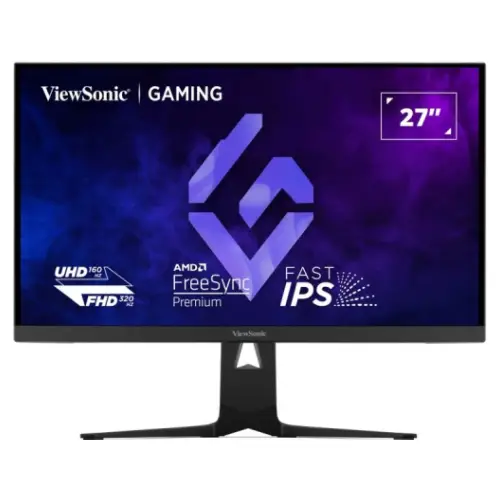
ViewSonic XG275D1-4K dual-mode gaming monitor
The ViewSonic XG275D1-4K is a 27-inch gaming monitor built around a Fast IPS panel and a switchable dual-mode display. In its UHD mode it presents 3840 × 2160 pixels at up to 160Hz. In its FHD esports mode it switches to 1920 × 1080 at up to 320Hz. This lets the user choose between higher pixel detail for visually rich games and a faster refresh target for competitive play. The panel remains a 16:9 flat display in both modes.
The exact model code is XG275D1-4K. Use that identifier when checking ViewSonic support material, compatible cables, firmware information, or retailer stock. The product name uses the official ViewSonic brand spelling. The catalog slug is already valid and publicly resolves, so it is retained to protect existing links and search indexing.
A monitor’s maximum refresh rate does not guarantee that every game will render at that rate. The connected graphics card, game engine, cable, output configuration, selected display mode, and graphics settings all affect the frame rate. Set the operating system and game to the intended resolution and refresh rate after switching modes, and check the monitor’s on-screen information to confirm the active signal.
Switchable UHD and esports FHD modes
The defining feature of the XG275D1-4K is its dual-mode operation. UHD mode uses the full 3840 × 2160 resolution and supports refresh rates up to 160Hz. FHD mode uses 1920 × 1080 resolution and supports rates up to 320Hz. The monitor also offers a 24.5-inch esports display-size option for players who prefer a smaller active image area during competitive matches.
This mode choice reflects different priorities. UHD provides more spatial detail for strategy games, open-world titles, editing and general desktop use. FHD at a higher refresh rate can make fast movement appear more continuous when the computer can supply enough frames. FHD uses fewer pixels than UHD, so the graphics workload is different; the actual performance gain depends on the game and PC.
Use the on-screen display or the manufacturer’s supported control method to select the desired mode, then confirm the resolution and refresh rate in the computer’s display settings. A cable and graphics output must support the selected signal. If a desired refresh option does not appear, check the cable connection, GPU output configuration, display mode, and graphics driver before assuming the monitor is faulty.
Fast IPS panel, pixel density and viewing
ViewSonic specifies a Fast IPS panel with LED backlighting, a 27-inch screen size, 16:9 aspect ratio and approximately 0.155mm pixel pitch. At 4K UHD, this corresponds to roughly 163 pixels per inch. The surface is flat, anti-glare and protected by a hard coating rated 3H. The stated viewing angles are 178 degrees horizontally and vertically.
IPS technology is designed to maintain usable color and contrast across a broad viewing angle. The anti-glare finish can reduce reflections from ordinary room light, although it cannot remove every reflection or compensate for direct light shining at the screen. Place the monitor so that windows and bright lamps are not directly reflected in the panel, and adjust brightness for the room.
The backlight is rated for a minimum 30,000-hour life in the reviewed specification. This is a manufacturer rating, not a promised service life for every component or an assurance that image quality will remain unchanged indefinitely. Actual results depend on brightness, usage hours, environmental conditions and care. Keep the panel clean with a soft suitable cloth and avoid abrasive materials or pressure on the screen.
Response, brightness, contrast and color
The official global specification lists a 0.5ms MPRT response figure. The Asia-Pacific specification and Star Tech listing also describe 0.5ms GTG. MPRT and gray-to-gray are different measurement methods, so the values should not be treated as directly interchangeable. This listing preserves the discrepancy openly instead of implying that both figures use one identical test. Real motion clarity also depends on refresh rate, frame delivery, overdrive and the chosen picture mode.
ViewSonic lists 300 cd/m² typical brightness and 1,000:1 typical static contrast, with an 80,000,000:1 dynamic contrast figure. The static value describes the panel’s ordinary white-to-black contrast under specified conditions; dynamic contrast is a processing-based figure and is not directly comparable to static contrast. The display supports HDR10. HDR results depend on the source content, HDR settings, selected mode and output signal; HDR10 support alone does not establish a particular certification tier or peak brightness.
The color specification lists 1.07 billion colors using 8-bit plus frame-rate control. Typical gamut figures include 99% sRGB coverage, 94% DCI-P3 and 91% NTSC, with the manufacturer also listing 128% sRGB gamut size. Coverage and gamut size are different measurements. These figures help describe the monitor’s color range, but do not replace calibration or color management for work where exact color reproduction matters.
Adaptive sync, eye comfort and game controls
The monitor supports AMD FreeSync Premium and NVIDIA G-SYNC Compatible according to the reviewed manufacturer and retailer specification material. Variable refresh can help synchronize display updates with compatible graphics output and may reduce tearing within the supported operating range. Enable the relevant setting on the monitor and in the graphics driver, and connect through an input and mode that support the desired feature.
ViewSonic Eye ProTech+ combines flicker-free operation with hardware and software Low Blue Light options. These are tools for adjusting the display to personal preference and the room, not a medical treatment or a guarantee that every user will avoid eye strain. Take regular breaks, maintain a comfortable viewing distance, and use brightness appropriate to the environment.
Gaming functions include a 24.5-inch esports display-size mode, Black Stabilization, customizable rear RGB lighting and ViewMode presets for different content such as FPS, RTS, MOBA, movies, web and text. Available presets change picture processing; users should compare the modes and choose one that suits the actual task. Not every preset is intended for color-critical work.
Video connections and USB-C power delivery
The XG275D1-4K provides two HDMI 2.1 inputs, one DisplayPort 1.4 input and one USB-C connection with DisplayPort Alt Mode. The HDMI and DisplayPort inputs support the monitor’s dual-mode vertical frequency ranges: up to 160Hz in UHD and up to 320Hz in FHD, subject to the source, cable and signal configuration. HDMI 2.1 also supports compatible console signals such as 4K at 120Hz when the console, cable and settings allow it.
The USB-C port can carry DisplayPort video and deliver up to 65W of USB Power Delivery to a compatible connected device. A laptop must support video output over USB-C and accept the supplied power profile to use this one-cable arrangement. Charging speed and operation can vary with laptop demand, cable capability and the display’s own operating conditions. The USB-C feature does not make this a USB-A hub: no USB-A downstream hub ports are listed for this model.
Use the included or a certified cable that matches the required signal. For a computer, check the graphics port specification and the supported refresh rates at the chosen resolution. For a console, confirm the console’s HDMI mode and game output options. If a connected device only offers a lower refresh rate, that can reflect the source hardware or configuration rather than the monitor’s maximum rating.
Sound, stand movement and mounting
Two built-in 2W speakers provide basic stereo audio for everyday desktop use, and a 3.5mm audio output is available for compatible headphones or external audio equipment. Speaker sound depends on source level and room conditions; users who need stronger bass or higher output may prefer dedicated speakers or a headset.
The supplied stand supports 130mm of height adjustment, tilt from −3 to +20 degrees, a 90-degree total swivel arc (45 degrees left and right), and portrait rotation up to 90 degrees in either direction. The catalog’s former swivel value said only “90º,” which can be mistaken for 90 degrees each way; this description clarifies the total arc. Ensure cables have enough slack before rotating or raising the display.
The VESA pattern is 75 × 75mm, not the 100 × 100mm pattern used by many larger monitors. Check the arm or wall mount’s supported pattern and weight rating before installation. The monitor also lists a Kensington lock slot. Mounting hardware beyond the supplied accessories should be selected to suit the wall or desk structure and installed according to the mount maker’s instructions.
Dimensions, weight, power and included items
The official specification gives dimensions with the stand of approximately 614.1 × 441.62 to 571.62 × 243.07mm, depending on height. Without the stand the display measures approximately 614.1 × 365.65 × 66.52mm. The carton is listed at approximately 908 × 508 × 177mm. Net weight is about 6.3kg with the stand and 4.4kg without it; packaged weight is approximately 9.6kg. Check desk depth and clearance before setup.
The monitor uses an external AC/DC adapter with a center-positive DC input socket. The manufacturer lists AC input at 100–240V, 50/60Hz, typical consumption of 46W, maximum consumption of 47W and standby consumption of 0.5W. USB-C power delivery can add to the system’s overall power demand; the monitor’s specified power use should not be read as the total consumption of the connected laptop.
The reviewed ViewSonic datasheet lists the monitor, three-pin power cord, AC/DC adapter, HDMI 2.1 cable, DisplayPort 1.4 cable, USB-C cable and quick-start guide in the box. Package contents can vary by region or shipment, so inspect the product carton and seller invoice at delivery. Keep the model label and warranty documentation for service requests.
Bangladesh listing, price and warranty
Direct Bangladesh retailer listings reviewed for this audit showed the XG275D1-4K around ৳85,800–৳90,300. Star Tech and Ryans each displayed a price of ৳86,000 at the time checked; Star Tech also displayed a regular price of ৳87,000 and stock availability. These are snapshots of retailer pages, not a fixed BiponiBD selling price or a guarantee that an offer remains available.
The direct listings reviewed commonly stated a three-year warranty. Warranty provider, coverage, service location, claim process and the start date can depend on the seller, official distribution channel and invoice. Confirm the written warranty terms before purchase, especially whether accessories and panel issues are covered and how local service is handled.
BiponiBD compares product and offer information across sellers. Before placing an order, check the current offer, seller, availability, delivery details and return or warranty conditions displayed for that offer. This description records manufacturer specifications and a dated market snapshot; live price and stock should always be rechecked.
Who this monitor is for
The XG275D1-4K may suit a player who wants a single screen for high-detail 4K gaming and a high-refresh 1080p mode for competitive play. It also provides adaptive sync, HDR10 support, adjustable ergonomics, a USB-C video and charging connection, and basic integrated speakers. The 24.5-inch esports display-size option adds another way to tailor the active image for certain games.
Before choosing it, consider whether the PC can drive the desired resolution and frame rate, whether the monitor’s flat anti-glare IPS image matches personal preferences, and whether the available ports suit the rest of the setup. Laptop users should verify USB-C video and 65W power compatibility. Console players should check that the console, game and cable support the wanted output.
For a mixed setup, compare monitor depth, height range, VESA compatibility and speaker output with the available desk and peripherals. Confirm the unusual 75 × 75mm mounting pattern with an existing arm. The best mode is the one that matches the games and devices in use; UHD 160Hz and FHD 320Hz represent different operating choices rather than simultaneous resolutions.
Product identification and catalog accuracy
The manufacturer is ViewSonic Corporation and the model is XG275D1-4K. The previous catalog record assigned the product to “Others” and included “27-inch 4K” inside the model and manufacturer part number fields. The corrected record uses the existing ViewSonic brand entry and the clean XG275D1-4K identifier. The active catalog slug and product identity are preserved.
The prior resolution attribute included a literal “&” string, which could be escaped again on the storefront. It has been corrected to a normal ampersand. The product specifications also now state the dual-mode refresh rates and HDMI/DisplayPort versions, clarify the 65W USB-C feature, and explain the 75 × 75mm mounting pattern.
A second active BiponiBD record for this same model was found during inventory review. This record was not deleted, merged or redirected as part of the content update. Catalog owners should review the duplicate separately to decide how offers, media, identifiers and product history should be reconciled without losing merchant or order relationships.
Availability and content notes
This catalog item remains Active and its existing storefront route remains unchanged. The update corrects product content while preserving its product ID, product number, category, URL slug, variant identity, current SKU, listed MSRP, offer status and six existing media records. The product was not merged with the separately identified duplicate.
Manufacturer specifications and retailer listing information can differ by region or measurement method. The response-time sources are not fully consistent: ViewSonic global lists 0.5ms MPRT, while APAC and Star Tech also list 0.5ms GTG. The description makes this difference explicit. Bangladesh price, stock and warranty terms can change and should be verified at the time of purchase.
Product information is provided to help compare the model’s principal specifications and use cases. Confirm compatibility, included items, current offer details and warranty conditions with the seller before ordering. Model-specific manufacturer references and Bangladesh retailer pages used in this audit are recorded in the product’s specification evidence metadata.