Walton CiNEd WD27GI07 27-inch QHD 165Hz IPS Gaming Monitor: Complete Guide
Model identity and intended use
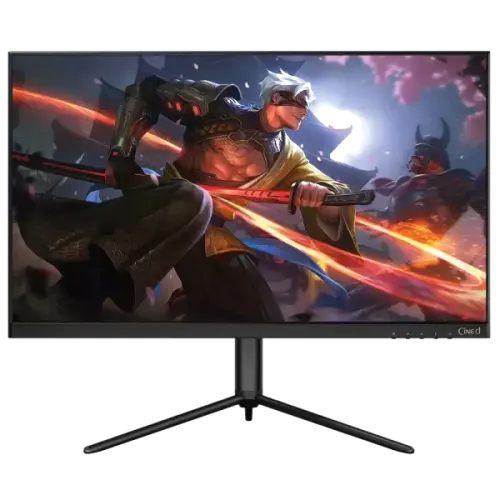
The Walton CiNEd WD27GI07 is a 27-inch QHD gaming monitor from Walton Digi-Tech. The model code is WD27GI07; CiNEd is the product line. It is intended for high-refresh PC gaming, media and everyday computer work. Walton’s model-specific information is the basis for resolution, refresh rate, inputs, brightness and warranty details in this guide. The existing product name, URL slug, Monitors category, Active status, Walton brand, variant ID, SKU and ৳28,000 catalog price are preserved. Model name and manufacturer part number are normalized to WD27GI07 so search filters and the manufacturer identifier do not contain extra screen-size wording. The title already identifies the correct product and remains recognizable to customers.
QHD resolution and pixel pitch correction
The display’s native resolution is QHD 2560 × 1440 at a 16:9 aspect ratio. A 27-inch QHD panel has approximately 108.8 pixels per inch, providing more workspace and finer detail than Full HD at the same size. Walton’s model information provides a pixel pitch of 233.1 micrometres. The catalog had stored this as “233.1” under a millimetre heading, which is off by a factor of 1,000. The corrected value is approximately 0.2331 × 0.2331mm (233.1µm × 233.1µm). Use the native resolution in the operating system and choose interface scaling to suit the viewing distance. This preserves image sharpness while keeping text and menus readable. The number of pixels alone does not describe color accuracy or panel uniformity.
Refresh rate, OD response and Adaptive-Sync
Walton lists 165Hz at QHD over DisplayPort and 144Hz at QHD over HDMI. That distinction matters when setting up a gaming PC or console: choose DisplayPort when 165Hz is the goal, then select the supported resolution and refresh rate in the graphics settings. The monitor’s 1ms response value is specified with Overdrive (OD) enabled. Overdrive changes pixel transitions and its result depends on the selected OSD level; the published figure should not be interpreted as a guaranteed response for every transition. Walton lists FreeSync and G-SYNC Compatible support. These Adaptive-Sync features can reduce tearing when a compatible GPU, driver and port are used. NVIDIA G-SYNC Compatible operation is listed over DisplayPort. Actual frame rate remains dependent on the source computer and game.
IPS picture, gamut and HDR expectations
Walton specifies an IPS LED-backlit panel with 350 cd/m² brightness, 1000:1 typical contrast and 178-degree horizontal and vertical viewing angles. The model listing gives 16.7 million colors and wide-gamut figures of 101% NTSC and 100% Adobe RGB. These figures describe gamut size or coverage, not measured factory accuracy; creative users should calibrate the display and confirm their application’s color-management setup. The anti-glare surface can help diffuse reflections from ordinary indoor lighting. HDR is listed as supported, but the specification does not list local dimming or a VESA DisplayHDR certification. Treat that as HDR input compatibility. It does not guarantee the peak highlights or dark-scene contrast of a display designed for high-dynamic-range mastering.
Inputs, refresh limits and audio
The rear input bay includes two DisplayPort inputs, two HDMI inputs and one 3.5mm audio output, plus the DC power socket. Walton lists QHD refresh up to 165Hz through DisplayPort and 144Hz over HDMI. Connect the source with a cable and graphics output that support the intended mode, then select the matching input in the monitor menu. Four video inputs make it convenient to leave a PC and other devices connected, although only one source is displayed at a time. Built-in stereo speakers are rated at 2W per channel. They can handle basic alerts and everyday video, while headphones or external speakers may be preferable for gaming or music. The 3.5mm jack is an output, not a microphone input. A 12V 4A external adapter powers the display.
Stand, VESA fit and rear lighting
The included stand supports height adjustment, horizontal swivel and tilt from -5 degrees to +15 degrees. Walton’s reviewed model listing does not quantify the height travel or swivel angle, so those details are not invented here. The 75 × 75mm VESA pattern is smaller than the 100 × 100mm size found on many monitors; verify arm compatibility before ordering a mount. The stand has a stable tripod-style base that uses desk depth, so check available space and cable clearance. Product images show rear accent light strips and three-side frameless styling. The available sources do not claim motherboard synchronization or addressable RGB software control, so this guide describes the lighting as built-in rear accents only. Keep the rear vents and port area accessible during installation.
Power, weight and shipping
The WD27GI07 uses an external DC 12V, 4A power adapter. Walton lists AC input at 100–240V, 50/60Hz, 1.2A and power consumption of 48W. The official net weight is 5.35kg and gross packaged weight is 7.35kg, each subject to the stated tolerance. Walton’s product sheet does not publish exact carton length, width and height. Those logistics fields remain blank instead of using dimensions from a different CiNEd monitor. A seller or carrier may provide package measurements for a specific batch, which can be recorded after checking them against the box. Keep the adapter, serial number, purchase invoice and packaging together for warranty service or transport. Do not substitute a power adapter unless its voltage, current, polarity and connector match Walton’s requirements.
Price and Bangladesh warranty
The current BiponiBD variant price is ৳28,000, and Walton BD’s page gives a regular price of ৳34,750. Retail offers can change with promotions and stock, so check the final price and delivery charge before ordering. Walton lists three years of service warranty for this model, with two years for the display panel and one year for the external adapter. Service coverage may distinguish repair from replacement; use the warranty card and seller invoice for the purchased serial number as the controlling terms. Confirm that the seller is authorized, the unit is new and sealed, and the stated service location is convenient. Barcode, GTIN and manufacturing country were not established from the captured physical product evidence, so those fields remain blank rather than being inferred from the brand.
Setup checklist for gaming and work
For a PC setup, connect DisplayPort first if you want to configure QHD at 165Hz. In the operating system or graphics control panel, select 2560 × 1440 and choose a refresh rate that the source, port, cable and monitor support. HDMI users should expect the listed 144Hz QHD maximum. If Adaptive-Sync is desired, enable the relevant monitor OSD option and check the GPU driver settings; FreeSync or G-SYNC Compatible availability depends on the connected graphics card. Adjust Overdrive only after checking for inverse ghosting or bright trails in moving scenes. Test the stand height and swivel before fixing the final cable route. For color tasks, use a calibrated workflow, because NTSC and Adobe RGB gamut percentages do not establish color accuracy. Keep the model-specific warranty card and adapter details with the purchase invoice.
Who should choose this display
The WD27GI07 is a good fit for users who want QHD resolution and a high refresh rate on a 27-inch IPS screen. It is especially suitable for PC gamers who can connect by DisplayPort and run games at high frame rates. HDMI remains useful for console and secondary devices, with the published maximum of 144Hz at QHD. The adjustable stand, four video inputs and headphone output add flexibility for shared desks. Consider a 4K panel if fine detail is the priority, or a certified HDR display if HDR movies and production are central to the purchase. Before buying, verify that the graphics card supports QHD 165Hz, choose the correct cable, confirm the 75 × 75mm mount, measure the base footprint and check the serial-specific panel/adapter warranty terms.