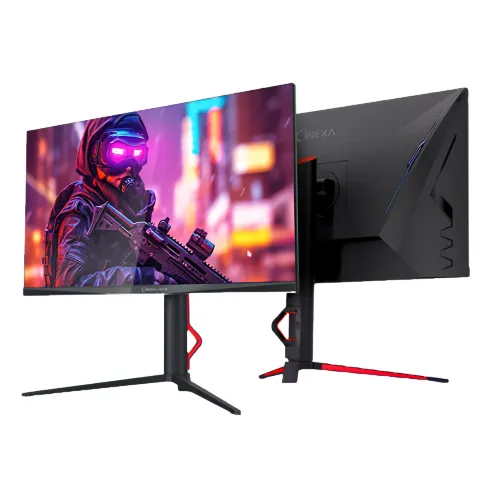
Walton CiNEXA WD27EG200: 27-inch QHD gaming monitor
The Walton CiNEXA WD27EG200, also marketed as the CiNEXA G200, is a 27-inch flat IPS gaming monitor with a 2560 × 1440 QHD resolution and a 16:9 aspect ratio. Its key connection detail is easy to miss: Walton lists up to 200Hz through DisplayPort and up to 144Hz through HDMI. Choose DisplayPort when you want the highest listed refresh rate. The 27-inch QHD panel provides more desktop detail than Full HD at the same size, while the high refresh mode targets responsive PC gaming. This guide separates Walton's exact published specifications from retailer shorthand and explains the connection, setup, ergonomics, warranty and price points buyers should check before ordering.
Panel, resolution and image sharpness
The screen measures 27 inches (68.58cm) diagonally and uses an LED-backlit IPS LCD panel with a flat anti-glare surface. Native resolution is 2560 × 1440, commonly called QHD or 2K in local listings. At 27 inches and 16:9, that geometry is about 108.8 pixels per inch, with a pixel pitch around 0.233mm. Compared with a 27-inch Full HD display, QHD places more pixels in the same physical area, so text, interface elements and fine image edges can look more defined. You can adjust operating-system scaling if smaller text is hard to read. IPS viewing angles are listed as 178° horizontally and vertically; actual contrast and color appearance still vary with viewing position, room lighting and panel settings. Walton describes a three-side frameless design. The visible bezel is narrow, though the active image does not extend physically to the outer edge.
200Hz DisplayPort and 144Hz HDMI limits
Walton lists 200Hz over DisplayPort and 144Hz over HDMI at the monitor's 2560 × 1440 resolution. That interface split matters: the included 1.5m DisplayPort cable is the practical choice for the full listed 200Hz mode. HDMI can still provide a smooth high-refresh QHD signal up to the documented 144Hz. Walton's product table identifies the connector types and refresh limits but does not print HDMI or DisplayPort protocol revision numbers. Although retailers sometimes label the ports HDMI 2.0 or DP 1.4, those version labels are not repeated here as verified manufacturer specifications. The computer's graphics output, cable, operating system and selected resolution/refresh mode must all support the requested signal. On a PC, open display settings after connection, select 2560 × 1440, then choose the highest available refresh rate. A menu showing only 60Hz may mean the wrong port/cable is in use, the graphics output is limited, or the mode has not been selected. A console may offer fewer modes than a compatible gaming PC.
Response modes and motion features
Walton advertises 1ms MPRT and 2ms OD. These refer to different techniques: MPRT is associated with perceived motion clarity and backlight behavior, while OD means pixel overdrive. They are not interchangeable measurements, nor do they guarantee every pixel transition completes in the stated time under every setting. The monitor also lists adaptive sync support, including AMD FreeSync and NVIDIA G-SYNC Compatible in the manufacturer and retailer descriptions. Adaptive sync can align screen refresh with a compatible graphics source to reduce tearing when frame delivery fluctuates. Enable it in the monitor menu and graphics driver where required, and check which connection your graphics card supports. Walton's page does not publish an exact variable-refresh operating range, so this guide does not promise one.
Brightness, contrast and color claims
The official detailed specification table lists 350 cd/m² brightness; Walton promotional material and local retailers also cite a 400-nit peak value. These are presented as typical/base and peak claims respectively, rather than treating 400 as a guaranteed sustained brightness at every setting. Static contrast is listed at 1000:1, with dynamic contrast (DCR) available as a display feature. Walton specifies 1.07 billion colors, 85% NTSC and 120% sRGB. The sRGB percentage is a gamut-volume style figure and should not be read as 120% accurate sRGB coverage. Walton does not provide a factory calibration Delta E, DCI-P3/Adobe RGB coverage or a color-accuracy certification in the product materials reviewed. This wide-gamut description is useful for general entertainment and gaming, but color-critical design work should use measured calibration and a display with published accuracy data.
HDR and adaptive display expectations
Walton lists HDR support and DCR. HDR signal compatibility can allow the display to accept HDR content, but no VESA DisplayHDR certification, local-dimming zones or measured HDR brightness performance is stated in the published model specifications checked for this review. Treat HDR as supported input/content handling, not as a guarantee of premium HDR highlights or deep local-dimming blacks. In a bright room, the published 350 cd/m² base brightness may be more relevant than a peak promotional number. Use the monitor's menu and operating-system HDR setting to compare SDR and HDR content on your actual system. For ordinary text and browsing, choose the mode that preserves clear text and comfortable brightness; for games, test HDR in the specific title because implementation varies.
Ports, audio and built-in speakers
The rear connections include two HDMI inputs, two DisplayPort inputs, one 3.5mm audio output and one DC power input. Walton lists refresh limits by HDMI versus DisplayPort but does not publish a protocol revision number in the table. The display also has integrated stereo speakers rated at 3W × 2 (6W total). This can provide basic desktop or video sound without external speakers, though it is not a substitute for a dedicated headset or speaker system when you need stronger bass, loudness or spatial positioning. The audio-out jack gives another route for wired audio equipment. With four video inputs, multiple computers or consoles can remain connected; select the appropriate source from the monitor's on-screen controls. Inspect the ports and included cable types when the box arrives, especially if you intend to connect through HDMI while using the 200Hz headline specification.
Stand ergonomics, lighting and VESA mounting
The supplied stand offers several adjustments. Walton lists tilt from -5° to +15°, swivel up to 45° left and right, clockwise pivot up to 90°, and height adjustment of 135mm ±5mm. Those adjustments make it easier to place the screen at a comfortable eye level or rotate it for portrait use. The stand includes a cable-management clip and decorative red accents. Walton also lists 100 × 100mm VESA mounting if you prefer a compatible arm or wall mount; verify the mount's weight rating and screw requirements before installation. The rear housing has ambient lighting accents, as visible in the product imagery. Stand range can depend on how the monitor is assembled and the available desk clearance, so leave room to turn or raise it without striking a wall or shelf.
Dimensions, carton and shipping weight
With its stand, the published dimensions are 614 × 264 × 561mm (length × width × height as listed by Walton). Without the stand they are 614 × 54 × 364mm. The carton measures 824 × 155 × 446mm. The monitor's net weight is 6kg ±5%, while packaged gross weight is 8kg ±5%. The screen is therefore a substantial desk setup compared with smaller lightweight displays; check the usable desk depth, stand footprint and delivery path. For shipping metadata, the product record uses the manufacturer's packaged gross weight and carton measurements, which are more useful for delivery planning than confusing the box with the unboxed monitor. Carrier volumetric rules may still determine the final delivery charge.
Power adapter and box contents
The monitor uses an external 12V, 4A adapter, with maximum power consumption listed at 48W and standby at 0.5W. Walton specifies 100–240V AC input for the adapter. The manufacturer's package contents list a 1.5m DisplayPort cable, a 1.2m UK-type power cord, the AC adapter and a user manual. The included DisplayPort cable is the straightforward route to the 200Hz mode listed for DP. Retailers can change bundles or listings as stock changes, so compare the delivered box against the seller's invoice and confirm any missing cable or accessory promptly. Keep the adapter ventilated and use a stable power outlet. Do not substitute an adapter with a different voltage or polarity; match the original rating.
Warranty coverage in Bangladesh
Walton Bangladesh lists tiered coverage for this model: two years for the panel, one year for the adapter and power-supply board, and three years for all other parts/service. These periods apply to different components and should not be simplified into three years of panel or adapter coverage. Confirm the exact service center, invoice date, warranty card/serial registration process, dead-pixel policy and exclusions with the seller. The saved BiponiBD variant price remains ৳24,200. At the time of this catalog review, the Bangladesh listings compared ranged from ৳24,200 at retailers to Walton's ৳26,999 official listed price; prices and stock can change. This is a dated comparison, not a promise of current availability or a price guarantee. Ask the seller whether delivery, installation or promotional discounts alter the amount due.
Model identity and unverified fields
The clean model identifier is WD27EG200; Walton markets the CiNEXA G200/CiNEXA WD27EG200 series. The product label in the existing catalog is preserved, while the model and manufacturer part number are normalized for clearer search and product matching. Walton's public specifications and the seller pages reviewed do not provide an exact barcode/GTIN or a standardized country-of-origin statement for this SKU. Those remain unset instead of being inferred from the brand's home country. Similarly, the manufacturer source lists HDMI and DisplayPort counts and refresh limits but not connector protocol revisions; retailer labels such as HDMI 2.0 and DP 1.4 are not copied as confirmed model data. Exact panel supplier, firmware revision and factory color-calibration figures are also not published in the checked sources.
Who this QHD monitor suits
This monitor is a fit for buyers who want a 27-inch QHD desktop, high refresh gaming through DisplayPort, adaptive sync, a full-adjustment stand and integrated speakers. Its HDMI mode remains useful for devices that top out at 144Hz QHD. QHD gives more detail and workspace than Full HD at 27 inches, while the 200Hz option depends on DisplayPort and a capable graphics source. The listed 350 cd/m² base brightness, IPS 1000:1 static contrast and lack of a published DisplayHDR tier set realistic expectations for HDR use. Buyers who require verified color accuracy should seek measurement data; those needing USB-C docking or a USB hub should check that requirement separately because neither is listed among this model's connections. Compare the exact warranty breakdown and price on the invoice before ordering.
Quick setup checklist
Assemble the stand on a stable desk, route the cables through its clip, and connect the supplied adapter. For the highest listed refresh, connect a compatible PC to DisplayPort with the included DP cable. In the operating system, set 2560 × 1440 and select 200Hz; if you use HDMI, the manufacturer lists up to 144Hz at QHD. Turn on adaptive sync in both monitor and graphics settings where supported. Adjust height, tilt, swivel or pivot to suit your posture, then set brightness for the room. Test the built-in speakers and audio output, select the right input when multiple devices are attached, and verify any warranty registration requirements with the seller. If a desired refresh mode is missing, check the graphics output and cable first, then the system's advanced display mode.
Specification and source transparency
The technical details here are based on Walton Digi-Tech's exact WD27EG200 product specification and Walton Bangladesh's model listing, cross-checked against Star Tech, TechLand BD, PC Express and other local retailer listings. The official source confirms the panel, resolution, refresh split, dimensions, stand, power and warranty tiers. Retailers commonly repeat the 400-nit headline, while the detailed manufacturer table lists 350 cd/m²; both claims are documented with typical/base versus peak wording. The official product page does not state connector revision numbers, an exact GTIN/barcode or country of origin, so none is invented. The product's visible four-image gallery was inspected individually: a combined front/rear hero, front view, side profile and rear/control view. Image descriptions below are written to match those actual views. Price and warranty are local listing snapshots and should be reconfirmed at purchase.