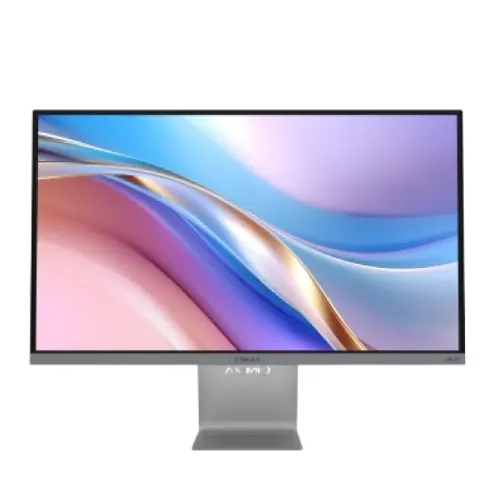
Walton CiNEXA WDI08UK27 27-inch 4K UHD IPS Monitor: Complete Buying Guide
Model identification and intended use
The Walton CiNEXA WDI08UK27 is a 27-inch 4K UHD IPS monitor for detailed productivity, media, design preview and laptop-based desks. Walton also refers to the family as UK27. Its model code is WDI08UK27; this is not the Walton WD27UI08 or the CiNEd gaming series. Those models have separate resolution, refresh, stand and connection specifications. The WDI08UK27 combines 3840 × 2160 pixels, a 60Hz refresh rate, 95% DCI-P3 color coverage, USB-C with up to 65W power delivery and two HDMI inputs. This guide uses Walton’s model-specific specification and verified Bangladesh retailer listings. The existing product name, URL slug, category, active status, Walton brand and catalog price remain unchanged.
4K detail and pixel pitch correction
The 27-inch panel has native UHD resolution of 3840 × 2160, or 8.29 million pixels. At this screen size, pixel density is approximately 163 pixels per inch, which produces sharp text, detailed images and room for multiple windows. Walton’s data table displays “155.4 × 155.4” under a pixel-pitch heading with millimetres as the unit, but that unit cannot be correct: 155.4mm would be more than 15 centimetres per pixel. The figure corresponds to 155.4 micrometres, or 0.1554mm. The corrected specification records 0.1554 × 0.1554mm and about 163 PPI. Users may need operating-system scaling to keep menus and text at a comfortable size while retaining the native 4K detail.
IPS picture, color and brightness
Walton specifies an IPS LED-backlit LCD with 400 cd/m² brightness, 1000:1 typical contrast, 178-degree horizontal and vertical viewing angles, 1.07 billion colors and 95% DCI-P3 coverage. These values are useful for creative preview and media viewing, especially compared with basic sRGB office screens. Gamut coverage describes the range of colors, not the display’s measured accuracy or uniformity. Calibrate the monitor if color-critical output matters. The anti-glare surface helps diffuse reflections under indoor lighting. A 27-inch 4K panel can show fine detail, but the smaller interface elements may require scaling; set the OS to the native resolution and choose a comfortable scaling level rather than lowering the panel resolution.
60Hz refresh and response behavior
The WDI08UK27 is specified for 60Hz at native 4K. That is appropriate for office applications, web browsing, video playback and many creative workflows, but it is not a 120Hz or 144Hz gaming screen. Walton lists 5ms overdrive response time. Overdrive changes liquid-crystal transitions and is not an input-lag or frame-rate figure. A connected gaming PC or console can display at 4K only if its output supports the resolution and refresh combination. For fast competitive play, compare a high-refresh QHD or Full HD monitor. For detailed work and cinematic 4K media, the pixel count and color coverage are more relevant than the refresh-rate ceiling.
USB-C, HDMI and DisplayPort
The monitor includes two HDMI 2.0 inputs, one DisplayPort 1.2 input and one USB Type-C connection with DisplayPort Alt Mode and up to 65W Power Delivery. USB-C can carry video and charge a compatible laptop through one cable, reducing desk clutter. Check the laptop’s USB-C port supports DisplayPort video and whether 65W meets the laptop’s charging requirement. HDMI and DisplayPort support standard desktop and media sources. The rear panel also has a 3.5mm audio output and a separate DC input for the power adapter. These are distinct connectors; an older catalog value combined “Audio Out + DC In” as if they were one port, so the corrected port list names them separately.
Audio and HDR expectations
Walton lists a 3.5mm audio output but does not specify internal speakers. The output can connect headphones or external speakers, and audio may be delivered from a compatible HDMI, DisplayPort or USB-C source. Plan separate audio equipment if sound is needed. HDR is marked supported and peak brightness is specified as 400 cd/m², but no local dimming system is listed. Treat this as HDR signal compatibility rather than a high-contrast HDR display. A 1000:1 IPS contrast ratio and the lack of local dimming constrain the difference between very bright highlights and deep dark areas. For HDR grading or dark-room cinema viewing, compare displays with higher contrast and a documented local-dimming or OLED design.
Eye care and physical design
Walton lists Flicker-Free and Low Blue Light functions, an anti-glare surface and three-side frameless styling. These features can support comfortable everyday use, but the best result depends on room light, brightness, text scaling and viewing distance. The metal stand supports tilt from -5° to +15°. Walton’s official specification does not publish a VESA mounting pattern for this model, and the rear image does not show standard VESA mounting holes. Do not assume that it can attach to a common 100 × 100mm arm. The stand is not height-adjustable, and swivel or pivot controls are not listed. Check desk clearance and monitor height before purchase if ergonomic positioning is important.
Power adapter and product logistics
The monitor uses an external DC 19V, 5.79A adapter and accepts AC 100–240V input. Walton lists maximum power consumption up to 110W and standby consumption of 0.5W. Official model information gives a net weight of 5.35kg ±5% and gross package weight of 7.15kg ±5%. Exact box dimensions are not published in the model specification, so the catalog shipping dimensions remain unset rather than being copied from another Walton monitor. The adapter has a separate warranty period from the panel. Keep the original carton and power adapter for transport and warranty service, and check the adapter label matches the model before connecting it.
Warranty, price and Bangladesh purchase checklist
The catalog price is ৳31,000 and Walton lists a regular price of ৳33,590. Current Bangladesh retailers offer the monitor around ৳30,375–৳31,000, depending on stock and payment method. Local product listings describe up to three years of service, commonly two years for the panel and one year for the adapter. Confirm the current terms printed on the warranty card, authorized seller status, serial-based coverage, adapter inclusion, return conditions and final delivery price. No readable barcode, GTIN or country-of-origin label was available in the captured product evidence, so those structured fields remain blank. Do not infer manufacturing origin from the Walton brand or fill an identifier from a different model.
Who should choose the WDI08UK27
Choose this Walton CiNEXA model if you want 4K detail on a 27-inch screen, a USB-C connection with up to 65W charging, wide DCI-P3 coverage and HDMI, DisplayPort and USB-C inputs at a local price. It suits office work, photo/video preview, browsing and media consumption better than high-refresh esports. Consider a QHD monitor if you prefer larger interface elements without scaling, or a higher-refresh panel if gaming speed is the priority. Check stand height and the absence of a published VESA pattern before placing it on an arm. Confirm whether the USB-C cable and other accessories are included in the box. A precise model match and current warranty card are more useful than assuming specifications from another Walton CiNEXA product.
First setup checklist
Connect the supplied adapter to the separate DC input and plug a video-capable USB-C, HDMI or DisplayPort cable into the source of your choice. For a laptop single-cable desk setup, confirm DisplayPort Alt Mode and USB-C power delivery support on the computer; a 65W supply may not fully power every workstation laptop. In the operating system, choose 3840 × 2160 at 60Hz and set scaling to a comfortable level. If color work matters, select a consistent picture mode and calibrate the panel with your normal ambient lighting. Keep the rear ports accessible and route wires neatly. Verify sound through an external audio device, since built-in speakers are not listed. Save the invoice, serial number and Walton warranty card before discarding packaging.