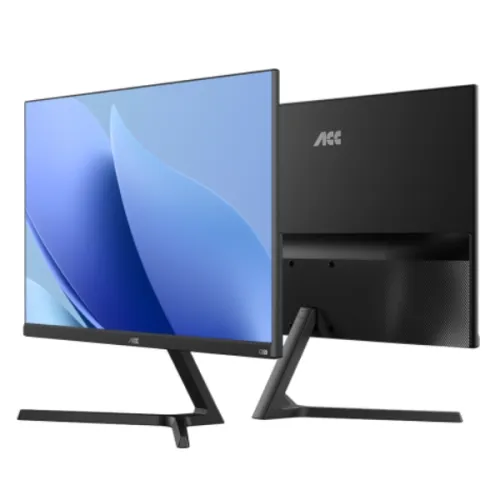
Walton ACC WDF13C22I monitor overview The Walton ACC WDF13C22I is a 21.45-inch class Full HD IPS monitor designed for everyday study, home computing, office work, video viewing and casual gaming. Walton’s official product page identifies model WDF13C22I with a 21.45-inch FHD IPS LED-backlit display, 1920 × 1080 maximum resolution and a 100Hz refresh rate. The official page and local seller listings also describe HDMI and VGA connectivity, a Y-shape stand, dual built-in speakers and a slim three-side frameless design. This page distinguishes manufacturer-published facts from retailer statements where those sources differ. Full HD display for work and entertainment The 1920 × 1080 Full HD resolution gives this 21.45-inch screen a familiar widescreen workspace for documents, spreadsheets, web pages, online classes, streaming video and general desktop applications. The IPS panel and stated 178-degree horizontal and vertical viewing angles are intended to keep the picture more consistent when viewed away from the centre than a narrow-view panel. Walton lists 300 cd/m² brightness, 1000:1 contrast, 16.7 million display colours and an anti-glare surface. Walton’s specification table gives the aspect ratio as 17:9, while Star Tech and TechLand list 16:9 for the same model. Because those values conflict, confirm the supplied unit’s format and resolution through its label or on-screen information before relying on that field for a multi-monitor or projection setup. Smooth 100Hz motion The published refresh rate is up to 100Hz, with a stated 5ms response time. A higher refresh rate can make cursor movement, scrolling and compatible game motion appear smoother than a conventional 60Hz display when the computer can output the matching mode. The actual refresh rate depends on the connected device, graphics output, resolution, cable and operating-system display settings. Walton lists FreeSync support; compatible hardware and a suitable connection are required to use variable refresh. The seller lists HDR as supported, but no peak brightness, HDR certification or local-dimming specification was found in the retrieved Walton page. Treat HDR as a listed input/display feature, not a guarantee of premium HDR performance. Colour, comfort and viewing Walton publishes a 300 cd/m² brightness rating, a 1000:1 contrast ratio, 85% NTSC colour gamut and 16.7 million colours. These figures provide useful comparison points, but they do not establish factory calibration or suitability for colour-critical print and professional grading. Walton lists Flicker Free and Low Blue Light functions. Such display settings can be adjusted for personal comfort, but they do not remove the need for sensible room lighting, an appropriate viewing distance, breaks and good posture. An anti-glare surface can help reduce reflections from ambient light; it cannot eliminate glare in every environment. Walton’s page also lists HDR support without a stated certification or brightness tier, so users who need a specific HDR standard should check the exact product documentation. Connections and sound The product listing names HDMI, VGA, an audio-out connection and a DC 12V input. Walton’s page does not specify an HDMI version, while TechLand lists HDMI 2.0; verify the port marking and supported video modes on the delivered monitor if HDMI bandwidth is important. VGA is an analogue option for older computers. The audio-out jack and dual 3W speakers provide basic audio options; speaker loudness and sound quality depend on the source and listening environment, and integrated monitor speakers are not a substitute for a dedicated speaker system when stronger or more detailed sound is required. The included power adapter is listed as 12V, 3A. Check that the original adapter and the appropriate power cable are included before installation. Stand, mounting and desk setup The official product page identifies a Y-shape stand and lists tilt adjustment from approximately −5° to +15°. Star Tech also lists a 75 × 75 mm VESA mounting pattern. Confirm the back-panel mounting points, screw length, monitor weight and stand or wall-mount capacity before buying a separate mount. The three-side frameless design can create a cleaner visual edge when displays are placed next to one another, although the active image area still has a physical border. Set the screen so the top portion is near eye level and keep the stand on a stable, level surface. Power and practical setup Walton lists a 12V, 3A adapter, maximum power consumption of 26W and standby consumption of 0.5W. Actual use varies with brightness, selected display mode, speakers and connected equipment. The input specification is AC 100–240V through the supplied adapter. Use the supplied adapter that matches the label on the monitor; do not substitute a power supply based only on a matching connector. Connect the computer through HDMI or VGA, select the matching input, and then choose 1920 × 1080 at up to 100Hz in the operating system if the computer and connection support it. If the screen initially runs at a lower refresh rate, check the graphics settings and cable before assuming the monitor is defective. Who may find it suitable This monitor may suit students who need a Full HD screen for online lessons and assignments, home users who browse and stream, office users who value a 100Hz panel for everyday scrolling, and casual gamers who want IPS viewing angles with Adaptive Sync support. HDMI and VGA allow it to work with a mix of newer and older computers. Built-in speakers can be convenient for basic system audio, and VESA support offers an alternative to the included stand when a compatible arm or wall mount is preferred. Consider a different screen if you need a larger workspace, higher pixel density, refresh rates above 100Hz, a verified professional colour-calibration workflow, stronger HDR performance, USB-C docking, or a USB hub. This model’s official description lists Full HD at 21.45 inches; it should not be presented as a QHD or 4K display. Check the exact model label because nearby Walton models can have similar sizes and different panel, stand, refresh or warranty specifications. Warranty and purchase checks Warranty wording differs between seller pages reviewed. Star Tech states a three-year service warranty described as three years for the panel and one year for the adapter. TechLand lists three years overall but specifies two years for the panel and one year for the adapter. The manufacturer product page reviewed here did not settle those seller-specific terms. Ask the seller to write the coverage duration, service provider, adapter coverage, dead-pixel policy, invoice requirements and service process on the purchase documents. Warranty eligibility can depend on the unit source and serial number. Prices, stock, delivery coverage, included cables and warranty can change by merchant and date. The market estimate, when present, is an informational comparison and is not a BiponiBD Store offer. Confirm the merchant’s current stock and final payable price before ordering. Inspect the box contents and monitor label at delivery, then test the native resolution, 100Hz mode, HDMI/VGA inputs, speakers, audio output, stand adjustment and any required sync functions within the seller’s return or replacement period. At a glance • Model: Walton ACC WDF13C22I • Screen: 21.45-inch class, IPS, LED-backlit LCD • Native/maximum resolution: Full HD 1920 × 1080 • Refresh rate: up to 100Hz; dependent on device and connection • Response time: 5ms as published by Walton • Brightness and contrast: 300 cd/m² and 1000:1 as published by Walton • Colour: 16.7 million; 85% NTSC listed by Walton • Surface and viewing angle: anti-glare; 178°/178° listed • Features: FreeSync, Flicker Free, Low Blue Light; HDR listed without a stated certification • Inputs and outputs: HDMI, VGA, audio out, DC 12V; HDMI version not stated by Walton • Audio: dual 3W speakers listed • Stand and mount: Y-shape tilt stand; 75 × 75 mm VESA listed by Star Tech • Power: 12V, 3A adapter; 26W maximum and 0.5W standby listed by Walton • Aspect ratio: Walton lists 17:9; Star Tech and TechLand list 16:9. Verify the exact unit. • Warranty: seller terms conflict; obtain the written coverage for the exact unit before purchase Check the current BiponiBD product and merchant details, then confirm the aspect ratio, connection version, package contents, availability and written warranty directly with the selected seller.