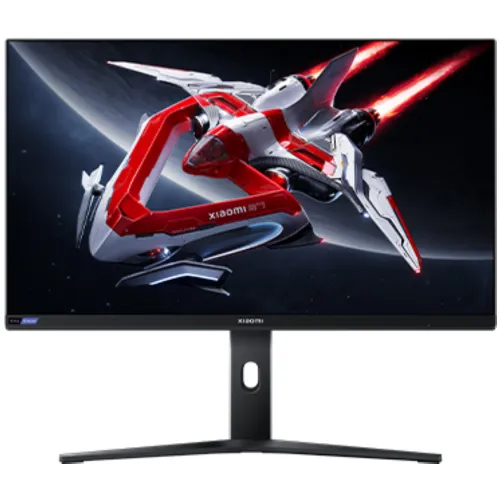
Overview: a 27-inch QHD Mini LED monitor
The Xiaomi Mini LED Gaming Monitor G Pro 27i is a 27-inch monitor built around a QHD 2560 x 1440 IPS display and a Mini LED backlight with 1,152 local dimming zones. Xiaomi identifies the product model as P27QBA-RGPGL. Local listings often call it “G Pro 27”; the official global name adds the “i” suffix, and the matching product model confirms the identity. The display combines a maximum 180Hz refresh rate, 1ms typical response time, HDR1000 support, and wide-gamut color specifications. This mix is aimed at PC gaming, HDR entertainment, and everyday work on a detailed 16:9 screen. It can be a good fit for buyers who want local dimming and a high refresh rate together, but feature labels do not replace checking the connected computer, cable, software, display mode, and actual unit. The content below distinguishes peak from typical brightness and describes the advertised color measurements without treating them as a substitute for professional calibration.
QHD resolution and desktop space
The native 2560 x 1440 resolution gives the 27-inch panel 3,686,400 pixels in a 16:9 layout. It provides more workspace and fine detail than Full HD, while demanding less rendering power than 4K at comparable settings. That balance can help players keep text and interface elements readable without shrinking them excessively, and gives editing timelines, browser windows, spreadsheets, and development tools more room. The monitor accepts the image signal from the connected computer or console; it does not upscale low-resolution source material into genuine QHD detail. For the sharpest desktop view, select 2560 x 1440 in the operating system and use an application scaling level suited to viewing distance. At 27 inches, QHD is a common compromise between clarity and performance for a mid-range or high-end gaming PC. Actual game frame rates still depend on the GPU, game engine, graphics quality, and thermal limits.
Mini LED backlight and 1,152 local dimming zones
The defining feature is the Mini LED backlight, divided into 1,152 local dimming zones according to Xiaomi. Local dimming lets backlight regions change brightness independently in response to image content. In compatible HDR scenes, this can improve perceived highlight-to-shadow separation compared with a conventional edge-lit backlight that changes as one large area. Zone count describes the backlight system; it is not the same as the number of pixels or individually controlled LEDs in every implementation. A bright object against a dark background can still cause some glow or halo around that object because each zone covers many pixels, and the result varies with scene content, viewing angle, room lighting, and the selected dimming mode. For users who prefer consistent SDR desktop brightness, local dimming and HDR settings can be adjusted or disabled through the OSD. Xiaomi's exact model documentation lists the 1,152 zones; this page does not infer a contrast ratio beyond the official 1000:1 static panel specification.
HDR1000 and brightness measurements
Xiaomi lists HDR1000 support and 1,000 nits peak brightness for the G Pro 27i. The official global FAQ separately gives 600 nits typical brightness and 1,000 nits peak, so a peak figure should not be mistaken for full-screen sustained brightness. HDR is most useful with compatible content, an HDR-capable source, suitable operating-system or console settings, and the monitor's HDR mode enabled. Local dimming helps the backlight respond to picture regions, while the LCD panel's 1000:1 static contrast remains a separate specification. HDR appearance depends on mastering, tone mapping, picture mode, room lighting, and configuration. Xiaomi calls this model HDR1000; buyers should use the manufacturer specification rather than unsubstantiated claims about certifications in reseller copy. If SDR desktop use looks too bright, too dim, or uneven after HDR is enabled, review both the source device's HDR output and the monitor's on-screen settings instead of assuming the screen is defective.
180Hz refresh and 1ms response
The maximum refresh rate is 180Hz, and the typical response time is 1ms, according to Xiaomi. A 180Hz panel can refresh up to 180 times per second when the source, chosen resolution, input, connection, graphics hardware, and settings all support that mode. Faster updates can make supported game motion and pointer movement appear smoother than a 60Hz display, but do not make a game render extra frames automatically. Configure the refresh rate in the operating system or graphics control panel after connecting the monitor. The 1ms figure is typical and describes a measurement under defined conditions; it is not a guarantee that every pixel transition finishes in exactly one millisecond at every overdrive setting. Motion clarity and overshoot can vary with the selected response mode, game frame rate, and individual sensitivity. For competitive play, users should test the available overdrive and refresh settings with their own games and avoid assuming the highest numerical setting is always the clearest.
IPS panel and wide color gamut
Xiaomi specifies an IPS LCD display with 1.07 billion colors and coverage of 99% DCI-P3, 97% Adobe RGB, and 100% sRGB. The manufacturer also states a color accuracy value of Delta E below 2 and provides a color accuracy report in the package contents. These are useful reference points for photography, illustration, design previews, and media work, but color accuracy still depends on picture mode, output range, application color management, calibration state, and the individual unit. A wide gamut can make compatible game and video content look more vivid; unmanaged SDR content may look oversaturated if the screen uses a wide-gamut mode. Creators should select an appropriate color mode and use a calibrated workflow if deliverables must meet a client or print standard. Xiaomi lists a typical 178-degree horizontal and vertical viewing angle, which describes viewing-angle tolerance rather than identical luminance and color from every position.
Adaptive sync and gaming compatibility
The official Xiaomi specifications list FreeSync, which can coordinate supported graphics output with monitor refresh timing to reduce tearing when frame delivery changes. Some Bangladesh pages use shorthand such as “Free-Sync” or “Adaptive Sync”; the most conservative exact-model claim is Xiaomi's FreeSync listing. To use it, connect a compatible graphics card, install a suitable driver, and enable the feature in the monitor and graphics settings as applicable. Game performance remains bounded by the computer and title; adaptive sync does not guarantee a particular frame rate. The product information captured for this review does not confirm a specific console VRR mode, HDMI bandwidth ceiling, or G-Sync certification, so those should be checked with Xiaomi or the seller for the intended device rather than inferred from FreeSync. For a PC gaming setup, use one of the DisplayPort inputs when that is the connection recommended by your graphics card and desired refresh mode, then confirm the negotiated resolution and refresh rate.
Ports, audio, and device setup
The official spec lists two DisplayPort inputs, two HDMI inputs, and one audio port. The exact HDMI revision and per-port maximum refresh table were not present in the product specification page used for this audit, so confirm those details before buying for a specific console, laptop dock, or graphics card. The audio output can route sound to compatible external headphones or speakers; Xiaomi's official model information does not list built-in speakers. The display is therefore not a self-contained sound system. If a connected source sends audio over HDMI or DisplayPort, select the monitor or external output in the device's sound settings. For a PC, plug the cable into the graphics card rather than an unused motherboard output when a dedicated GPU is installed. After setup, use the monitor OSD to select the active input and verify that the computer is outputting 2560 x 1440 at the target refresh rate.
Stand adjustment and VESA mounting
The supplied multifunction stand is adjustable forward and backward, left and right, can be raised or lowered, and can be rotated, according to Xiaomi. The listed tilt range is approximately 5 degrees forward with a tolerance and 21 degrees backward with a tolerance. Xiaomi lists VESA 75 x 75 mm mounting, so compatible monitor arms can be used when their load rating, fastener length, and mounting instructions match the display. The monitor measures 613.35 x 169.45 x 526.5 mm with its base and weighs 6.8 kg including the base. Measure desk width and depth, consider cable bends and arm travel, and make sure the display has ventilation clearance. The reported dimensions and weight apply to the manufacturer's stated configuration; packaging weight is not the same. Adjust the top edge and viewing angle for a comfortable seated position, and follow the installation guide before removing the base or attaching an arm.
Power and package contents
Xiaomi lists a 24V, 2.71A power input and 65W rated power. The official package contents include the display, base and base mount, power adapter, user manual, color accuracy report, and DisplayPort cable. Box contents may vary by region, seller bundle, or stock configuration, so confirm the local sealed package before purchase. Use the supplied adapter and inspect the local mains compatibility printed on the adapter label. Keep the adapter accessible and avoid placing it where it can be covered by fabric or trapped behind furniture. For cleaning, switch the screen off, disconnect power, and wipe with a soft, clean cloth; avoid spraying liquid directly on the panel. The included calibration report can be useful context, but it is not a substitute for checking the current monitor mode or recalibrating after settings or environment changes.
Use for gaming, media, and creative work
For PC gaming, the strongest combination is the QHD canvas, 180Hz maximum refresh, IPS viewing characteristics, and Mini LED dimming for supported HDR games. For movies and streaming, HDR1000 and local zones can make bright highlights stand apart from darker areas when the source has compatible HDR content. For work, 27 inches and 2560 x 1440 give room for side-by-side windows, and the adjustable stand makes it easier to align the display with a desk. For color tasks, the listed gamut and Delta E specification are useful starting points, but users should verify the mode, profile, and calibration before relying on it for production-critical output. A single monitor cannot guarantee performance in every role; FPS games, spreadsheets, HDR movies, and print workflows have different priorities. Buyers should consider their main device, room lighting, desk layout, and software before deciding whether Mini LED features justify the cost over a conventional QHD gaming screen.
Trade-offs to consider before buying
Mini LED's 1,152 zones add local backlight control, but zone blooming can remain visible in some scenes and is not equivalent to per-pixel OLED dimming. Peak brightness is 1,000 nits while typical brightness is listed at 600 nits in Xiaomi's FAQ, so sustained full-screen brightness is lower than the peak headline. The 180Hz maximum requires a source and connection that negotiate that mode; the official page consulted did not expose a detailed port bandwidth chart. The built-in audio is not listed, so external audio equipment is needed. Color performance depends on mode and calibration despite the broad gamut and Delta E claim. VESA mounting uses a 75 x 75 mm pattern, so confirm arm compatibility. These trade-offs do not make the model unsuitable; they help compare it honestly with standard QHD IPS, OLED, and other Mini LED displays.
Bangladesh price and warranty context
Local Bangladesh listings checked on 5 November 2026 showed advertised prices from ৳38,500 at Ultra Technology to ৳39,990 at TechLand, with Star Tech listing ৳39,000. Offers and stock can change, and cash, online, card, or EMI prices may differ. The existing catalog variant MSRP of ৳41,000 remains unchanged; the dated market range is separate comparison evidence, not a guaranteed checkout price. Warranty statements differ between sellers: TechLand lists one year, while Ultra Technology describes two-year service coverage with one-year parts and excludes the adapter. The catalog's existing one-year warranty text is retained; customers should confirm the written local coverage, service location, excluded components, dead-pixel policy, return window, and required documents with the selected seller. Check exact model code P27QBA-RGPGL, serial information, accessories, and invoice before leaving the shop or completing delivery.
Summary
The Xiaomi G Pro 27i brings together a 27-inch QHD IPS display, Mini LED backlight with 1,152 local dimming zones, HDR1000, 180Hz refresh, 1ms typical response, wide color gamut, and a multifunction stand. Its manufacturer model code is P27QBA-RGPGL. Those specifications make it worth comparing for buyers who want high-refresh PC gaming and HDR in one desk-sized monitor. The central cautions are the distinction between 600-nit typical and 1,000-nit peak brightness, the fact that local dimming can show zone halos in difficult scenes, and seller-specific warranty differences. Verify the supported refresh at your exact input and device, and confirm warranty and included accessories locally. With those checks, shoppers can judge the screen on a clear specification basis rather than relying only on product labels or time-sensitive promotions.