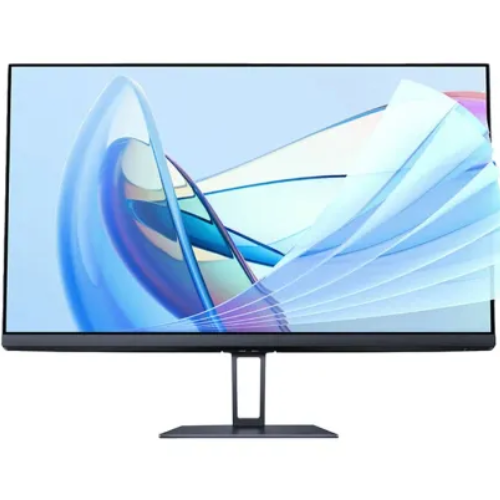
Xiaomi Redmi 1A (P24FBB-RA) 23.8-inch IPS 100Hz Full HD Monitor
A 23.8-inch Full HD screen for a practical desk setup
The Xiaomi Redmi 1A 23.8-inch IPS 100Hz Monitor, factory model P24FBB-RA, is a widescreen desktop display for home offices, study desks and everyday productivity. Bangladesh sellers commonly use the Redmi 1A name for this 100Hz version. Adding the manufacturer code to the listing helps distinguish it from the older 60Hz Redmi 1A family. The existing BiponiBD slug already describes the model and refresh rate and should remain unchanged.
IPS picture, Full HD detail and comfortable viewing angles
The flat 23.8-inch panel uses IPS technology and a W-LED backlight. Its native 1920 × 1080 resolution fits a standard 16:9 desktop format for documents, browser windows, video and general computer work. Xiaomi’s related global A24i specification lists 178° horizontal and vertical viewing angles, 250-nit typical brightness, 1000:1 typical contrast and 16.7 million colors. The stated panel pixel pitch is about 0.2745 mm, roughly 92.6 pixels per inch.
Color coverage and the limits of the published figures
Bangladesh retail descriptions for the P24FBB-RA and Xiaomi’s related A24i materials report 99% sRGB coverage and factory calibration with average ΔE below 2. Those figures are useful context for web graphics and photo review, but they do not replace calibration or guarantee identical results across every regional batch. No HDR certification or professional hardware calibration workflow was established in the reviewed sources, so this page makes no such claim.
100Hz refresh and 6ms typical gray-to-gray response
A maximum 100Hz refresh rate can make pointer movement, scrolling and supported game motion appear smoother than a 60Hz display. The published response-time figure is 6ms typical gray-to-gray; it should not be confused with a 1ms gaming claim. To use the higher refresh rate, the computer and connection must output 1920 × 1080 at 100Hz, and the correct option may need to be selected in the operating system or graphics settings.
Check the model: 100Hz P24FBB-RA versus the older 60Hz RMMNT238NF
The Redmi 1A label is used for more than one generation. The P24FBB-RA reviewed here is identified by Bangladesh seller listings as the 100Hz version with HDMI and DisplayPort and a 75 × 75 mm VESA pattern. The older RMMNT238NF is a 60Hz model described with HDMI and VGA and without VESA mounting. Xiaomi’s global Monitor A24i / P24FBA-RAGL is a related 100Hz platform, not the exact Bangladesh factory code. Buyers replacing an old monitor should compare the back label and connector layout rather than relying on the short Redmi 1A name alone.
Digital connections and sound
The exact Bangladesh product listing identifies one HDMI and one DisplayPort input, together with a DC power connection. Xiaomi’s global A24i page specifies DisplayPort and an HDMI port; HDMI version details vary among published descriptions, so this page avoids promising a particular HDMI revision for every regional box. The standard HDMI-plus-DisplayPort configuration does not list VGA. Retailer specifications also report no internal speakers and no 3.5mm audio output, so connect headphones or speakers to the computer or another audio source.
Stand, VESA mounting and desk dimensions
The supplied desktop stand is described as tilt-adjustable. Xiaomi’s related A24i specification gives approximately −5° to +15° of tilt and supports a 75 × 75 mm VESA mount with M4 × 10 mm screws. Height adjustment, swivel and portrait pivot are not listed for the standard stand. Published footprints vary slightly: Bangladesh P24FBB-RA references are around 538.7 × 418.7 × 180 mm, while the global A24i sheet lists 539.9 × 411.4 × 170 mm. Net weight is reported around 2.7–2.98 kg depending on regional version; a Bangladesh gross package figure around 4.2 kg is not the bare monitor weight.
Connecting a computer and setting the refresh rate
Connect a desktop graphics card or laptop output to HDMI or DisplayPort, then connect the supplied DC adapter to the monitor. Use a cable and source device that support the desired 1920 × 1080 timing. After the first connection, open the operating system display settings and select 100Hz if it is available. If only 60Hz appears, check the cable, graphics output, adapter or dock, driver and selected display mode before assuming the panel is faulty. A USB-C dock or adapter must pass through the required video signal; a connector shape alone does not guarantee a supported refresh rate. The product is a monitor, not a USB-C display, so the listing does not claim single-cable USB-C video or integrated power delivery.
Where a 23.8-inch Full HD monitor fits best
At this size and resolution, the Redmi 1A is intended for a conventional single-screen workstation, study desk, accounting or office software, web browsing and general entertainment. The 16:9 image format is compatible with common computer video output. A 100Hz mode may make desktop motion feel more fluid when the computer can drive it. The Full HD panel provides a familiar 1920 × 1080 workspace; it does not provide the extra desktop area of a QHD monitor. Buyers who need built-in audio should plan to use computer speakers or headphones, because no internal speakers or audio jack are listed. Users who need frequent changes in screen height or portrait rotation should budget for a compatible VESA arm, since the included stand provides tilt only.
Practical placement, cleaning and setup checks
Before assembly, compare the stand components and port arrangement with the package list and confirm that the rear label says P24FBB-RA. Place the monitor on a level desk with room around the rear power connection. The published 7.5 mm measurement refers to the slim upper panel profile and does not mean that the complete display depth including stand is 7.5 mm. For a monitor arm, check that it supports the 75 × 75 mm pattern and the weight of the exact regional unit; follow the included manual for screw length and mounting procedure. Use a soft, clean cloth for the screen and follow Xiaomi’s care instructions. Avoid pressing on the panel or using unapproved liquids. Keep the adapter and ventilation area unobstructed.
Low Blue Light and power input
The supplied gallery includes a TÜV Rheinland Low Blue Light Software Solution mark, and listings for the related platform describe DC dimming. These display options can be enabled from the monitor controls; the feature description does not promise to prevent or treat eye conditions. The listed external adapter rating is 12V DC at 2A, with rated maximum power of 24W. The existing specification field called “Voltage” incorrectly contains a watt value; it is corrected here to the proper DC input, while power consumption is recorded separately.
Package contents, warranty and purchase checks
Retail package information lists the display, stand base and bracket, power adapter, HDMI cable, screws, screwdriver and user documentation. Contents can depend on the importer or regional package, so check the delivered carton. Public Bangladesh warranty offers are not consistent; the product record’s current one-year term needs confirmation against BiponiBD’s actual supplier agreement, offer and invoice. The public price range and stock status should likewise come from the current BiponiBD offer rather than a third-party snapshot.
Quick specification summary
Model P24FBB-RA; Bangladesh retail name Xiaomi Redmi 1A 23.8-inch IPS 100Hz Monitor; 23.8-inch flat IPS, W-LED; 1920 × 1080 native resolution; 16:9; up to 100Hz; 6ms typical GtG; 250 cd/m² typical brightness; 1000:1 typical contrast; reported 99% sRGB and ΔE<2 calibration; 178°/178° viewing angles; one HDMI and one DisplayPort; no built-in speakers or 3.5mm output; tilt stand; 75 × 75 mm VESA; 12V⎓2A adapter; 24W rated maximum power. Verify the exact model code and seller warranty before checkout.
Technical specifications
- 23.8-inch flat IPS panel with native Full HD 1920 × 1080 resolution and a 16:9 widescreen format.
- Up to 100Hz refresh rate and a listed 6ms gray-to-gray typical response time for smoother everyday scrolling and motion.
- Retail and related official A24i platform specifications state 99% sRGB coverage and factory color calibration with ΔE below 2.
- One HDMI and one DisplayPort input on the standard P24FBB-RA Bangladesh listing, plus DC input.
- 75 × 75 mm VESA mounting support; the related A24i specification lists M4 × 10 mm screws.
- TÜV Rheinland Low Blue Light software solution is shown in the supplied product gallery; DC dimming is listed for the related platform.
- Tilt-adjustable desktop stand and three-side micro-bezel appearance; no height, swivel or pivot adjustment is specified.
- 12V⎓2A external power input and 24W rated maximum power.