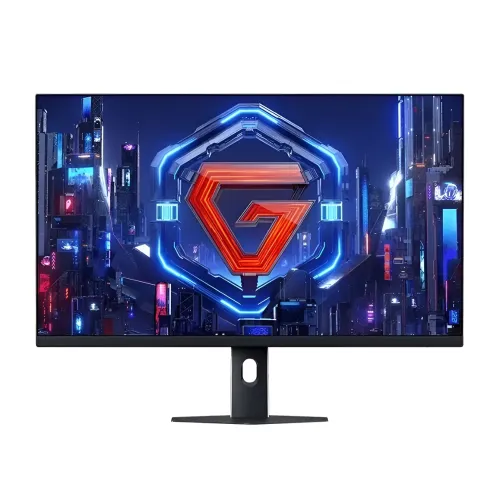
Xiaomi Redmi G27Q 2026 Multifunction Bracket 27-inch QHD 200Hz Gaming Monitor: Buyer Guide
Identify the correct G27Q edition
The Xiaomi Redmi G27Q name has been used across different years, refresh rates and stand configurations. This catalog item is titled Xiaomi Redmi G27Q 2026 Multifunction Bracket and its Bangladesh retailer SKU matches model code P27QDC-RG. Xiaomi’s China product page names the REDMI G27Q 2026 Multifunction Stand edition, and model databases and retailer listings associate P27QDC-RG with the 27-inch 200Hz QHD Fast IPS product. This identifier matters because the standard 2026 tilt-stand model P27QDB-RG and global Xiaomi G27Qi 2026 P27QDB-RGGL are related but distinct SKUs. Earlier 2023 and 2025 G27Q products also use the same family name with different specs. Read the carton model code and confirm the bracket before accepting the unit; retailer titles and images can be reused across products.
QHD resolution at 27 inches
The screen is listed at 2560 × 1440 pixels in a 16:9 flat 27-inch format. QHD, 2K and 1440p are common names for this resolution; it is not 4K UHD. Compared with Full HD, QHD displays more detail and gives additional desktop space for documents, code editors, timelines and side-by-side windows. A 27-inch screen is a familiar size for a desk, but text scaling and viewing distance remain personal choices. The Fast IPS panel is described with wide 178-degree horizontal and vertical viewing angles. That supports comfortable viewing away from the exact centre, though the number is a panel specification rather than a promise of identical contrast from every position. For a laptop setup, confirm that the laptop GPU and output adapter can drive native QHD at the refresh rate you want.
What 200Hz delivers
A 200Hz maximum refresh rate means the display can refresh up to 200 times per second in a supported mode. At 200Hz each refresh interval is five milliseconds, shorter than the interval at 144Hz. This can make pointer movement and fast game motion look smoother, especially when a gaming PC renders a high and stable frame rate. The monitor does not generate frames: the game, graphics card and settings determine frame output. Demanding games at native QHD may run well below 200 frames per second, while competitive titles and adjusted settings can make higher rates more attainable. After connecting by DisplayPort, select 2560 × 1440 and the highest supported refresh rate in the operating system or GPU control panel. If a mode is missing, check the input, cable, graphics driver, colour format and GPU output capability.
Response time and motion settings
Retailer and model listings describe a 1ms typical gray-to-gray response time. This is a measured panel transition under specified conditions, not a guarantee that every pixel transition finishes in exactly one millisecond or that all motion blur disappears. Perceived clarity depends on refresh rate, frame rate, overdrive, transition type and the player’s sensitivity to trails. Start with a balanced overdrive setting and inspect moving edges for both blur and bright inverse ghosting. Fast IPS can offer a practical mix of colour reproduction and speed, but headline response figures should not be treated as independent laboratory measurements of every sample. For office work, video and general browsing, resolution, text rendering and brightness may matter more than the fastest response preset.
Colour, brightness and HDR limits
Exact-code product databases report 400 cd/m² brightness, 1.07 billion colours, 100% sRGB, 95% DCI-P3 and factory colour deviation ΔE below 2. These are useful stated specifications, but gamut coverage and a calibration claim do not substitute for an independent test of uniformity or the specific delivered panel. Xiaomi’s related global 2026 G27Qi page also lists 400 nits typical brightness, 1.07B colour depth and 1000:1 typical contrast. HDR400 appears in family sources. The IPS contrast figure and absence of local dimming mean that bright highlights cannot be dimmed independently from nearby dark areas. HDR compatibility is therefore an entry-level HDR feature rather than a promise of OLED-like black levels. Use a suitable SDR or HDR preset for the content and check the exact regional carton if colour-critical work is central to your purchase.
Adaptive sync and certification
Retailer listings identify Adaptive-Sync and FreeSync; some also say G-Sync. Variable refresh can coordinate the display with changing GPU frame output and reduce tearing when the function is supported by the selected input and graphics driver. The sources reviewed do not establish an NVIDIA certification for this exact P27QDC-RG SKU, so treat G-Sync as a reported compatibility mode, not a certified guarantee. Enable Adaptive-Sync in the monitor menu if available, then configure the GPU driver and test the games you use. Do not infer a specific VRR range or low-framerate compensation from a broad “FreeSync” label unless the exact model manual states it. Console output modes also depend on the console, game and HDMI implementation; this is a 200Hz PC-oriented product, but consoles do not automatically use its full maximum refresh rate.
Ports and the best connection
The listing identifies two DisplayPort 1.4 inputs, two HDMI 2.0 inputs, one audio output and one DC power input. Xiaomi’s global 2026 family manual lists a maximum 200Hz over DisplayPort and 144Hz over HDMI. Use DisplayPort 1.4 for QHD at 200Hz; HDMI 2.0 remains useful for a console, laptop or second computer, subject to supported modes. A 3.5mm audio output can pass sound from the active input to headphones or external powered speakers. No built-in speakers, USB-A hub or USB-C video/docking port is listed. If a laptop has only USB-C, verify that the port supports DisplayPort Alt Mode and use a compatible USB-C-to-DisplayPort adapter or cable. Box contents can vary by regional import, so check whether the carton includes the stated DP cable and power adapter.
The multifunction bracket and ergonomics
This listing is specifically named the Multifunction Bracket edition, and Star Tech describes height adjustment, swivel, tilt and pivot. That is the primary practical difference from the standard tilt-only P27QDB-RG variant. Exact adjustment ranges are not consistent across the sources reviewed: some model databases describe tilt to approximately +21 degrees, while Star Tech’s table repeats the standard edition’s +15-degree value. Verify the physical range and mechanism on the exact unit rather than relying on a copied table. Height adjustment can help align the top of the screen near eye level; swivel changes horizontal direction, and pivot can rotate the panel to portrait orientation when the graphics driver supports it. The provided gallery includes front and rear product renders but does not demonstrate each movement. A 75 × 75mm VESA pattern is also listed, though the mount screw size and load capacity must match the monitor arm.
Dimensions, weight and the seller conflict
For P27QDC-RG, Chinese model databases and a JD-linked listing report dimensions around 612.95 × 522 × 227.3mm and net weight 5.5kg. Star Tech identifies the same MPN but lists 4.15kg, which is the weight Xiaomi publishes for the related global standard-stand G27Qi 2026. PC House also uses the standard edition’s 612.95 × 470.85 × 173mm and 4.15kg values even while its title says multifunction bracket. This is a concrete catalog-data conflict, not a reason to blend both values. The listing’s longer, taller footprint and exact-code 5.5kg figure are better matched to the multifunction chassis, but carton confirmation is still prudent. Package weight can be different again; a seller feed reports a 6.96kg gross shipment. Treat product dimensions and shipping package dimensions as separate measurements.
Power, included items and care
The exact listing gives a 24V DC, 2A adapter requirement; Xiaomi’s related global 2026 specification identifies 48W rated maximum power. That is a rating, not a measured constant draw during ordinary use. Check the adapter’s output label and supplied plug for the import batch, and use a properly grounded outlet or suitable UPS if needed. The global family specification includes a display, power adapter, stand/base, screw kit, DisplayPort 1.4 cable and manual; P27QDC-RG sellers may bundle additional or different items. The JD-linked local specification lists monitor, base/bracket, DP cable, adapter, screw kit and manual. Do not promise a calibration report or a particular plug until the box contents are confirmed. Keep ventilation around the display and adapter, route cables without tension, and protect the screen surface while fitting the bracket.
Bangladesh price and warranty
The local price changes with cash offers, promotions and stock. The pages reviewed list approximately ৳26,999 at PC House, ৳27,500 cash at Star Tech, and up to ৳31,250 regular at Star Tech; PQS showed a lower ৳25,500 offer. Use these as dated observations rather than a guaranteed selling price. The catalog variant price is ৳28,800 and remains unchanged. Star Tech and PC House list one-year warranty, but warranty fulfilment is seller/distributor-dependent for imported stock. Confirm the exact P27QDC-RG carton, serial number, invoice description, warranty provider, coverage period and claim exclusions before purchase. A different shop or batch may advertise a different period. Keep the invoice and packaging, and test the panel, inputs, bracket movement and dead pixels promptly under the seller’s written return policy.
Who should choose this configuration
The P27QDC-RG is a sensible shortlist option for someone who wants a 27-inch QHD gaming display and values an adjustable stand without immediately buying a separate arm. It also suits mixed desk use when the PC can make use of high refresh and the user sometimes needs height, portrait pivot or swivel positioning. It is less suitable if you need integrated speakers, USB-C docking, a USB hub, independently dimmed HDR zones or a warranty that is identical across every Bangladesh seller. Buyers should verify the physical bracket, model code, dimensions and warranty before comparing it with standard-stand G27Q products. For high refresh, check that the desktop GPU or laptop connection can drive QHD 200Hz over DP 1.4. Compare the exact model identifier and included bracket, not just the shared G27Q 2026 name.