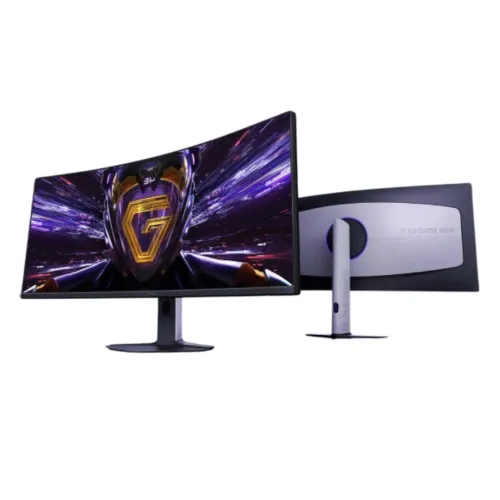
Xiaomi Redmi G34WQ 2026 34-inch UWQHD curved monitor
A wide curved screen for games and focused work
The Xiaomi Redmi G34WQ 2026 is a 34-inch ultrawide monitor built around a 21:9 VA panel. It displays 3440 × 1440 pixels, a format often called UWQHD, and uses a 1500R curve. Xiaomi markets this 2026 screen internationally as the Curved Gaming Monitor G34WQi; Bangladesh retailers list the regional Redmi G34WQ version with product code C34WQDA-RG. Check that code when comparing listings because earlier G34WQi models and similarly named monitors may have different specifications. This page describes the 2026 model and keeps its product identity and local naming intact.
What 3440 × 1440 means in daily use
UWQHD provides 3440 horizontal pixels and 1440 vertical pixels across a broad 21:9 canvas. The additional width can make it easier to place two applications side by side, keep a video timeline open beside a preview, compare documents, or view a wider game scene. It does not automatically replace a dual-monitor setup: window arrangement, software support and desk width still matter. Text scaling and the distance between the user and screen determine how comfortable small interface elements appear. Set the operating system to the panel’s native resolution when the computer supports it to preserve the intended image detail.
1500R curvature and viewing position
The panel uses a 1500R curvature, a specification describing the screen’s curve radius. A curved ultrawide panel can keep the left and right sides angled toward the viewer and make a wide screen feel more cohesive at a suitable desk distance. The best position varies by user, seating distance and task. Place the monitor centrally, avoid strong reflections and allow enough depth for the base and cable connections. For spreadsheets, reading and design work, test your preferred viewing distance and text scale before committing to an ultrawide layout. A curve is a viewing preference rather than a substitute for suitable resolution or application settings.
VA panel contrast and colour coverage
Xiaomi lists a VA panel with 3500:1 typical contrast and 400-nit typical brightness. The specifications also list 95% DCI-P3 and 100% sRGB coverage, alongside 1.07 billion colours. These figures describe contrast, brightness and colour-space range; they do not by themselves establish uniformity or factory calibration accuracy. The monitor can serve general gaming, media, office and creative tasks, but professional colour workflows should check the exact calibration requirements and use an appropriate calibrated setup. The wide colour gamut may make compatible content appear more vivid, while SDR and HDR results depend on the source, application and selected settings.
180Hz refresh and motion response
The maximum refresh rate is listed as 180Hz. A higher refresh setting can present more updates per second than a typical 60Hz mode, which may make cursor movement and compatible games appear smoother. To use the maximum rate, the computer’s graphics output, the selected HDMI or DisplayPort input, the cable, driver and operating-system display mode must all support the required timing. Xiaomi also lists a 1ms grey-to-grey response time as typical. Response-time measurements depend on test method and selected mode; the figure does not guarantee that every transition is free from blur or ghosting. Adjust overdrive carefully if the menu offers it.
Adaptive sync for compatible systems
AMD FreeSync Premium is listed as a supported feature. Adaptive sync coordinates the display refresh with compatible graphics output over supported configurations, which can help reduce tearing and stutter when frame delivery changes. A compatible graphics card, driver, connection and game settings are required. The actual range and behavior should be checked with the host device rather than inferred from a feature label alone. If multiple sources are connected, select the correct input and configure adaptive sync for the intended gaming system. The monitor remains usable for regular desktop applications and video even when adaptive sync is not active.
HDR400 and media viewing
The monitor lists HDR400 support. HDR playback involves the display, source device, operating system, software and content working together, so enable the mode only after checking that the complete setup supports it. HDR certification is a useful feature label but does not by itself promise a particular professional grading result. For standard work, use the picture mode and brightness that suit the room. For HDR content, compare the source’s supported resolution and refresh rate and test the selected input. Keep expectations grounded in the product specifications and the intended viewing use rather than treating any single HDR badge as a measure of overall image quality.
Inputs and audio output
The official Xiaomi specification lists two HDMI 2.0 inputs and two DisplayPort 1.4 inputs. That gives a desk several ways to connect compatible computers or consoles; the active device is selected through the monitor’s input control. The same official list includes a 3.5mm audio output and DC-in. It does not list USB-C, a USB hub or integrated speakers. Use a compatible computer or console audio connection, and attach headphones or external speakers if needed. For maximum refresh and resolution, check the source output and cable specifications rather than assuming all ports or adapters expose identical modes.
Stand, mounting and desk planning
Xiaomi’s specification lists forward tilt of 5 degrees with a 2-degree tolerance and backward tilt of 21 degrees with a 2-degree tolerance. It lists a 100 × 100mm VESA mounting pattern. The official information does not list height adjustment, swivel or pivot, so this product description does not promise those adjustments. A compatible monitor arm can provide additional positioning if its load rating and mounting hardware are suitable. The complete monitor measures about 811.3 × 277.3 × 521.5mm with its stand and weighs about 6.5kg with the base. Measure desk space and check the arm or shelf before setup.
Power and included setup items
The monitor uses an external power adapter. Xiaomi specifies 24V DC at 2.71A and 65W rated power. The official package list includes the monitor, power adapter, stand base and bracket, screw kit, DisplayPort 1.4 cable and user manual. Regional packages can vary, so confirm the box contents with the seller and keep the adapter and documents for support. Place the display on a stable surface, connect power and the chosen video cable, and select 3440 × 1440 plus the desired refresh rate in the computer settings. Use the manual for mounting, control and safety instructions.
Eye comfort and low-blue-light information
Xiaomi lists TÜV Rheinland Low Blue Light certification. This product feature may be useful to shoppers comparing display comfort options, but it does not replace sensible room lighting, readable scaling, regular breaks or a comfortable viewing distance. Set brightness for the room and avoid placing bright windows directly behind the user. If the screen is used for long work sessions, position its center at a comfortable height; because the included stand lists tilt rather than height adjustment, a suitable desk or VESA arm may be needed to achieve the preferred position.
Gaming, entertainment and productivity fit
The broad 21:9 canvas, 180Hz maximum refresh, FreeSync Premium and curved panel make the Redmi G34WQ 2026 relevant to compatible PC gaming. Ultrawide game support varies by title and platform, and consoles may not use the full 3440 × 1440 format. For productivity, the additional width can help with two windows or a long editing timeline. For movies, aspect-ratio bars may appear depending on the source. Consider desk depth, the monitor’s physical width, available GPU output and the software you use before choosing an ultrawide display over a conventional 16:9 monitor.
Local model and warranty checks in Bangladesh
Bangladesh listings identify the monitor as Xiaomi Redmi G34WQ 2026 and give model code C34WQDA-RG. The existing catalog lists a one-year warranty. Retailers may set different claim procedures and adapter coverage, so check the invoice, warranty provider, box requirements and service location before ordering. Current seller prices and stock can change; no price or availability promise is included in this description. The technical content follows Xiaomi’s matching official 2026 G34WQi specification and feature pages, with local sources used to confirm the Redmi name, model code and Bangladesh seller terms.
Quick setup checklist
Before use, check the carton and adapter for damage, mount the base on a stable desk or follow the manual for a suitable VESA arm, and connect a compatible HDMI 2.0 or DisplayPort 1.4 cable. In the operating system, select 3440 × 1440 and then choose the highest supported refresh rate. Enable adaptive sync only where the graphics hardware and settings support it. Set brightness for the room, adjust the stand tilt, and connect headphones or external speakers if required. Test the video ports and inspect the screen while the retailer return window is active. Keep the product code and purchase documents for service.
Technical highlights
- 34-inch 21:9 ultrawide display with 3440 × 1440 UWQHD resolution
- 1500R curved VA panel
- Up to 180Hz maximum refresh rate
- 1ms GTG typical response time, per Xiaomi test conditions
- 400-nit typical brightness and 3500:1 typical contrast
- 95% DCI-P3 and 100% sRGB colour gamut; 1.07 billion colours
- HDR400 support
- AMD FreeSync Premium anti-tearing support
- TÜV Rheinland Low Blue Light certification
- Two HDMI 2.0 and two DisplayPort 1.4 inputs
- 3.5mm audio output; no built-in speakers listed
- Tilt-adjustable stand and 100 × 100mm VESA mount
- External 24V 2.71A adapter; 65W rated power